

Taskade
Build custom apps, AI agents & workflows
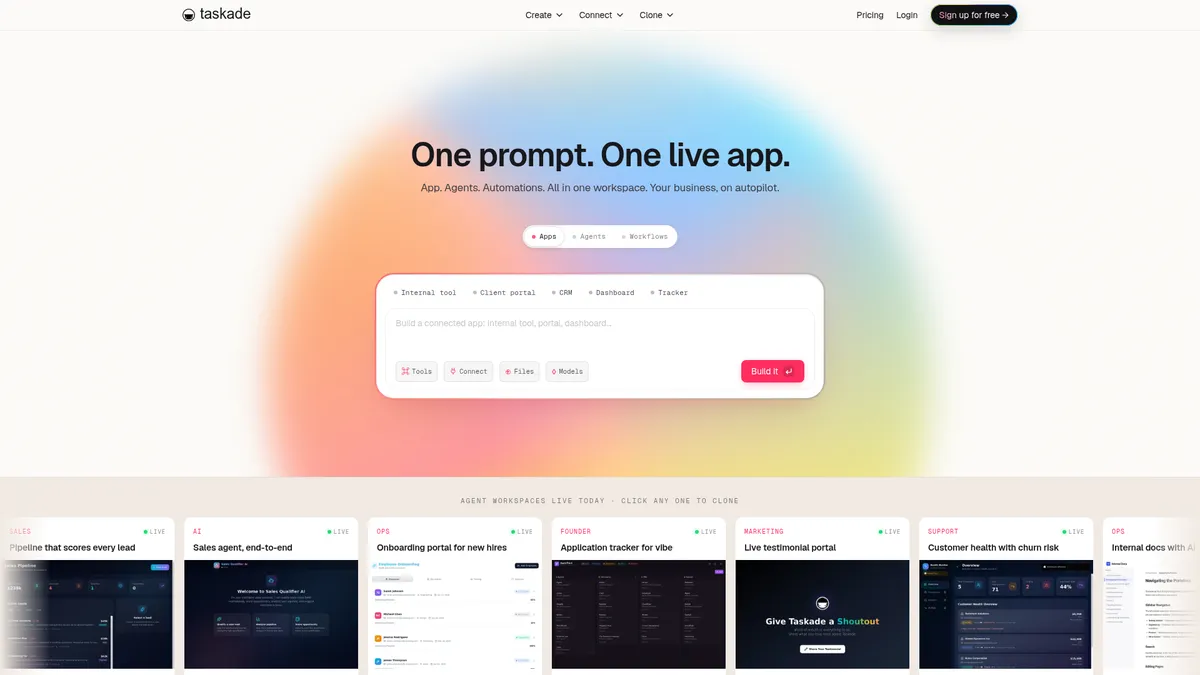
What is Taskade?
How to Use Taskade
Getting started with Taskade is straightforward. Follow these five steps to create your first custom app, train an AI agent, and set up an automated workflow. You'll have a functional workspace tailored to your team's needs in under 30 minutes.
Create Your Workspace
Sign up for Taskade and create a new workspace. Choose from a blank canvas or browse the community gallery for pre-built templates that match your needs, such as sales CRM, project tracker, or marketing dashboard.
Build Your First Project
Add a project to organize your tasks, documents, and knowledge. Use Taskade's rich editor to create notes, checklists, and databases that form the memory layer of your workspace. Invite team members to collaborate in real-time.
Create an AI Agent
Navigate to the Agents section and create a new agent. Give it a name, choose its AI model, and train it on your project data. Assign custom tools for it to use, such as web search, document analysis, or API calls to external services.
Set Up an Automation
Go to the Automations tab and create a new workflow. Define triggers (e.g., new task created, status changed), add conditions and actions, and connect to external integrations. Test your automation to ensure it runs smoothly before activating it.
Deploy and Collaborate
Share your workspace with team members, set role-based permissions, and publish your custom app as a standalone interface. Monitor your AI agents and automations from the dashboard, and iterate based on usage and feedback.
Taskade Core Features
Taskade Use Cases
- 1Sales teams can build custom CRM pipelines with automated lead tracking, scoring, and follow-up workflows. AI agents qualify leads and update records while dashboards provide real-time visibility into the sales funnel.
- 2Marketing teams can create campaign management hubs with automated content scheduling, social media posting, and performance tracking. AI agents analyze campaign data and suggest channel optimizations.
- 3Operations managers can design custom dashboards and approval workflows connecting finance, HR, and project management systems. Automated triggers reduce manual handoffs and accelerate decision-making.
- 4Remote teams can build custom productivity tools and task managers tailored to their specific workflows. AI agents help prioritize tasks, manage focus time, and maintain team alignment across time zones.
- 5Entrepreneurs can create AI-powered chatbots and virtual assistants for customer support, lead generation, and internal knowledge management without hiring developers.
Pros and Cons of Taskade
Pros
- Highly customizable platform that adapts to any team's unique workflows without requiring coding expertise or development resources
- Native AI agents with persistent memory, custom tools, and multi-model support enable sophisticated automation beyond simple chatbots
- Real-time collaboration across devices with offline support keeps teams productive anywhere, anytime without connectivity issues
- Unified workspace combining project management, app building, and automation reduces tool sprawl and streamlines workflows
✕ Cons
- Steep learning curve due to the platform's immense flexibility and unique Workspace DNA architecture requires time investment to master
- Credit-based usage limits can be restrictive for power users and large-scale automations, requiring careful monitoring of consumption
- Pricing scales quickly for larger teams and enterprise features like white-labeling, making it less cost-effective at scale
Taskade vs Top Alternatives
| Feature | Notion | ClickUp | Make | Zapier |
|---|---|---|---|---|
| Custom AI Agents | AI assistant with limited customization, no custom agents | AI writing assistant only, no trainable custom agents | No native AI agent capabilities | No native AI agent capabilities |
| No-Code App Builder | Template-based content system with no visual app builder | Limited custom app capabilities via dashboards and views | No app building functionality | No app building functionality |
| Workflow Automation | No native workflow automation capabilities | Basic automation rules and triggers | Advanced visual automation with branching and looping | Advanced no-code automation with multi-step workflows |
| Unified Workspace | Knowledge management platform with AI add-ons | Project management platform with AI features | Pure automation and integration platform | Integration-only platform with no workspace features |
Taskade Pricing
Free
- 1 user
- 3 apps
- 3,000 credits per month
- Real-time collaboration
- Community gallery access
Starter
- 3 users
- Unlimited apps
- 10,000 credits per month
- Custom branding
- Priority support
Pro
- 10 users
- Unlimited apps
- 50,000 credits per month
- Advanced permissions
- API access
- White-label options
Taskade FAQ
What is Taskade?+
Is Taskade free to use?+
How do Taskade credits work?+
Can I build custom apps on Taskade without coding?+
What kind of AI agents can I create with Taskade?+
Does Taskade integrate with other tools?+
How does Taskade compare to Notion?+
Taskade Review — Editor's Score
Who Should Use Taskade?
Taskade is ideal for small to medium teams that want to build custom business applications without hiring developers. It's particularly valuable for sales, marketing, and operations teams that need tailored workflows with AI-powered automation.
Taskade is an ambitious all-in-one platform that successfully combines AI agents, custom app building, and workflow automation. While the learning curve is real and the credit system can feel restrictive, it delivers genuine value for teams ready to consolidate their tool stack into one AI-native workspace.
- Build custom apps without writing a single line of code
- Create and train multi-model AI agents with persistent memory
- Visual workflow automation with branching, looping, and integrations
- All-in-one workspace replacing multiple SaaS subscriptions
📺 Taskade Tutorials & Introduction
Create AI Teams with Taskade: Full Tutorial & Honest Review (2024)
Taskade Tutorial For Beginners | How To Use Taskade - YouTube
Taskade AI Workflow Generator is AMAZING! - YouTube
Keywords: