

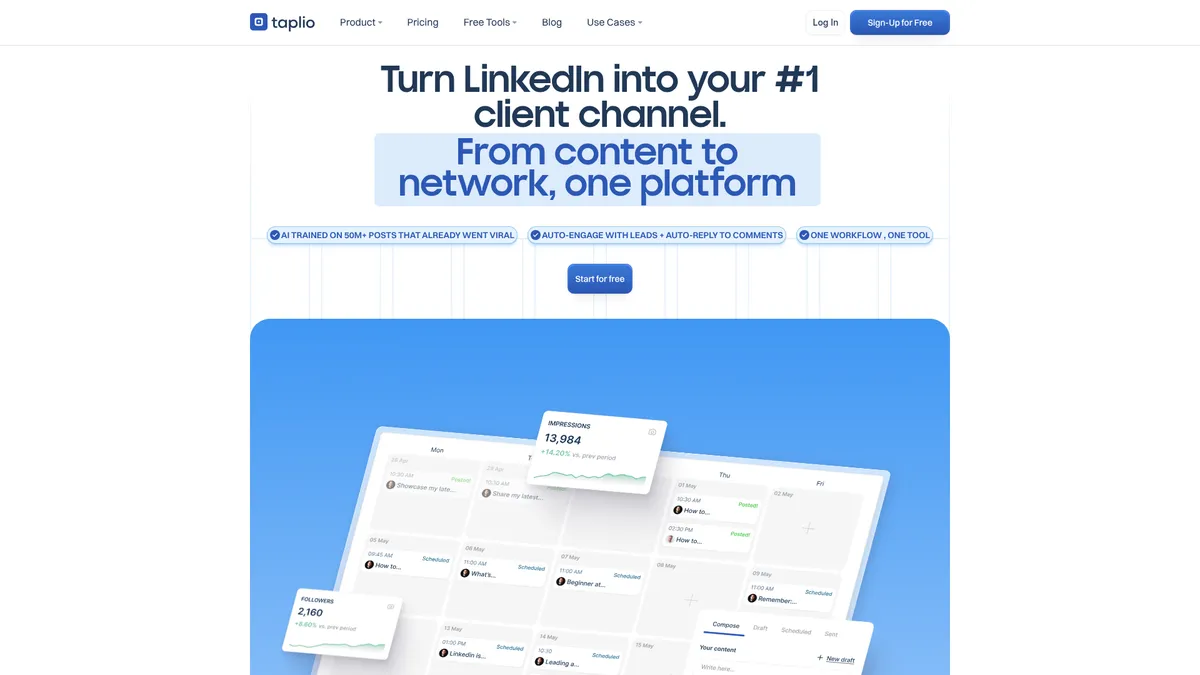
What is Taplio?
How to Use Taplio
Getting started with Taplio is quick and straightforward. Follow this guide to set up your account, create your first AI-powered LinkedIn post, and start growing your professional brand.
Sign Up for a Free Trial
Visit taplio.com and sign up for a 7-day free trial with full Pro features. No credit card is required. Once your account is created, you'll be guided through the onboarding wizard to connect your LinkedIn profile.
Connect Your LinkedIn Account
Authorize Taplio to access your LinkedIn account. This connection allows Taplio to publish posts, track analytics, and manage engagement on your behalf. You can configure permission levels and restrict specific actions from the settings panel.
Find Viral Post Inspiration
Use the Viral Post Inspiration Engine to search over 5 million top-performing LinkedIn posts by keyword. Filter by industry, engagement metrics, or content type to discover what resonates with your target audience. Save promising ideas to your collection for later use.
Create Your First AI Post
Open the AI Post Writer, enter your topic or key points, and let Taplio generate a complete post with hook, body, and call-to-action. You can refine the output using the AI Outline and Rewrite tools, add custom images or carousels, and preview how it will look on LinkedIn.
Schedule and Automate Engagement
Drag your post to the Scheduled column on the Kanban board to set a publish date and time. Then configure your automation rules—set keyword triggers for auto-liking and commenting on target posts, create DM sequences for leads, and monitor everything from the analytics dashboard.
Taplio Core Features
Taplio Use Cases
- 1Consistently publish AI-optimized content to establish yourself as a thought leader in your industry. Taplio's viral post database helps you identify trending topics, while the AI writer crafts engaging posts that resonate with your target audience.
- 2Transform your LinkedIn activity into a lead generation machine. Use automated DMs and connection requests to engage with prospects who interact with your content, and track all interactions through the built-in lead database.
- 3Plan, create, and schedule weeks of LinkedIn content in advance using the Kanban board. The AI carousel generator and image creator let you produce rich multimedia posts without design skills, while analytics help you refine your strategy based on performance data.
- 4Manage multiple client LinkedIn profiles from a single dashboard with role-based permissions. The collaboration tools streamline approvals, while analytics provide client-ready performance reports that demonstrate ROI.
- 5Automate your prospecting workflow by setting keyword triggers to engage with potential customers. Auto-like and comment on target posts, then follow up with personalized DMs automatically, all while tracking engagement metrics to measure success.
Pros and Cons of Taplio
Pros
- All-in-One Solution - Combines content ideation, creation, scheduling, analytics, and outreach automation in one seamless platform, eliminating the need for multiple disconnected tools.
- AI Trained on 500M+ LinkedIn Posts - The AI model leverages a massive dataset of viral content to generate posts that are optimized for LinkedIn's algorithm and audience preferences.
- Visual Kanban Editorial Workflow - The drag-and-drop board provides clear visibility into your content pipeline, making planning and collaboration intuitive for teams and solo creators alike.
- Low-Risk Onboarding - A 7-day free trial with full Pro features, plus a 30-day money-back guarantee, lets you thoroughly test the platform before committing.
✕ Cons
- Limited Company Transparency - Taplio does not publicly disclose founding year, headquarters, or data privacy certifications, which may raise concerns for enterprise buyers conducting due diligence.
- AI Credits Restrict Lower-Tier Plans - The Starter plan's 250 monthly AI credits can be consumed quickly by power users, potentially forcing an upgrade to higher-tier plans sooner than expected.
- Automation Risks LinkedIn Reputation - Over-reliance on automated engagement and bulk messaging could appear spammy and potentially trigger LinkedIn's safety measures if not configured carefully.
Taplio vs Top Alternatives
| Feature | Buffer | Shield | ContentStudio |
|---|---|---|---|
| AI Content Creation | Basic AI suggestions only | Not available | Built-in AI writing assistant |
| LinkedIn Analytics | Basic post-level analytics | Deep LinkedIn profile & content analytics | Cross-platform analytics dashboard |
| Engagement Automation | Not available | Comment moderation only | Scheduling-based engagement only |
| Visual Scheduling | Simple calendar scheduler | Not available | Calendar view with drag-and-drop |
Taplio Pricing
Free (Taplio X)
- Profile metrics on any LinkedIn profile
- Top-performing post insights
- Industry highlights
Starter
- Scheduling & core analytics
- 250 AI credits per month
- 500 comment credits per month
- Basic engagement tools
- AI post generation
Growth
- All Starter features
- Unlimited AI posts
- Unlimited comments
- Faster reply & comment automation
- Team collaboration tools
Pro
- Unlimited AI usage
- Full lead outreach automation
- Automated DMs & connection requests
- Priority support
- 90-day monitoring
- Full analytics suite
Taplio FAQ
What is Taplio and how does it work?+
Does Taplio offer a free trial?+
Is there a free version of Taplio?+
Can Taplio automate LinkedIn engagement?+
Is Taplio safe to use with my LinkedIn account?+
What are Taplio's AI credits and how do they work?+
Can I manage multiple team members or clients with Taplio?+
Taplio Review — Editor's Score
Who Should Use Taplio?
Taplio is ideal for B2B sales professionals, marketers, content creators, and agencies who want to build a LinkedIn brand, generate leads, and scale their outreach. It's less suited for casual users or those who only need basic scheduling.
Taplio delivers a genuinely impressive all-in-one solution for LinkedIn growth. Its AI trained on millions of viral posts gives it a unique edge over generic content tools. While the pricing can feel steep for solo users and the automation features require careful handling, it's a powerful platform for anyone serious about turning LinkedIn into a revenue channel.
- AI trained on 500M+ LinkedIn posts for content that resonates
- End-to-end workflow from ideation to analytics in one platform
- Robust automation for scaling engagement and outreach
📺 Taplio Tutorials & Introduction
Taplio for LinkedIn Marketing Beginners Guide and Review - YouTube
The Ultimate AI Tool for Personal Branding on LinkedIn - YouTube
Taplio Review: Best LinkedIn Tool For Growing Your Business?
Keywords: