

Sunsama
The calm daily planner for modern knowledge workers
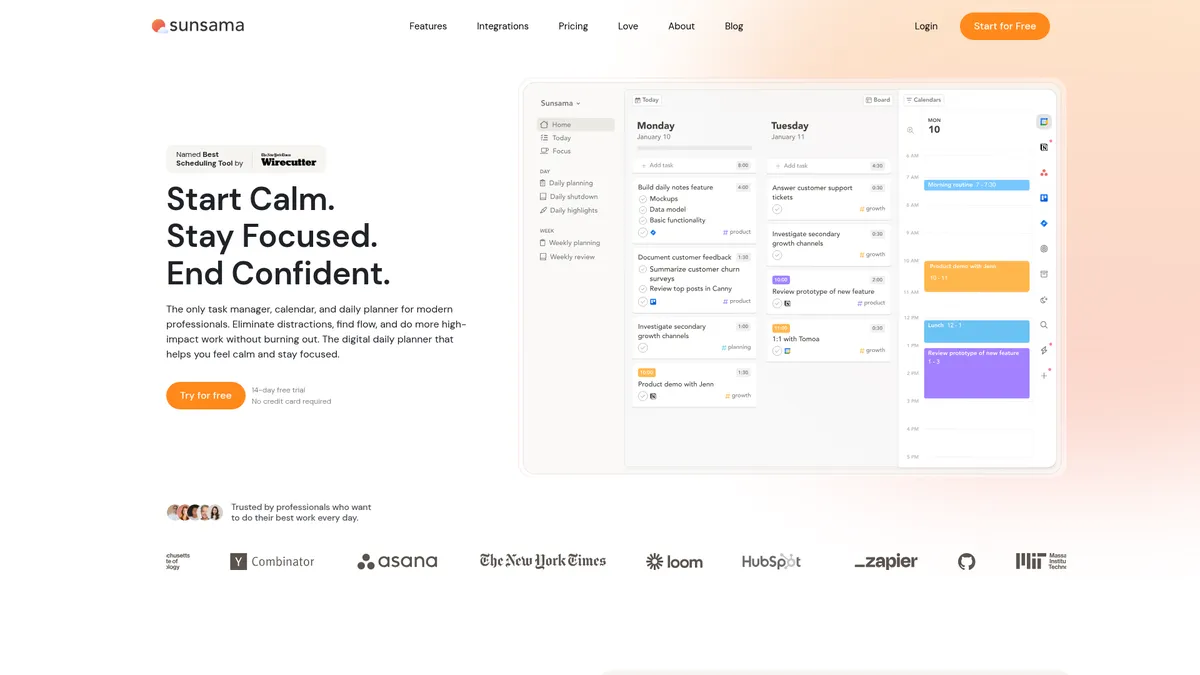
What is Sunsama?
How to Use Sunsama
Sunsama makes daily planning simple once you know the workflow. Here's how to set up your first day, connect your tools, and start protecting your focus with time-blocking and AI scheduling suggestions.
Connect Your Tools
Start by linking your calendars and task managers. Go to Settings > Integrations and connect Google Calendar or Outlook for events, then add Todoist, Asana, or any other tools you use. Sunsama will pull all your commitments into one unified inbox.
Plan Your Morning
Open the daily planner and review your unified inbox. Set 1-3 top priorities for the day, drag tasks onto your calendar timeline, and block time for deep work. Sunsama's AI will alert you if you're overbooked.
Time-Block Your Calendar
Drag and drop tasks directly onto your calendar to reserve time for each activity. Use the visual calendar view to see meetings and tasks side by side, and adjust blocks as your day evolves.
Focus with Deep Work Sessions
Enable deep-work mode to block out distractions during your most important tasks. The focus-mode UI hides everything except your current task, helping you concentrate without interruptions.
Review Your Week
Use the weekly overview to see upcoming commitments, adjust your schedule proactively, and reflect on what you accomplished. This helps you maintain work-life balance and plan ahead with clarity.
Sunsama Core Features
Sunsama Use Cases
- 1Daily planning for knowledge workers – Knowledge workers juggling multiple projects and meetings can use Sunsama's morning planner to set daily intentions, review tasks from connected tools, and block time for focused work, ensuring nothing falls through the cracks.
- 2Remote team time management – Remote freelancers and distributed teams can centralize their schedules, visualize team capacity, and share daily plans to stay aligned without endless status meetings or email chains.
- 3Deep work protection – Professionals who struggle with constant interruptions can schedule uninterrupted deep-work sessions, letting Sunsama auto-detect overbooking and reschedule less critical tasks to protect their focus.
- 4Workload balancing for team leads – Managers can see their team's commitments at a glance, adjust assignments proactively, and enforce work-hour boundaries to reduce burnout and improve overall team output.
- 5Secure task planning for enterprises – Companies with compliance requirements can deploy Sunsama with SSO/SAML, SCIM provisioning, and audit logs, ensuring task planning meets enterprise security and privacy standards.
Pros and Cons of Sunsama
Pros
- Calm, intentional daily planning – Sunsama's morning ritual and time-blocking approach help you start each day with clarity and purpose, reducing the reactive chaos of a typical workday.
- Deep integration ecosystem – Connects with Google Calendar, Outlook, Todoist, Asana, GitHub, HubSpot, and thousands more via Zapier, centralizing your entire workflow in one place.
- AI scheduling assistant – Smart suggestions help you balance your workload, alerting you when you're overbooked and recommending the best times for focused deep work.
- Generous free trial – The 14-day trial gives you full access to every feature with no credit card required, letting you thoroughly test the platform before committing to a paid plan.
✕ Cons
- No native desktop or mobile apps – Sunsama is a web-only app; while the responsive design works on phones, there's no dedicated app for iOS, Android, or desktop operating systems.
- Paid-only model after trial – There's no permanent free tier, so you must subscribe to continue using it beyond the 14-day trial, which may feel steep for basic task management needs.
- Learning curve for integrated workflows – Users accustomed to keeping tasks and calendars in separate tools may need time to adapt to Sunsama's unified daily planning approach and time-blocking methodology.
Sunsama vs Top Alternatives
| Feature | Todoist | Motion | Akiflow |
|---|---|---|---|
| Daily Time-Blocking | Manual task scheduling only | Auto-scheduling entire day | Drag-and-drop time blocking |
| Calendar & Task Unification | Separate calendar and task views | Unified calendar and tasks view | Unified daily task and calendar view |
| AI Scheduling Assistant | No AI scheduling assistant | AI auto-optimizes daily schedule | AI-powered smart scheduling |
| Integration Depth | Zapier integration for 2,000+ apps | Limited native integrations | Limited native integrations |
Sunsama Pricing
Free Trial
- 14-day unlimited access to all features
- No credit card required
- Full integration access
- AI scheduling suggestions
Pro Annual
- Unlimited daily planning
- All integrations with 2,000+ apps
- AI + MCP scheduling assistant
- Zapier automation access
- Priority email support
Pro Monthly
- Unlimited daily planning
- All integrations with 2,000+ apps
- AI + MCP scheduling assistant
- Zapier automation access
- Priority email support
Enterprise
- SSO/SAML authentication
- SCIM provisioning
- Audit logs
- Custom privacy controls
- Dedicated account manager
- Compliance-ready infrastructure
Sunsama FAQ
What is Sunsama?+
How much does Sunsama cost?+
Does Sunsama have a free plan?+
What integrations does Sunsama support?+
Is Sunsama available on mobile?+
How is Sunsama different from Todoist or Asana?+
Can teams use Sunsama?+
Sunsama Review — Editor's Score
Who Should Use Sunsama?
Knowledge workers juggling multiple projects and meetings, remote freelancers needing a centralized daily planner, team leads wanting to visualize capacity and protect deep-work time, and companies requiring secure, compliant task-planning tools.
Sunsama delivers a refreshingly calm approach to daily planning that genuinely helps knowledge workers protect their focus. Its strength lies in unifying tasks, calendar, and integrations into one intentional workflow. While the lack of native apps and the paid-only model may deter some, anyone overwhelmed by fragmented productivity tools will find Sunsama a worthy investment in their sanity.
- Unifies tasks, calendar, and integrations into one calm daily view
- AI scheduling assistant that alerts overbooking and balances workload
- 14-day free trial with full feature access and no credit card required
📺 Sunsama Tutorials & Introduction
The Ultimate Guide to Sunsama: Burnout Killer - YouTube
Sunsama Review: The Ultimate Google Calendar Replacement?
Sunsama Tutorial (2026) | Master Time-Blocking, Focus, and Daily ...
Keywords: