

Storydoc
Create interactive AI-powered business documents in minutes
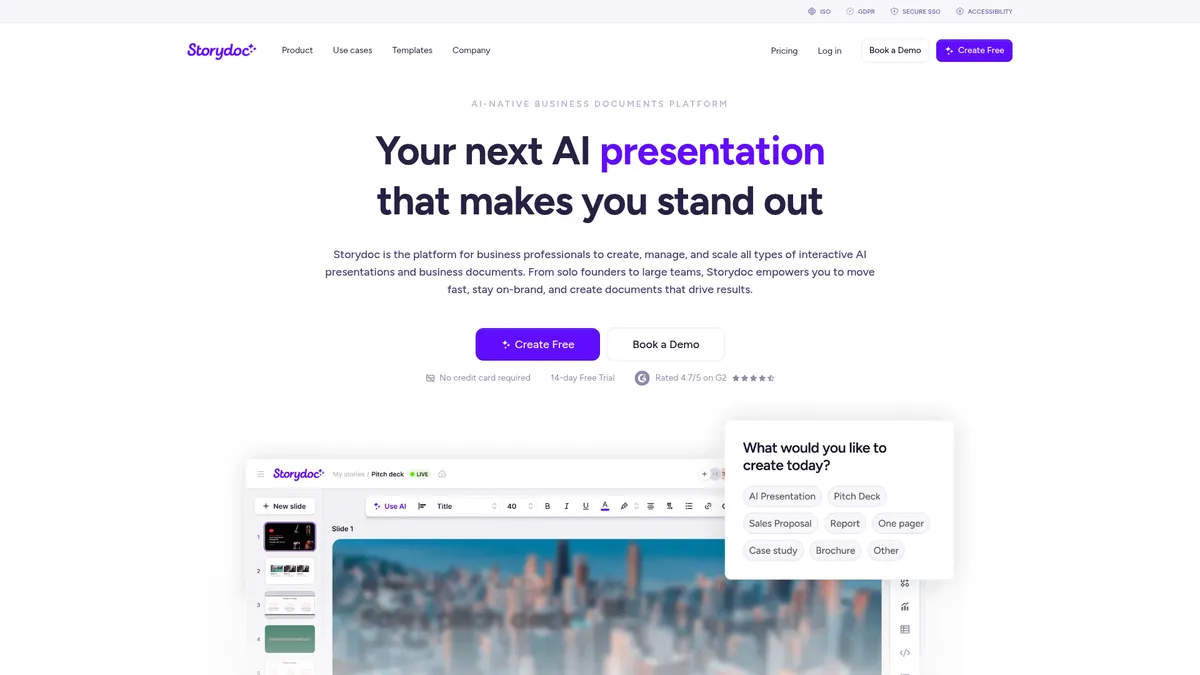
What is Storydoc?
How to Use Storydoc
Creating your first interactive AI presentation in Storydoc takes just a few minutes. Follow this step-by-step guide to go from blank canvas to a polished, trackable business document that drives engagement.
Sign up and start your free trial
Head to Storydoc.com and create an account. You can start with a 14-day free trial that gives you full access to all features, including AI generation, interactive elements, and analytics. No credit card is required to begin exploring.
Choose a template or start with AI
Browse the template library for sales proposals, pitch decks, or marketing documents. Alternatively, use the AI creation feature — simply describe what you need, and Storydoc will generate a structured document with professional layouts and placeholder content ready for customization.
Customize and add interactive elements
Use the drag-and-drop editor to refine your content, swap images, and adjust layouts. Enhance engagement by embedding interactive elements like Calendly scheduling links, YouTube videos, clickable buttons, and dynamic calls-to-action that make your document actionable.
Personalize with variables and automation
Set up personalization variables (e.g., recipient name, company, industry) to automatically tailor each copy of your document. This is especially powerful for sales outreach — create one template and let Storydoc populate unique details for every prospect.
Share, track, and optimize performance
Send your document via email, share a link, or embed it on your website. Storydoc's analytics dashboard shows you opens, clicks, scrolls, and time spent per page in real-time. Use these insights to follow up intelligently and refine your documents over time.
Storydoc Core Features
Storydoc Use Cases
- 1Sales proposals and decks: Sales teams can build interactive, trackable proposals with embedded scheduling links and dynamic pricing tiers that close faster and provide real-time engagement insights.
- 2Investor pitch decks: Founders and startups can create immersive pitch presentations with embedded product demos, video messages, and clickable prototypes while tracking exactly which slides investors re-read.
- 3Marketing collateral and case studies: Marketing teams can produce on-brand interactive brochures, one-pagers, and case studies that stand out from static PDFs and capture actionable lead intelligence.
- 4Client presentations for agencies: Consultants and agencies can deliver personalized, white-labeled presentations that wow clients with interactive elements and data-driven engagement reporting.
- 5Internal business reporting: Teams can create dynamic internal reports with live embedded resources, data visualizations, and collaborative feedback loops for more effective cross-functional communication.
Pros and Cons of Storydoc
Pros
- Intuitive drag-and-drop editor with AI-powered generation makes it simple for anyone to create professional, interactive documents without design skills or technical expertise.
- Smart automation and personalization with variables save hours of manual work by enabling bulk customization of documents for each recipient or prospect at scale.
- Deep engagement analytics provide actionable intelligence on how recipients interact with your documents, helping you prioritize leads and refine your messaging.
- Seamless integrations with popular CRM and marketing automation tools connect directly into existing workflows, keeping your sales and marketing data in sync.
✕ Cons
- AI image and text generation credits are capped per plan (20-50 images and 25-125 text credits monthly), which can limit heavy AI usage for power users.
- Starter plan lacks advanced features like team collaboration, custom branding, personalization variables, and workspace management, pushing users toward pricier tiers.
- No free tier is available — only a 14-day free trial — which may be a barrier for budget-conscious individual users or small teams exploring the platform.
Storydoc vs Top Alternatives
| Feature | Canva | Beautiful.ai | Gamma |
|---|---|---|---|
| AI-Powered Creation | Dedicated AI document builder for business documents and proposals | Generates full structured documents, not just slide decks | AI creates complete business documents, proposals, and presentations |
| Interactive Elements | Rich embedding (Calendly, videos, CTAs, forms) for actionable documents | Native interactive elements like scheduling, CTAs, and embedded media | Deeper embedding options including Calendly and custom CTAs |
| Engagement Analytics | Deep per-page and per-recipient engagement tracking with scroll maps | Detailed analytics on opens, clicks, scrolls, and time-on-page | More granular per-page engagement tracking and recipient insights |
| Starting Price | Starts at $19.80/mo (billed annually) with no free tier | Starts at $19.80/mo vs Beautiful.ai's $12/mo | No free plan (14-day trial) vs Gamma's free tier and $8/mo paid plans |
Storydoc Pricing
Starter
- AI creation and templates
- Interactive & dynamic elements
- AI Images (20 credits/mo)
- AI Text (25 credits/mo)
- Basic analytics
- Limited slides & templates
- Basic security
- Export to PDF
- Version automations (10/mo)
- Storydoc branding included
Pro
- Everything in Starter
- AI Images (50 credits/mo)
- AI Text (125 credits/mo)
- Extended analytics
- Unlimited slides & templates
- Advanced security
- Version automations (25/mo)
- Remove Storydoc branding
- Stock images, videos & icons
- Collaboration tools
- Personalization with variables
- Workspace management
- Marketing & CRM integrations
Team
- Everything in Pro
- Advanced analytics
- Extended security
- Version control
- All features included
- Custom integrations
- Dedicated support
- Priority onboarding
Storydoc FAQ
What is Storydoc and who is it for?+
How does Storydoc's AI document creation work?+
Can I track how recipients interact with my documents?+
Does Storydoc integrate with CRM and marketing tools?+
What are the main differences between the Starter and Pro plans?+
Is there a free version of Storydoc?+
Can I export my interactive documents to PDF?+
Storydoc Review — Editor's Score
Who Should Use Storydoc?
Sales professionals creating interactive proposals, founders building investor pitch decks, marketing teams producing trackable collateral, and agencies delivering personalized client presentations. It's also a strong fit for anyone who wants to move beyond static PDFs and slide decks.
Storydoc is a genuinely impressive tool for anyone who needs to create business documents that actually get results. Its blend of AI-powered creation, rich interactivity, and deep analytics makes it a standout in the presentation software space. While the credit limits and lack of a free tier may deter casual users, for sales teams, founders, and marketers who want to close deals and wow investors, it delivers real ROI.
- AI generates professional documents from scratch in seconds
- Interactive elements transform static docs into actionable experiences
- Granular analytics reveal exactly how recipients engage with your content
- Personalization at scale saves hours on customizing documents for each prospect
📺 Storydoc Tutorials & Introduction
What is Storydoc? | Storydoc Overview | Online Presentations
Storydoc Review: PowerPoint Alternative - YouTube
How to Build Stunning AI-Powered Interactive Presentations | Storydoc
Keywords: