

Sembly
AI meeting intelligence for high-impact teams
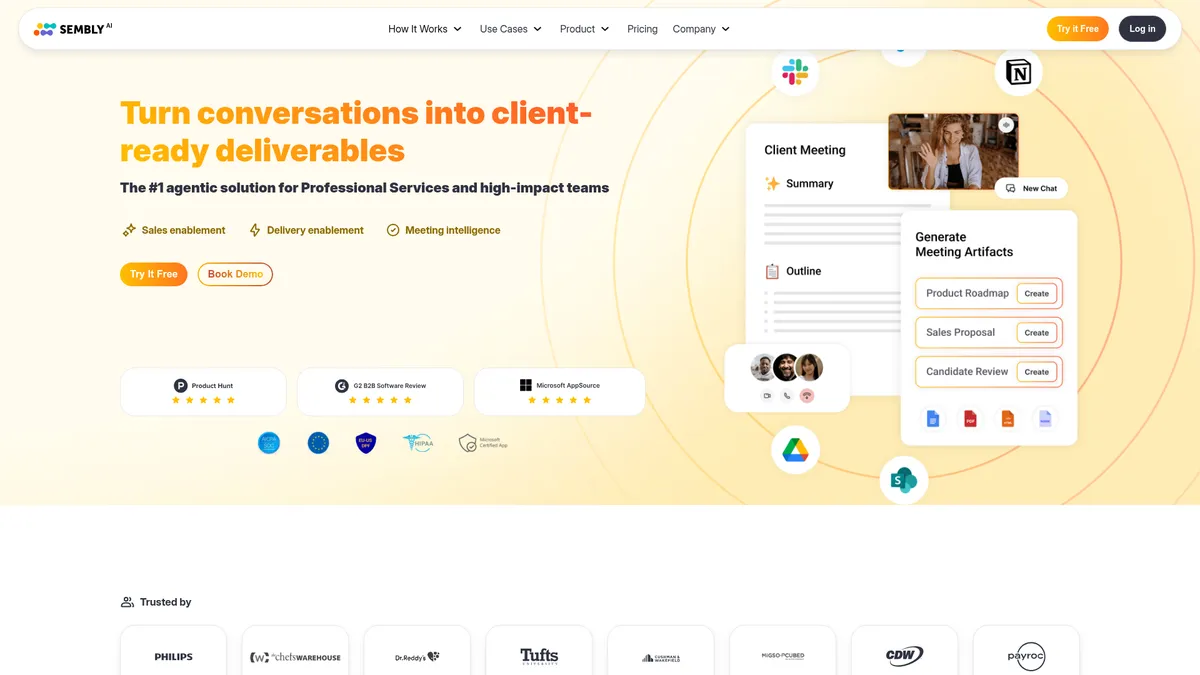
What is Sembly?
How to Use Sembly
Getting started with Sembly is straightforward. In a few minutes, you can have your AI meeting assistant set up and ready to capture, transcribe, and analyze your calls. Here's how to get Sembly working for your team.
Create your Sembly account
Head to Sembly.ai and sign up for the Basic, Pro, or MAX plan. No free trial is available, but you can start with the Basic plan for $17/month (or $10/month annual) to test the waters with unlimited meetings and transcription.
Connect your calendar and video conferencing tools
Integrate Sembly with your Google Calendar, Outlook, or Microsoft 365 calendar. Then connect Zoom, Google Meet, or Microsoft Teams. Sembly will automatically join your scheduled meetings and start recording and transcribing.
Set up integrations with your workflow tools
Connect Sembly to your existing tech stack — Salesforce, Notion, Slack, HubSpot, and 50+ other tools. This ensures meeting insights automatically flow into your CRM, project boards, and team communication channels.
Customize your AI agent and preferences
Set up custom vocabulary for industry-specific terms, configure data retention policies, and personalize your AI agent's avatar. You can also create templates for meeting outputs to standardize how summaries and minutes are formatted.
Review analytics and start using AI-generated outputs
After your first meetings, explore the workspace analytics dashboard to see engagement trends. Use the conversation search to find specific topics, and let the AI assistant draft follow-up emails, sales pitches, or gap analyses based on meeting content.
Sembly Core Features
Sembly Use Cases
- 1Project management offices can track every decision, action item, and milestone across recurring meetings without manual note-taking, ensuring nothing slips through the cracks.
- 2Marketing and creative agencies can capture client briefs, feedback sessions, and brainstorm recordings, then instantly generate shareable summaries and follow-up action plans.
- 3Product development teams can analyze sprint retrospectives and stand-ups to identify sentiment trends, track feature requests, and keep engineering aligned with product goals.
- 4HR and recruitment professionals can record candidate interviews and internal reviews, using AI-generated summaries to compare talent and maintain compliance with audit trails.
- 5Venture capital firms and startups can automate meeting notes for pitch reviews, board meetings, and investor updates, with conversation search to revisit critical financial discussions.
Pros and Cons of Sembly
Pros
- Deep meeting intelligence goes beyond basic transcription to analyze sentiment, decisions, and action items — making it more of an accountability partner than a passive recorder.
- Rock-solid integrations with over 50 popular business tools including Salesforce, Notion, Slack, and HubSpot means your meeting data flows where work actually happens.
- Scalable pricing from solo users to 500-person teams with clear feature progression, so you're not paying for enterprise features you don't need on day one.
- Advanced search with custom vocabulary and topic tracking makes it easy to surface specific discussions from months-old recordings without scrubbing through hours of video.
✕ Cons
- No free tier or free trial available — the Basic plan starts at $17/month which may feel steep for individual freelancers or very small teams just testing the waters.
- Basic plan is limited to a single user, so teams need to jump to the Pro tier at $29/month to collaborate, which can add up quickly for larger organizations.
- Company history and founding details are sparse, making it harder to assess long-term stability and roadmap credibility compared to more transparent competitors.
Sembly vs Top Alternatives
| Feature | Otter.ai | Fireflies.ai | Fathom |
|---|---|---|---|
| Core meeting intelligence features | AI transcription, summaries, and action items | AI transcription, summaries, and conversation intelligence | AI meeting notes, transcription, and highlights |
| Pricing and free tier availability | Free tier with 300 min/month; Pro at $16.99/mo | Free tier available; Pro at $19/mo | Free plan for individuals; Team at $19/mo |
| Integration ecosystem depth | Limited to 3,000+ integrations via Zapier | 50+ native integrations including CRM and PM tools | CRM integrations and Zapier connectivity |
| AI analysis depth (sentiment, topics, decisions) | Basic sentiment and topic tracking | Advanced topic tracking and sentiment analysis | Action item detection with manual assignment |
Sembly Pricing
Basic
- 1 user
- Unlimited meetings
- Meeting transcription and notes
- Basic AI summaries
- Unlimited meeting history
Pro
- 40 users
- Multi-meeting AI chat
- Unlimited HD video recording
- AI-generated documents
- Integrations with 50+ tools
MAX
- 500 users
- Advanced meeting intelligence
- Full traceability
- Agent customization
- Workspace analytics
Sembly FAQ
What is Sembly and how does it work?+
Does Sembly have a free plan?+
What platforms does Sembly integrate with?+
Can Sembly track action items and decisions from meetings?+
Is Sembly HIPAA compliant?+
How many users can use Sembly on each plan?+
What makes Sembly different from other meeting transcription tools?+
Sembly Review — Editor's Score
Who Should Use Sembly?
Sembly is best suited for project management offices, marketing and creative agencies, product development teams, and venture capital firms that rely heavily on meetings for decision-making and need a structured way to capture, analyze, and action meeting outcomes.
Sembly is a serious contender in the meeting intelligence space, especially for professional services teams that need more than just transcripts. Its decision tracking, sentiment analysis, and workspace analytics genuinely add value over simpler transcription tools. The lack of a free tier might deter solo users, but for teams running 10+ meetings a week, the ROI is clear. If you're tired of chasing action items and losing insights in call recordings, Sembly is worth the investment.
- Decision and action item tracking with accountability layer
- Native integrations with 50+ business tools including Salesforce and Notion
- AI assistant that drafts emails, pitches, and analyses from meeting content
- Workspace analytics for engagement trends and meeting health metrics
📺 Sembly Tutorials & Introduction
Sembly AI vs Otter AI | Which AI Note Taker is Better?? - YouTube
How To Use Sembly Ai – Ultimate Guide - YouTube
Sembly AI + Confluence Automation Tutorial - YouTube
Keywords: