

SAP Build Apps
Enterprise low-code platform with AI-powered development
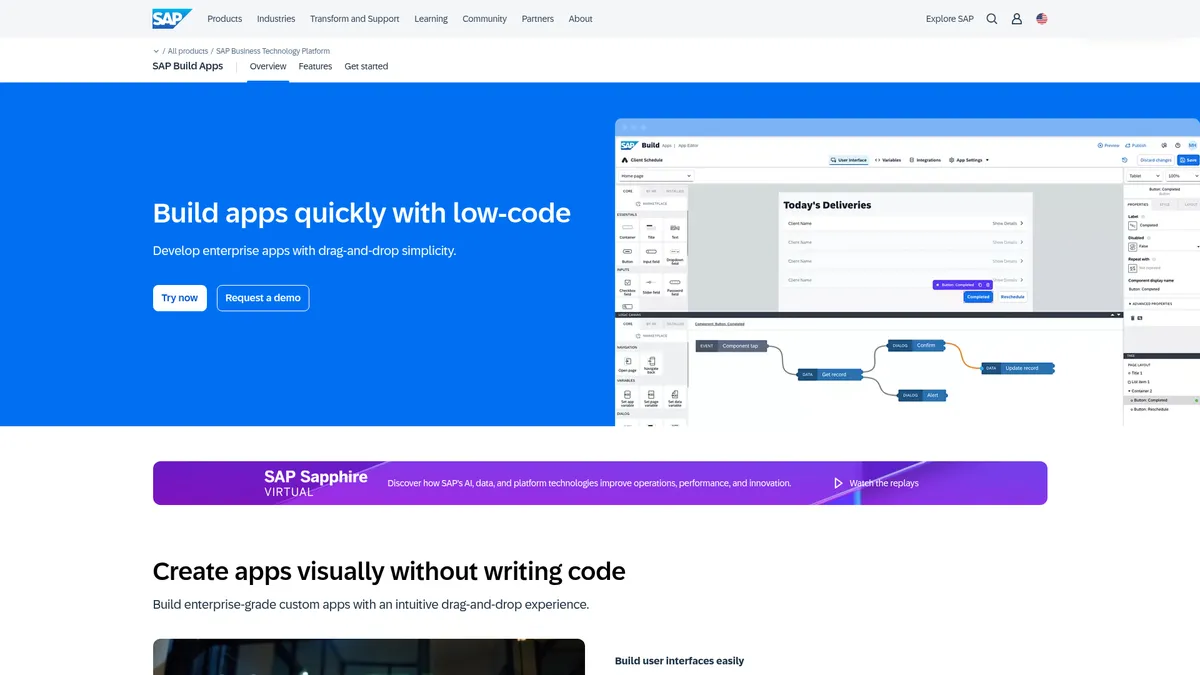
What is SAP Build Apps?
How to Use SAP Build Apps
Building your first app with SAP Build Apps is surprisingly straightforward thanks to the visual drag-and-drop interface and Joule AI copilot. Follow this guide to create a simple employee leave request app from scratch, connecting it to an SAP backend and deploying it to web and mobile.
Create a new project and set up your canvas
Log into SAP Build Apps via your SAP BTP account and start a new project. Choose a blank canvas or select from pre-built industry templates. The main workspace shows your app canvas on the left, a component palette on the right, and a data bindings panel below.
Design your UI with drag-and-drop components
Drag UI components like forms, buttons, input fields, and tables from the palette onto your canvas. Use the properties panel to customize labels, colors, and layouts. The Joule AI copilot can also generate entire form screens if you type a description like 'leave request form with employee ID and date range'.
Wire up business logic and data connections
Use the logic editor to define what happens when users interact with your app—submit buttons trigger data flows, validation rules fire, and approval workflows kick off. Connect to your SAP backend via pre-built connectors or REST/OData APIs to fetch employee data and submit leave records.
Preview, test, and deploy your app
Use the built-in preview tool to test your app in real time across web and mobile form factors. Once satisfied, publish directly to SAP BTP, export as a native app for iOS/Android stores, or deploy as a progressive web app accessible from any browser.
SAP Build Apps Core Features
SAP Build Apps Use Cases
- 1Build employee self-service portals and HR apps that connect directly to SuccessFactors for hire-to-retire workflows, letting staff manage leave, expenses, and personal data without IT intervention
- 2Extend SAP S/4HANA processes with custom front-ends for lead-to-cash and source-to-pay cycles, giving sales and procurement teams tailored interfaces that match their exact workflows
- 3Create worker guidance and production-line assistance apps for manufacturing environments, with offline support so floor operators can access schematics and log data without WiFi
- 4Rapidly prototype internal tools like approval dashboards, inventory trackers, and project status boards without consuming developer resources or navigating long IT backlogs
- 5Develop AI-driven assistants and chatbots via Joule Studio that can query SAP data, guide users through troubleshooting steps, or automate routine support tickets
Pros and Cons of SAP Build Apps
Pros
- Accelerates app delivery dramatically with true no-code UI building and drag-and-drop simplicity, letting business users create functional apps in hours instead of weeks
- Deep out-of-the-box integration with SAP's core ERP, HR, and cloud services eliminates the heavy lifting of connecting to enterprise data sources
- AI-powered Joule copilot reduces manual coding overhead by translating natural-language descriptions into working UI components and business logic
- Enterprise-grade governance, security controls, and scalable hosting on SAP BTP ensure compliance without sacrificing development velocity
✕ Cons
- Pricing is not transparent and requires an SAP BTP subscription, which can be prohibitively expensive for small and mid-size organizations outside the SAP ecosystem
- Advanced logic scenarios may still require custom JavaScript, challenging the pure 'no-code' promise and creating a ceiling for non-technical builders
- Vendor lock-in to the SAP ecosystem is significant, making it an impractical choice for organizations that aren't already committed to SAP infrastructure
SAP Build Apps vs Top Alternatives
| Feature | OutSystems | Microsoft Power Apps | Mendix |
|---|---|---|---|
| AI-assisted development | Joule AI copilot generates UI and logic from natural language | Joule AI copilot generates UI and logic from natural language | Joule AI copilot generates UI and logic from natural language |
| Enterprise ERP integration | Deep native integration with SAP S/4HANA, SuccessFactors, and BTP | Deep native integration with SAP S/4HANA, SuccessFactors, and BTP | Deep native integration with SAP S/4HANA, SuccessFactors, and BTP |
| No-code visual builder | True no-code UI builder accessible to business users without training | True no-code UI builder accessible to business users without training | True no-code UI builder accessible to business users without training |
| Multi-platform deployment | Web, native iOS/Android, PWA, and desktop with offline support | Web, native iOS/Android, PWA, and desktop with offline support | Web, native iOS/Android, PWA, and desktop with offline support |
SAP Build Apps Pricing
Free Trial
- Full platform access for limited time
- Access to Joule AI copilot
- Community support
- Limited app deployments
Pay-as-You-Go
- Consumption-based pricing via SAP BTP
- All platform features
- Standard support
- Production deployments
Enterprise
- Custom enterprise agreement
- Dedicated support and SLAs
- Advanced governance and security
- Unlimited app development and deployments
SAP Build Apps FAQ
What is SAP Build Apps and how does it differ from SAP AppGyver?+
Is SAP Build Apps free to use?+
Can I build mobile apps with SAP Build Apps?+
Does SAP Build Apps require coding skills?+
What is the Joule AI copilot in SAP Build Apps?+
How does SAP Build Apps integrate with existing SAP systems?+
Who is the ideal user for SAP Build Apps?+
SAP Build Apps Review — Editor's Score
Who Should Use SAP Build Apps?
SAP Build Apps is ideal for SAP-centric organizations looking to empower citizen developers and accelerate custom app delivery. It's perfect for business analysts who need to build departmental tools, IT teams extending S/4HANA workflows, and enterprises wanting to create AI assistants without heavy coding investment.
SAP Build Apps is a powerful low-code platform that delivers on its promise of rapid enterprise application development—especially for organizations already embedded in the SAP ecosystem. The visual builder is genuinely intuitive, and the Joule AI copilot adds meaningful acceleration for common patterns. However, opaque pricing and significant vendor lock-in make it a tough sell for teams not already running SAP infrastructure.
- Joule AI copilot generates UI and logic from natural-language prompts
- Deep native integration with SAP S/4HANA, SuccessFactors, and BTP
- True multi-platform deployment including native mobile with offline support
- Enterprise-grade governance, security, and compliance controls
📺 SAP Build Apps Tutorials & Introduction
Empowering SAP Build Apps with AI: A New Paradigm in ... - YouTube
SAP Build Apps end to end training for professionals - YouTube
Integrating SAP AI Core in a SAP Build Apps (Low Code) application
Keywords: