
Routine
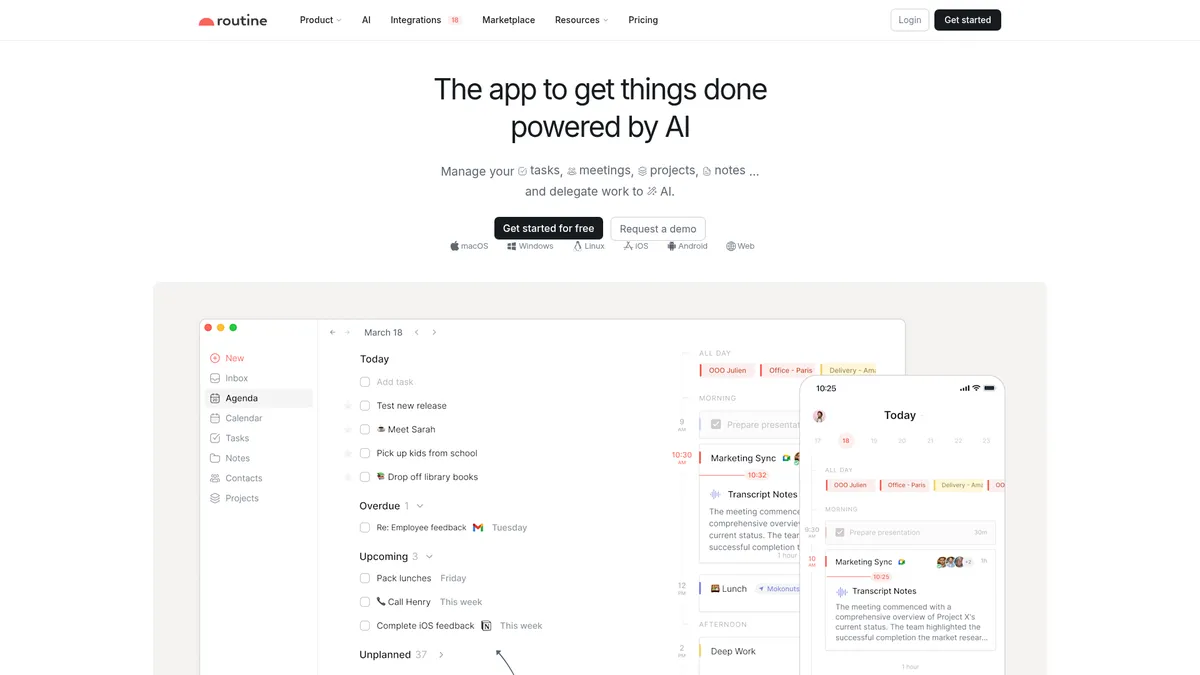
The AI workspace that unifies your digital life
What is Routine?
How to Use Routine
Routine is designed to be your single workspace for tasks, notes, meetings, and projects. This guide walks you through setting up your account, configuring your workflow, and leveraging AI features to boost productivity from day one.
Set Up Your Routine Account
Download Routine from routine.co for your preferred platform — macOS, Windows, Linux, iOS, Android, or the Web app. Create a free account and grant calendar permissions to sync your existing events from Google, Outlook, or iCloud so your schedule is immediately available.
Master Quick Capture
Use the desktop hotkey (default: Ctrl+Space or Cmd+Space) to instantly create tasks from anywhere on your computer. Type naturally using plain language — Routine understands dates, priorities, and project assignments from your input, making capture frictionless.
Connect Your Tools and Set Up Integrations
Navigate to Integrations in settings to connect Slack, GitHub, Zoom, Dropbox, and other services you use daily. This populates your Universal Inbox with notifications and tasks from your existing workflow tools, eliminating the need to check multiple apps.
Configure AI Meeting Notes
Enable AI Meeting Notes in settings and connect your calendar. Routine will automatically join eligible meetings on Zoom, Teams, or Google Meet to transcribe conversations, generate summaries, and create action items as tracked tasks in your workspace.
Build Custom Databases and Views
Create custom entity types for your specific workflows — whether that's a client CRM, project tracker, content calendar, or bug database. Use views like Kanban, calendar, grid, or list to visualize your data exactly how you need it, and apply filters to focus on what matters.
Routine Core Features
Routine Use Cases
- 1Personal Knowledge Management – Unify notes, tasks, calendar events, and contacts into a single searchable workspace. Use backlinks and custom databases to build a second brain that connects every piece of information automatically.
- 2AI-Powered Meeting Productivity – Let Routine's AI bot join your Zoom, Teams, or Google Meet calls to automatically transcribe and summarize discussions. Action items are instantly extracted and turned into tracked tasks, saving hours of manual note-taking.
- 3Small Business CRM & Client Management – Define custom entity types for leads, deals, and contacts with relational links between them. Build Kanban boards to visualize your sales pipeline while keeping all client communications and meeting notes attached to each record.
- 4Cross-Functional Project Coordination – Create custom databases for projects, tasks, and milestones with filtered views for different teams. Time-block focused work sessions, set recurrences, and use the universal inbox to centralize notifications from GitHub, Slack, and email.
- 5Remote Team Collaboration – Leverage workspaces and access controls to organize team projects with offline-first reliability. AI agents automate repetitive workflows while real-time syncing keeps distributed members aligned across devices.
Pros and Cons of Routine
Pros
- Deep AI Integration – Routine embeds AI throughout the experience, from automatic meeting transcription and summarization to voice-driven task creation and customizable AI agents. This reduces manual data entry and helps users focus on high-value work instead of administrative overhead.
- True Cross-Platform with Offline Mode – Unlike most productivity tools that require constant internet access, Routine works fully offline on all major platforms including macOS, Windows, Linux, iOS, Android, and Web. Data syncs seamlessly when connectivity returns, making it reliable for remote work and travel.
- Highly Customizable Data Model – The ability to define custom entity types, properties, and relational links means Routine can adapt to virtually any workflow. Users can build internal tools like a CRM, ATS, or bug tracker without switching platforms, which is rare in the all-in-one workspace category.
- Generous Free Tier – The forever-free plan includes unlimited tasks, calendars, notes, custom types, integrations, and collaboration with full offline support. This makes Routine accessible to individuals and small teams without upfront investment, with clear upgrade paths as needs grow.
✕ Cons
- Learning Curve from Deep Customization – The same flexibility that makes Routine powerful can overwhelm new users. With custom types, relational databases, views, and backlinks, there's a lot to explore, and the lack of pre-built templates means starting from scratch can feel daunting.
- Enterprise Pricing Is Opaque – While the Free and Professional tiers are clearly priced, Enterprise requires contacting sales for a quote. Growing teams that need compliance tools, audit logs, or unlimited history can't evaluate costs without a sales conversation.
- Some Advanced Features Still in Development – Templates and transclusion are listed as coming soon, which limits out-of-the-box functionality for power users. Early adopters may find themselves waiting for core capabilities that competitors already offer natively.
Routine vs Top Alternatives
| Feature | Notion | Motion | Akiflow |
|---|---|---|---|
| AI Meeting Notes | AI writing assistant available but no native meeting transcription | AI-powered scheduling and prioritization, no meeting transcription | Time-blocking focused with no AI meeting capabilities |
| Custom Data Model | Robust databases and relations with moderate flexibility | Fixed task structure without custom entity types | Predefined task and event structure only |
| Offline-First Architecture | Limited offline support on mobile; desktop requires connection | Requires internet connection for full functionality | Requires internet for real-time sync |
| Cross-Platform Support | macOS, Windows, iOS, Android, Web (no Linux desktop) | Web, iOS, Android, macOS (limited Windows support) | macOS, iOS, Web (no Windows or Linux) |
Routine Pricing
Free
- Unlimited tasks, calendars, notes, and contacts
- Custom types and databases
- Natural language input
- Unlimited integrations
- Collaboration and sharing
- Offline mode
Professional
- All Free features
- AI meeting notes
- Menu-bar widget
- Time tracking
- Contextual capture
- 30-day history
- Premium support
Business
- All Professional features
- Workspaces and access control
- AI agents
- Versioning
- 90-day history
- Priority support
Enterprise
- All Business features
- Unlimited history
- Compliance tools
- Audit logs
- Analytics
- User provisioning
- Dedicated success manager
Routine FAQ
What is Routine and who is it for?+
Is Routine free to use?+
Which platforms does Routine support?+
How does Routine's AI meeting notes feature work?+
Can I use Routine as a CRM or project management tool?+
Does Routine work offline?+
What integrations does Routine support?+
Routine Review — Editor's Score
Who Should Use Routine?
Routine is ideal for knowledge workers, freelancers, and small-to-mid-size teams who want a unified workspace combining tasks, notes, calendars, and AI-powered automation. It's particularly well-suited for power users who value customizability and offline reliability over out-of-the-box simplicity.
Routine is one of the most ambitious productivity platforms to emerge in recent years, successfully merging AI capabilities with a flexible, local-first workspace. While its wealth of customization options can initially feel overwhelming, the payoff in workflow efficiency is substantial. For knowledge workers and small teams tired of juggling separate tools, Routine offers a compelling all-in-one solution that only gets better as you invest time in tailoring it to your needs.
- Deep AI integration with automatic meeting notes, voice assistant, and customizable AI agents
- Local-first architecture with full offline support across all major platforms
- Highly flexible custom data model that adapts to any workflow from CRM to project management
📺 Routine Tutorials & Introduction
I Built an AI That Automates My Morning Routine (Using n8n)
How to Use Claude Routines – Full Workflow Automation Guide 2026
Claude Routines Tutorial: Automate Anything with Claude Ai!
Keywords: