

Roam Research
Your thoughts, connected. The original graph-based notes app.
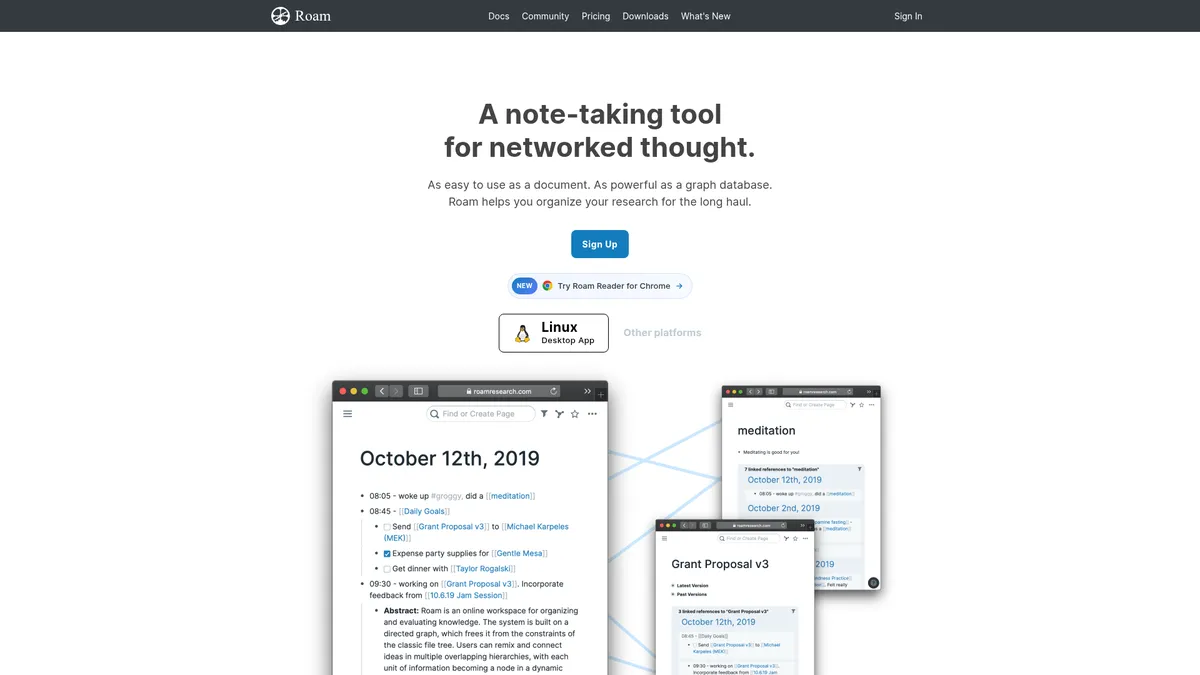
What is Roam Research?
How to Use Roam Research
Roam Research's power comes from its networked approach to note-taking. Instead of organizing notes in folders, you create connections between ideas using bi-directional links. Here's how to start building your knowledge graph in minutes.
Create Your Account and Start a Daily Note
Sign up for a free trial at roamresearch.com and you'll land on today's daily note page. This is your capture space—start typing thoughts, tasks, or anything that comes to mind. Every day you get a fresh page to dump ideas.
Link Your First Pages Using Double Brackets
Type [[ around a word or phrase to create a new page or link to an existing one. Roam automatically generates a backlink on the linked page, creating a two-way connection between your ideas. This is the core mechanic that builds your knowledge graph.
Use Block References to Reuse Content
Click the bullet icon next to any block of text and drag it into another page to create an embedded block reference. Block references update everywhere when you edit the original, keeping your knowledge consistent across the entire graph.
Explore Your Graph View
Click 'Graph View' in the left sidebar to see a visual map of your pages and their connections. Each node represents a page, and lines represent links between them. Use this view to discover patterns and navigate between related ideas.
Create Templates for Repeatable Workflows
Set up reusable page or block templates for meeting notes, project plans, or research logs using the template feature. This ensures consistent structure across your knowledge base and saves time on repetitive formatting.
Roam Research Core Features
Roam Research Use Cases
- 1Academic research and literature reviews — Researchers build interconnected literature reviews by linking papers, quotes, and ideas. Bi-directional linking helps discover new connections between sources, making it easier to synthesize complex academic material across disciplines.
- 2Building a personal knowledge base or second brain — Capture daily thoughts, ideas, and learnings in a structured yet flexible format using daily notes. The graph view and block references allow you to revisit and connect ideas over time, creating a powerful personal knowledge system that grows with you.
- 3Project planning and product management — Use daily notes and templates to track tasks, meeting notes, and project milestones in a connected workspace. Collaboration features let teams brainstorm, document decisions, and maintain a shared knowledge graph for ongoing projects.
- 4Writing long-form content like books or articles — Organize research, outline chapters, and draft content using block-level editing and referencing. The networked structure helps maintain coherence across complex writing projects by keeping related ideas linked.
- 5Technical documentation and team wikis — Create a living documentation system where team members contribute and link related concepts. Unlimited graphs and permission controls make it suitable for both private and shared knowledge bases that scale with your organization.
Pros and Cons of Roam Research
Pros
- Unparalleled ability to interlink ideas through bi-directional linking, fostering serendipitous discovery and deep connections between concepts that traditional note-taking apps can't match.
- Flexible document-like UI that scales seamlessly from simple daily journaling to complex research graphs with thousands of interconnected nodes and blocks.
- Strong collaboration features with unlimited collaborators on private or public graphs, making it ideal for team knowledge management and shared research projects.
- Extensible platform with a vibrant community building plugins, plus full API access for custom integrations and automation of repetitive workflows.
✕ Cons
- Steeper learning curve compared to traditional linear note-taking apps; users new to graph-based thinking may feel overwhelmed by the paradigm shift and lack of folder-based organization.
- Higher price point at $15/month with no permanent free tier, which can be a barrier for casual note-takers, students, or professionals with limited budgets.
- Limited offline functionality and heavy reliance on internet sync can be problematic for users in areas with unstable connectivity or those who prefer local-first tools.
Roam Research vs Top Alternatives
| Feature | Notion | Obsidian | Logseq |
|---|---|---|---|
| Bi-directional Linking | Manual backlinks via database relations | Native bi-directional links | Native bi-directional links |
| Graph View | No native graph view | Interactive graph view | Basic graph view |
| Block Referencing | Block-level content but no graph-wide references | Block references via plugins | Native block references |
| Starting Price | $10/mo Plus | Free (local), $50/mo Sync & Publish | Free (open-source) |
Roam Research Pricing
Pro Plan
- Unlimited private and public graphs
- Unlimited collaborators
- Full API access and all core features
- 31-day free trial included
Believer Plan
- Everything in Pro plan
- Early access to new features
- Community calls with the Roam team
- Priority support
Roam Research FAQ
What makes Roam Research different from other note-taking apps?+
Is Roam Research free to use?+
Can I collaborate with others in Roam Research?+
How does bi-directional linking work in Roam?+
Does Roam Research work offline?+
Can I import data from other apps into Roam?+
What platforms does Roam Research support?+
Roam Research Review — Editor's Score
Who Should Use Roam Research?
Ideal for academic researchers managing complex literature, writers developing book manuscripts, product managers tracking cross-functional projects, and anyone committed to building a personal knowledge base or 'second brain.'
Roam Research pioneered the concept of networked note-taking and remains a gold standard for building a second brain. Its bi-directional linking and block referencing create a knowledge graph that grows more valuable with every connection. The steep learning curve and premium pricing are real barriers, but for researchers, writers, and knowledge workers who commit to its paradigm, Roam rewards with transformative clarity.
- Pioneered bi-directional linking and graph-based note-taking
- Daily notes plus block references create a powerful capture-and-connect workflow
- Strong community and plugin ecosystem extend core functionality
📺 Roam Research Tutorials & Introduction
This Note-Taking App is a Game Changer - Roam Research
Making the most of Roam Research: Advanced: Using templates
How To Create Flowchart In Roam Research - YouTube
Keywords: