

RemNote
AI-powered all-in-one study platform for notes and flashcards
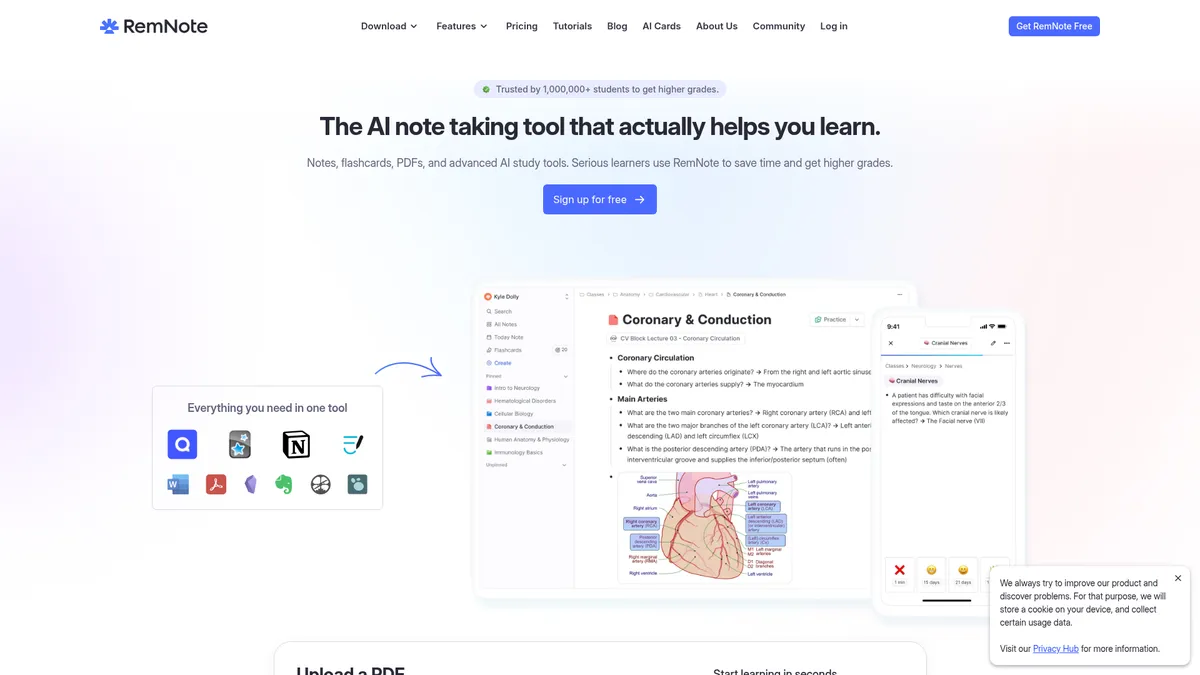
What is RemNote?
How to Use RemNote
RemNote makes it easy to transform lecture slides, textbook PDFs, or class notes into study-ready flashcards with spaced repetition. Follow these steps to set up your first effective study session.
Create a new Rem and structure your notes
Open RemNote and create a new document called a Rem. Use the outlining editor to type your notes with headings, bullet points, and rich formatting. This structured content becomes the foundation for generating flashcards automatically.
Generate flashcards from your notes
Select key concepts in your notes and click the flashcard icon to create Q/A cards. You can also highlight text and choose 'Add to card' from the context menu. With the Pro+AI plan, auto-generate entire decks from any document with one click.
Customize your flashcards
Enhance your cards with images, diagrams, or LaTeX formulas. Create image-occlusion cards by uploading a diagram and hiding parts of it for active recall. Add tags and assign cards to specific decks for organized, topic-based studying.
Set up your exam schedule
Navigate to the exam scheduler, enter your exam date, and select the relevant decks. RemNote automatically builds a daily study plan, telling you exactly how many new cards to learn and which ones to review each day leading up to the exam.
Start reviewing with spaced repetition
Open the study mode and begin reviewing your flashcards. Rate each card based on how easily you remembered it—the algorithm adjusts review intervals accordingly. Track your progress, streak, and retention statistics in the dashboard.
RemNote Core Features
RemNote Use Cases
- 1Medical students can annotate lecture slides, auto-generate flashcards from key concepts, and use spaced repetition to retain vast amounts of material for board exams like the MCAT or USMLE.
- 2Language learners can create vocabulary flashcards with image-occlusion, use AI explanations to understand grammar rules, and follow the exam scheduler to prepare for proficiency tests.
- 3Researchers can build a searchable knowledge base by annotating PDF papers, linking notes across documents, and reviewing key findings with spaced repetition.
- 4High school and college students can replace multiple study apps with one platform, taking notes in class, converting them to flashcards, and using the AI tutor for homework help.
- 5Educators can create shared study sets with custom templates, track student progress through spaced repetition, and use AI to generate quiz questions from lecture materials.
Pros and Cons of RemNote
Pros
- All-in-one workflow replaces Notion, Anki, Quizlet, and PDF annotators—saving time and reducing context switching between multiple apps.
- AI-powered flashcard generation and tutoring dramatically speed up study material creation and provide on-demand concept explanations.
- Generous free tier with unlimited notes, flashcards, and synced devices across all platforms with no artificial limits.
- Offline-first architecture with seamless sync ensures you can study anywhere, anytime without relying on an internet connection.
✕ Cons
- Free tier caps PDF annotations at 3 documents and image-occlusion cards at 5, which can be restrictive for heavy users.
- AI credits are consumed quickly on free and Pro plans, requiring the premium Pro+AI tier for extensive AI feature usage.
- Feature-rich interface has a noticeable learning curve for new users accustomed to simpler, single-purpose note-taking or flashcard apps.
RemNote vs Top Alternatives
| Feature | Anki | Quizlet | Notion |
|---|---|---|---|
| Spaced Repetition | Powerful, fully customizable spaced repetition with add-on ecosystem | Basic spaced repetition in Learn mode | Not available natively; manual workarounds with databases only |
| AI Study Tools | No native AI features; limited community-created add-ons available | AI flashcard generation on Plus paid plan | AI writing assistant (add-on); not study or flashcard focused |
| PDF Annotation | Not available natively; no PDF annotation support | Not available; no PDF annotation support | PDF annotation with highlight and comment tools available |
| Free Tier Value | Fully free and open-source with no paywalls | Free tier with ads; Plus at $7.99/month | Generous free tier for individuals with some limits |
RemNote Pricing
Free
- Unlimited notes and flashcards
- Unlimited synced devices
- 3 annotated PDFs
- 5 image-occlusion cards
- 1 handwritten document
- 100 AI credits per month
Pro
- Everything in Free
- Unlimited PDF annotation
- Unlimited image-occlusion cards
- Tables and templates
- Exam scheduler
- Unlimited handwritten documents
- 1,000 AI credits per month
Pro+AI
- Everything in Pro
- 20,000 AI credits per month
- AI flashcard and quiz generator
- AI explanations on every card
- AI tutor chat
- Lecture recorder
- AI grading of practice answers
- Image-to-text conversion
- Audio transcription
- Advanced image-occlusion
- Priority support
RemNote FAQ
Is RemNote free?+
How does RemNote's spaced repetition work?+
Can RemNote replace Anki and Notion?+
Does RemNote work offline?+
What is RemNote's AI tutor and how does it work?+
How many devices can I sync with the free plan?+
Who created RemNote?+
RemNote Review — Editor's Score
Who Should Use RemNote?
Ideal for students from high school through medical school, researchers, and lifelong learners who want a unified platform for note-taking, flashcard-based studying, and knowledge management. Best suited for those willing to invest time in learning a feature-rich tool for long-term gains.
RemNote is the ultimate study companion for students who want an all-in-one solution. It effectively replaces Anki, Notion, and Quizlet with a single, AI-enhanced platform. The main trade-off is complexity—new users should expect a learning curve before they unlock its full potential, but the payoff in productivity is substantial.
- All-in-one platform combining notes, flashcards, PDF annotation, and spaced repetition
- AI-powered flashcard generation, tutoring, and exam scheduling
- Generous free tier with unlimited notes, flashcards, and synced devices
- Founded at MIT with strong adoption at top universities worldwide
📺 RemNote Tutorials & Introduction
Ultimate RemNote Review: Best Student Note-Taking App? - YouTube
Study 2X Faster with AI + RemNote [Full Walkthrough] - YouTube
RemNote AI - YouTube
Keywords: