
Reclaim.ai
AI calendar automation that protects your focus time
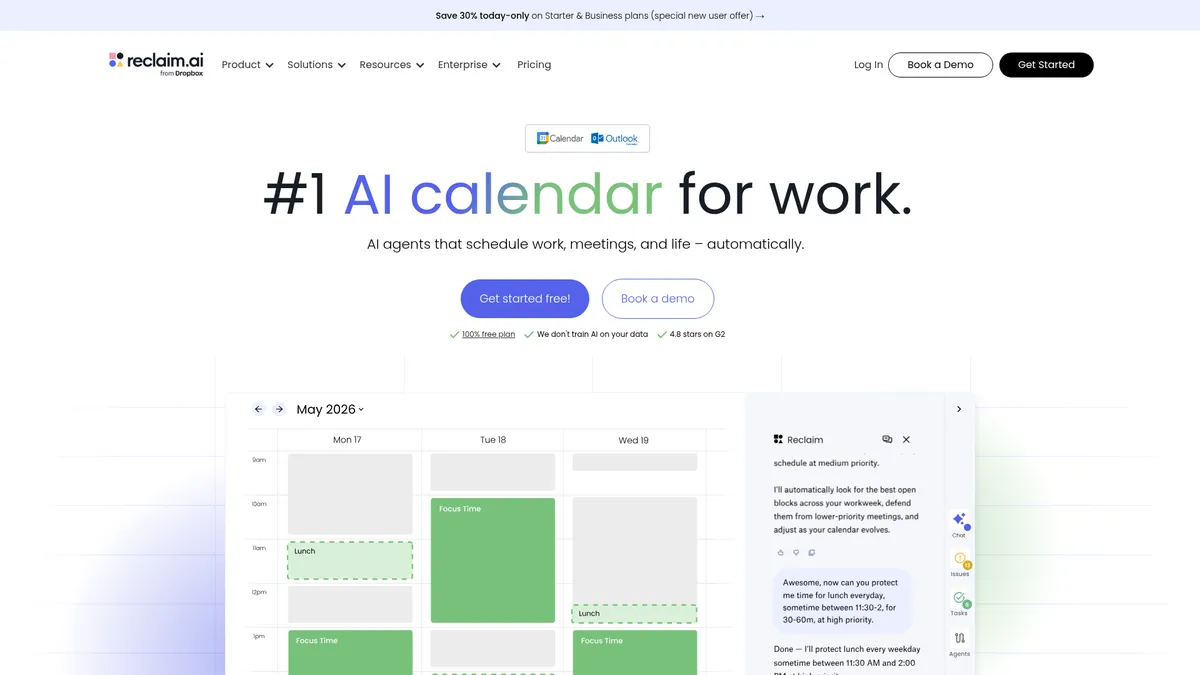
What is Reclaim.ai?
How to Use Reclaim.ai
Getting started with Reclaim.ai takes just a few minutes. Follow this simple guide to connect your Google Calendar, set your focus time preferences, and let the AI start optimizing your schedule automatically.
Install the Reclaim.ai Add-on
Visit the Google Workspace Marketplace and install the Reclaim.ai add-on for Google Calendar. Grant the necessary permissions for Reclaim to read and modify your calendar, tasks, and events.
Set Your Focus Time Goals
Configure how many hours of focus time you need each day and which time windows you prefer. Reclaim will automatically block those slots in your calendar and defend them from incoming meeting requests.
Connect Your Tools
Link your task management apps like Todoist, Asana, Jira, or Linear to sync tasks directly into your calendar. Reclaim will automatically schedule these tasks around your existing meetings and focus blocks.
Configure Habits and Buffers
Set up recurring habits like stand-ups, workouts, or lunch breaks and let the AI place them at optimal times. Customize buffer durations between events to ensure smooth transitions throughout your day.
Share Your Scheduling Link
Generate your AI-powered scheduling link and share it with colleagues and clients. Recipients see your real-time availability, and any booked meetings are automatically added to your optimized schedule.
Review and Refine Daily Plans
Check your Reclaim dashboard each morning to review the AI-generated daily plan. Make adjustments as needed, and trust the AI to handle rescheduling when new events or conflicts arise throughout the day.
Reclaim.ai Core Features
Reclaim.ai Use Cases
- 1Individual productivity optimization: Professionals use Reclaim.ai to automatically protect focus time for deep work, schedule personal tasks and habits around meetings, and maintain a healthy work-life balance. The AI continuously reshuffles the calendar as new events appear, ensuring priorities stay on track without manual intervention.
- 2Team capacity planning: Managers and HR teams leverage workforce analytics to balance workloads across team members, prevent burnout, and improve overall productivity. The platform provides visibility into who has too many meetings, who needs more focus time, and how team capacity aligns with project demands.
- 3Executive scheduling automation: Executive assistants and busy professionals automate meeting booking, buffer insertion, and time-tracking workflows. Reclaim's AI scheduling links and smart meetings features eliminate the back-and-forth of coordinating busy calendars across multiple stakeholders.
- 4Sales and business development pipeline: Sales teams use Reclaim to protect prospecting time from being overrun by internal meetings while making it easy for prospects to book calls via smart scheduling links. Buffer times between client meetings ensure reps stay organized and on schedule.
- 5Engineering sprint planning: Development teams optimize sprint planning by protecting deep-work blocks for coding, automatically fitting stand-ups and retros at optimal times, and visualizing how much focus time each engineer has. The analytics help tech leads identify when teams are over-allocated.
Pros and Cons of Reclaim.ai
Pros
- Deep AI-driven automation eliminates the tedious manual work of calendar management, letting the software continuously optimize your schedule around your goals and priorities without constant tweaking.
- Exceptional focus time protection with buffer management that actively defends deep work blocks from meetings and reshuffles tasks to keep your priorities intact throughout the day.
- Rich native integrations with popular productivity tools like Slack, Asana, Todoist, Jira, and Linear, making it easy to connect existing workflows without switching platforms.
- Team-level workforce analytics provide unprecedented visibility into capacity, meeting load, and work-life balance, helping organizations prevent burnout and optimize resource allocation.
✕ Cons
- Heavily reliant on Google Calendar with limited native support for Outlook or Apple Calendar users, which can be a dealbreaker for organizations entrenched in the Microsoft ecosystem.
- Advanced features including detailed analytics and admin controls are locked behind higher-priced Business and Enterprise tiers, making full-featured access expensive for larger teams.
- AI suggestions occasionally conflict with personal preferences or existing commitments, requiring manual overrides that can disrupt the automated experience and add friction to the workflow.
Reclaim.ai vs Top Alternatives
| Feature | Clockwise | Motion | Calendly |
|---|---|---|---|
| AI Focus Time Protection | AI automatically blocks and defends focus time from meeting conflicts | AI schedules around tasks but focus time protection is less robust | No focus time protection feature available |
| Task & Habit Scheduling | Basic task scheduling with calendar drag-and-drop support | Advanced auto-scheduling of tasks with dependencies and deadlines | Meeting scheduling only; no task or habit planning |
| Team Analytics & Reporting | Team-level analytics on focus time and meeting load with reporting | Project-level time tracking with analytics dashboards | Basic team availability and meeting analytics |
| Native Integrations | Native Google Calendar, Slack, Zoom, and Jira integrations | Integrates with Google Calendar, Slack, Zoom, and email | Extensive 1000+ app integrations via Zapier and API |
Reclaim.ai Pricing
Free
- AI Focus Time Protection
- Task Scheduling
- Buffer Time
- AI Habits
- Pomodoro Timer
- Calendar Sync
Starter
- Everything in Free
- AI Scheduling Links
- Smart Meetings
- Priority Support
- Advanced Time Tracking
Business
- Everything in Starter
- Workforce Analytics
- Team OOO Calendar
- Admin Controls
- API Access
Enterprise
- Everything in Business
- SSO
- Dedicated Support
- Custom Integrations
- Enterprise Admin Console
- Usage Reporting
Reclaim.ai FAQ
Is Reclaim.ai free to use?+
Does Reclaim.ai work with Outlook or Apple Calendar?+
How does Reclaim.ai protect focus time?+
Can teams use Reclaim together?+
What integrations does Reclaim support?+
Is Reclaim.ai owned by Dropbox?+
How does Reclaim's AI scheduling work?+
Reclaim.ai Review — Editor's Score
Who Should Use Reclaim.ai?
Reclaim is ideal for knowledge workers, remote teams, and managers who struggle with calendar overload and want to automatically protect deep work time. It's particularly valuable for Google Calendar users who need AI-powered scheduling, task management, and team analytics in one platform.
Reclaim.ai is one of the most intelligent calendar automation tools on the market, delivering genuine time-saving value through AI-driven scheduling. Its deep Google Calendar integration and rich feature set make it a must-have for productivity enthusiasts who live in the Google ecosystem, though Outlook users will need to look elsewhere.
- AI-powered focus time protection that actively defends deep work blocks
- Smart scheduling links and frictionless meeting coordination
- Workforce analytics for team capacity and work-life balance insights
- Generous free tier with 14-day trial on paid plans
📺 Reclaim.ai Tutorials & Introduction
Reclaim.ai: The AI Time Management App I Wish I Had 10 Years Ago
How To Use Reclaim.ai (For Beginners) - YouTube
Reclaim AI Review – Best Time Management Tool? - YouTube
Keywords: