

Readwise
Never forget a good idea from your reading
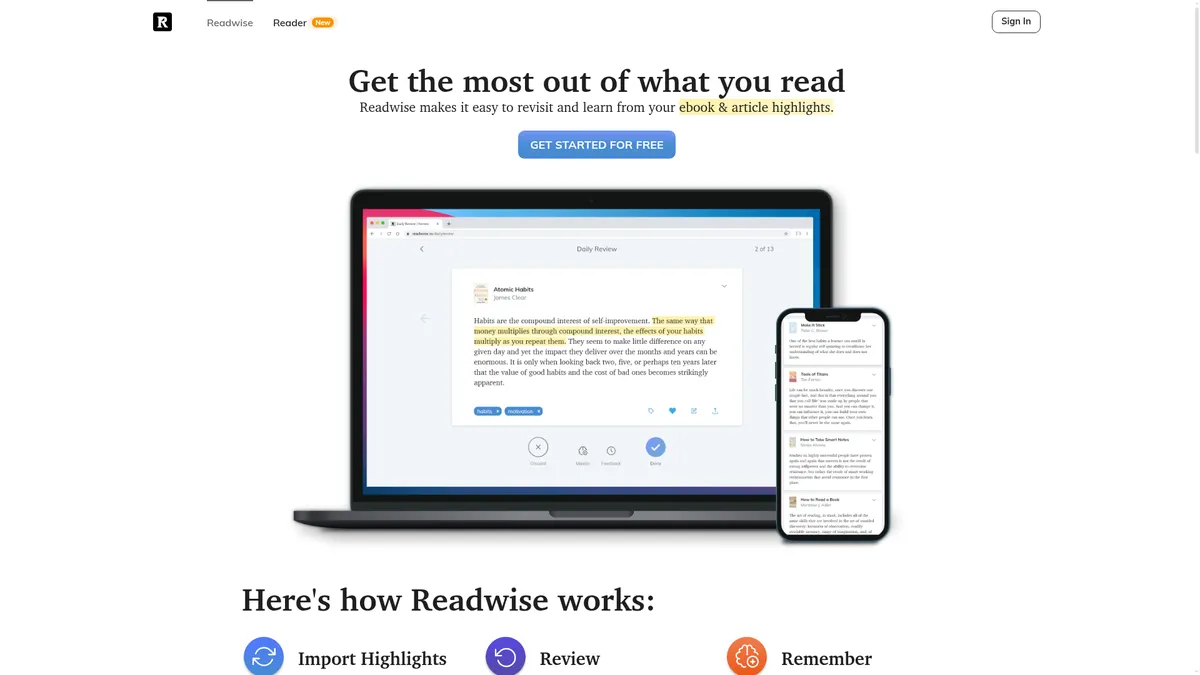
What is Readwise?
How to Use Readwise
Getting started with Readwise takes just a few minutes. Here's how to connect your reading sources, import your existing highlights, and set up your daily review routine to start retaining more from everything you read.
Create Your Account
Sign up for a free 30-day trial at readwise.io. No credit card is required to start. You'll get immediate access to all features, including the web app and daily email review.
Connect Your Reading Sources
Link your Kindle, Apple Books, Instapaper, Pocket, or other reading accounts to Readwise. It will automatically import all your existing highlights and continue syncing new ones as you read.
Set Up Your Daily Review
Choose your preferred review time and frequency in the settings. Readwise will send you a daily email digest with a curated selection of your highlights, using spaced repetition to optimize your learning.
Organize and Export Your Highlights
Use tags, favorites, and personal notes to organize your highlights within the web app. Connect your note-taking tools like Notion or Obsidian to export your best ideas into your knowledge management system.
Upgrade to Readwise Reader for the Full Experience
If you want an all-in-one reading environment, upgrade to Readwise Full. You'll get access to the Reader app where you can read articles, newsletters, and PDFs while keeping all your highlights in sync.
Readwise Core Features
Readwise Use Cases
- 1For avid readers who want to retain more from every book and article they consume. Readwise automatically captures and resurfaces key highlights so you actually remember what you read, turning passive consumption into active learning that compounds over time.
- 2Students and researchers who need to organize and review notes from multiple academic sources. Import highlights from textbooks, papers, and web articles, then review them daily to reinforce learning for exams and publications.
- 3Knowledge workers building a second brain with tools like Notion or Obsidian. Readwise exports highlights with full metadata directly into your knowledge management system, ensuring no important insight ever gets lost.
- 4Writers and content creators who collect quotes, ideas, and references from their reading. Use full-text search and export features to quickly find and cite the perfect passage for any article, book, or project.
- 5Lifelong learners who want to make reading a more impactful daily habit. The consistent review routine builds a lasting learning practice, helping you connect ideas across different books and articles over time.
Pros and Cons of Readwise
Pros
- Spaced repetition algorithm significantly improves long-term retention of highlights and key ideas compared to passive reading alone.
- Seamless integrations with major reading platforms (Kindle, Apple Books, Instapaper) and note-taking apps (Notion, Obsidian, Roam).
- Readwise Reader provides a polished, all-in-one reading environment for articles, newsletters, PDFs, and RSS feeds with built-in highlighting.
- Generous 30-day free trial with full access to all features, plus a 50% student discount that makes the tool highly accessible.
✕ Cons
- Full feature set requires a paid subscription; there is no permanent free tier beyond the 30-day trial period.
- Primarily designed for digital reading workflows, which limits utility for readers who prefer physical books and manual note-taking.
- The Reader app's extensive feature set can feel overwhelming for new users who just want simple highlight review.
Readwise vs Top Alternatives
| Feature | Matter | Instapaper | |
|---|---|---|---|
| Import from Kindle & Ebooks | No (web articles only) | No | No |
| Daily Spaced Repetition Review | Yes | No | No |
| Export to Note-Taking Apps | Yes (Notion, Roam) | Basic (email, Kindle export) | Basic (limited export options) |
| Native Reading App | Yes (Matter app) | Yes (Instapaper app) | Yes (Pocket app) |
Readwise Pricing
Readwise Lite
- Import highlights from Kindle, Apple Books, Instapaper, and more
- Daily email with highlights for spaced repetition review
- Web app for organizing highlights with tags and notes
- Full-text search across all highlights
- Export highlights to Notion, Obsidian, Roam, and other apps
Readwise Full
- Everything in Readwise Lite
- Access to Readwise Reader for reading articles, RSS, PDFs, and newsletters
- Early access to beta features and new integrations
- Read, highlight, and annotate in a single reading environment
- Sync all Reader highlights into your daily review queue
Free Trial
- 30-day full access to all Readwise features
- No credit card required to start
- Cancel anytime during the trial period
Readwise FAQ
What is Readwise and how does it work?+
What reading sources does Readwise support?+
Can I export my highlights to Notion or Obsidian?+
What is the difference between Readwise Lite and Readwise Full?+
Is there a free trial available?+
Does Readwise offer a student discount?+
Can I use Readwise if I read physical books?+
Readwise Review — Editor's Score
Who Should Use Readwise?
Readwise is ideal for avid readers, students, researchers, and knowledge workers who want to retain more from their reading and build a personal knowledge base. It is especially valuable for anyone who uses tools like Notion, Obsidian, or Roam to manage their learning and ideas.
Readwise is an indispensable tool for anyone who reads regularly and wants to actually remember what they learn. Its spaced repetition system turns passive highlighting into active knowledge building, and the Reader app makes it a complete reading ecosystem. While the subscription cost may give casual readers pause, the 30-day free trial and generous student discount make it easy to test. For knowledge workers, students, and lifelong learners, Readwise is easily one of the best tools in the space.
- Seamless import from 10+ reading sources including Kindle and Apple Books
- Spaced repetition algorithm proven to boost long-term memory retention
- Readwise Reader: a powerful all-in-one environment for articles, newsletters, and PDFs
- Deep export integrations with Notion, Obsidian, Roam Research, and Logseq
- Generous 30-day free trial with 50% student discount available
📺 Readwise Tutorials & Introduction
Chat with Your Highlights using Readwise - YouTube
The one Reader to rule them all? | Readwise Reader Review
3 Powerful Ways to Extract Highlights, Knowledge, & Insights from ...
Keywords: