
Placeit
Unlimited mockups, designs & AI tools for creators
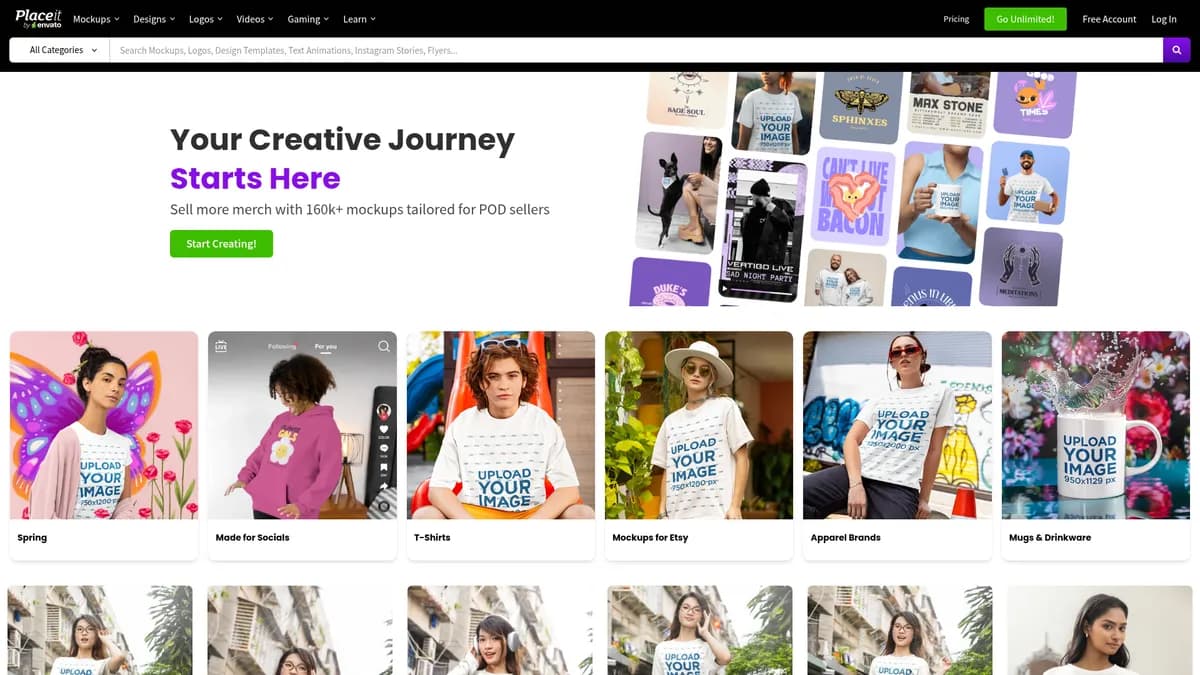
What is Placeit?
How to Use Placeit
Creating a professional product mockup on Placeit takes just a few minutes. Follow these simple steps to turn your artwork into realistic product visuals for your online store or marketing materials.
Choose Your Mockup Template
Browse Placeit's library of over 160,000 mockups and use the filters to narrow down by product category such as apparel, drinkware, tech, or home goods. You can also refine by style, season, or popularity. Click on any mockup to preview it and open the browser-based editor.
Customize Your Design
Upload your artwork, logo, or branding directly into the mockup template. Use the editor to adjust placement, size, and rotation. Swap background colors, add text overlays, and apply your brand colors with one click. The preview updates in real time so you can see exactly how the final product will look.
Download and Use Your Mockup
Once you're satisfied with your design, click the download button and choose your preferred format — PNG, JPG, or MP4 for video mockups. The file is ready instantly with no processing delays. All downloads include a commercial-use license, so you can use the visuals on Etsy, Amazon, Shopify, or any other platform immediately.
Placeit Core Features
Placeit Use Cases
- 1Print-on-demand sellers create professional product listings for Etsy, Amazon, and Redbubble with realistic mockups that boost conversion rates without needing a costly photoshoot or physical samples
- 2E-commerce brands generate lifestyle product photography and promotional visuals for their online stores using Placeit's massive library of customizable mockups and 3D product visualizations
- 3Social media marketers produce on-brand graphics, ads, and video content quickly using thousands of templates and the drag-and-drop editor, maintaining consistent visual identity across all platforms
- 4App developers showcase their mobile applications on realistic device mockups including iPhone, Android, and MacBook frames for app store listings, portfolios, and pitch decks
- 5Graphic designers create comprehensive branding assets — logos, business cards, flyers, and social media kits — for clients with full commercial licensing for unlimited resale
Pros and Cons of Placeit
Pros
- Unlimited mockup library with over 160,000 assets and no credit or download caps eliminates the need to purchase individual templates
- Browser-based editor removes software installation barriers and works seamlessly on any device with an internet connection
- Commercial-use license covers unlimited resale of all created assets, making it a perfect fit for POD sellers and freelance designers
- Integrated AI suite (text-to-image, logo generator, copy assistant) consolidates multiple tools into one subscription, reducing monthly software costs
✕ Cons
- Ongoing subscription cost can be higher than one-time template purchases for occasional or infrequent users
- Requires a stable internet connection to use; no offline editing or download capabilities are available
- Export resolution is limited to preset sizes, so ultra-high-resolution needs may require external upscaling software
Placeit vs Top Alternatives
| Feature | Canva | Smartmockups | Renderforest |
|---|---|---|---|
| Library Size | 600,000+ templates across all categories | 10,000+ mockups focused on screens and devices | Vast library of templates including mockups and videos |
| AI Tools | Magic Studio AI suite (text-to-image, Magic Edit, Magic Write) | Basic editing with no AI generation tools | AI video generator, logo maker, and design tools |
| Commercial License | Free & Pro plans with commercial license on Pro | Available on all paid plans | Available on paid plans only |
| Starting Price | $0 (Free) / $12.99/mo (Pro) | $9/mo (Pro) | $0 (Free) / $9.99/mo (Lite) |
Placeit Pricing
Monthly Plan
- Unlimited access to all mockups and templates
- AI suite (text-to-image, logo generator, copy assistant)
- Commercial-use license for all downloads
- Merch video maker access
- 30-day money-back guarantee
Annual Plan
- Everything in Monthly Plan
- Discounted annual rate
- Unlimited downloads with no credit limits
- Priority access to new content
- 30-day money-back guarantee
Placeit FAQ
What is Placeit and who is it for?+
Does Placeit offer a free trial?+
Can I use Placeit mockups commercially?+
What file formats can I export from Placeit?+
Does Placeit have AI-powered tools?+
How does Placeit compare to Canva?+
Can I cancel my Placeit subscription anytime?+
Placeit Review — Editor's Score
Who Should Use Placeit?
Placeit is ideal for print-on-demand sellers on Etsy, Amazon, and Shopify who need professional product listing images at scale. It's also a strong fit for e-commerce marketers, social media managers, and small business owners who regularly create branded visuals and want to avoid expensive photoshoots or complex design software like Photoshop.
Placeit delivers exceptional value for print-on-demand sellers and marketers who need unlimited, commercial-ready product mockups. Its massive library, integrated AI tools, and no-credit-download policy make it a standout choice in the mockup space. While the subscription cost may not suit casual users, power users will find it indispensable for scaling their visual content production at a predictable monthly price.
- Over 160,000 customizable mockups with no credit system
- AI-powered design tools under a single subscription
- Unlimited downloads with full commercial licensing
- Browser-based editor requiring zero software installation
📺 Placeit Tutorials & Introduction
Stop Paying for Placeit: Use Mockey AI Instead ($99 LTD) - YouTube
Full Placeit Tutorial For Beginners (2025) - YouTube
Placeit vs Kittl | Which Design Tool Fits Creators Better? - YouTube
Keywords: