
Obsidian
Build your second brain with linked notes
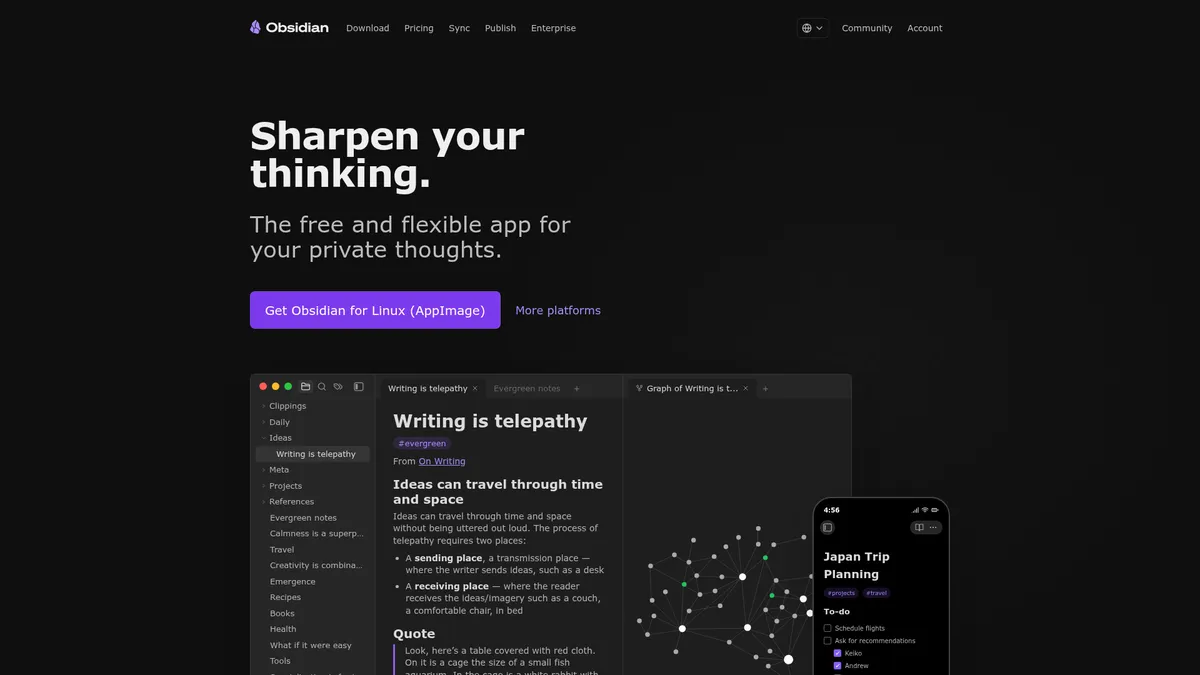
What is Obsidian?
How to Use Obsidian
Getting started with linked note-taking in Obsidian is surprisingly simple. Follow these steps to set up your first vault, create connected notes, and explore the graph view that makes Obsidian unique.
Download and Create a Vault
Download Obsidian from obsidian.md and install it on your device. Launch the app and click 'Create new vault' — give it a name and choose where to store it on your local hard drive. Your vault is simply a folder of plain Markdown files.
Create Your First Notes
Click 'New note' and start writing. Use Markdown syntax for formatting such as headers, bold text, and lists. Create a few notes on different topics to begin building out your knowledge base with real content.
Link Notes Together
In any note, type double brackets [[ to trigger the link suggestion menu. Select an existing note or type a new name to create a link. Obsidian automatically generates backlinks in the linked note, creating a two-way connection between your ideas.
Explore the Graph View
Open the graph view from the sidebar to see all your notes and their connections visualized as an interactive network. Click any node to navigate to that note, or filter by tags to focus on specific topics and see how they interconnect.
Obsidian Core Features
Obsidian Use Cases
- 1Personal Knowledge Management - Build a digital second brain by capturing ideas and connecting them with bidirectional links. The graph view reveals unexpected relationships between concepts, helping you retain and synthesize knowledge more effectively than traditional folder-based notes.
- 2Academic Research - Organize research papers, lecture notes, and source materials in a linked knowledge base. Use tags and Dataview queries to filter and surface relevant information across hundreds of notes instantly.
- 3Project Management - Manage complex projects using community plugins like Kanban boards, task lists, and calendar views. Keep all project documentation, meeting notes, and action items in one interconnected vault that your whole team can access.
- 4Creative Writing - Draft articles, books, and blog posts with the flexibility of Markdown formatting. The graph view helps you track characters, plot threads, and research sources in a single, searchable workspace.
- 5Team Documentation - Create shared knowledge bases for teams using Obsidian Sync and shared vaults. Build searchable documentation that grows organically as team members contribute linked notes and resources.
Pros and Cons of Obsidian
Pros
- Completely free core app with no locked features or limitations, giving you professional-grade note-taking without spending a penny.
- Local-first Markdown architecture guarantees your data never leaves your device unless you choose, ensuring complete privacy and offline access.
- Massive plugin ecosystem with thousands of community extensions lets you customize Obsidian into virtually any productivity tool you need.
- Bidirectional linking and graph view transform isolated notes into a networked knowledge system that reveals hidden connections and insights.
✕ Cons
- Steep learning curve for users unfamiliar with Markdown syntax or linked note-taking concepts, which can be intimidating for beginners.
- Core collaboration and sync features require a paid subscription, limiting team use and cross-device access without additional cost.
- Mobile apps lack the full plugin capabilities and performance of the desktop version, creating an inconsistent experience across devices.
Obsidian vs Top Alternatives
| Feature | Notion | Roam Research | Logseq | Bear |
|---|---|---|---|---|
| Local-First Storage | Cloud-based with local caching available | Cloud-dependent with no local-first option | Local-first Markdown and Org-mode files | Local storage in proprietary database format |
| Bidirectional Linking | Limited bidirectional linking added after launch | Native bidirectional linking as original pioneer | Native bidirectional linking and block references | Basic note linking with no graph view |
| Plugin Ecosystem | Modest template gallery with limited plugins | Smaller plugin ecosystem with fewer options | Growing but significantly smaller plugin ecosystem | Very limited plugin and extension support |
| Pricing | Free tier useful; paid plans from $10/month | Paid-only service starting from $15/month | Free and open source with no paid plans | Paid from $2.99/month but Apple devices only |
Obsidian Pricing
Free
- Unlimited local notes
- Bidirectional linking and graph view
- Thousands of community plugins
- No account required
Sync
- End-to-end encrypted sync
- One-year version history
- Shared vaults for teams
- Priority support
Publish
- Web publishing
- Custom domain support
- SEO and full-text search
- Theme customization
Commercial
- Commercial use license
- Bulk user licensing
- Custom support options
- All features included
Obsidian FAQ
Is Obsidian really free to use?+
How does Obsidian Sync work?+
Can I publish my notes as a website?+
Does Obsidian work offline?+
Is Obsidian open source?+
How do plugins work in Obsidian?+
Can I use Obsidian for team collaboration?+
Obsidian Review — Editor's Score
Who Should Use Obsidian?
Researchers, writers, students, and knowledge workers who want to build a personal knowledge base with complete data ownership and limitless extensibility.
Obsidian is a revelation for anyone serious about knowledge management. Its local-first architecture, bidirectional linking, and plugin ecosystem set a new standard for note-taking apps. While the learning curve is real, the payoff in improved thinking and organization is immense. For the price of free, it's almost unbeatable.
- Completely free and fully featured core app
- Local-first Markdown files guarantee data ownership
- Bidirectional linking and graph view enable networked thinking
- Thousands of community plugins for limitless customization
📺 Obsidian Tutorials & Introduction
Obsidian AI Tools Explained (Complete Guide) - YouTube
AI Tools for Obsidian — What I Actually Use (And What I Stopped)
Obsidian + AI: How to Do It The Right Way (Claude Code ... - YouTube
Keywords: