

NEURONwriter
AI-powered SEO content optimization platform
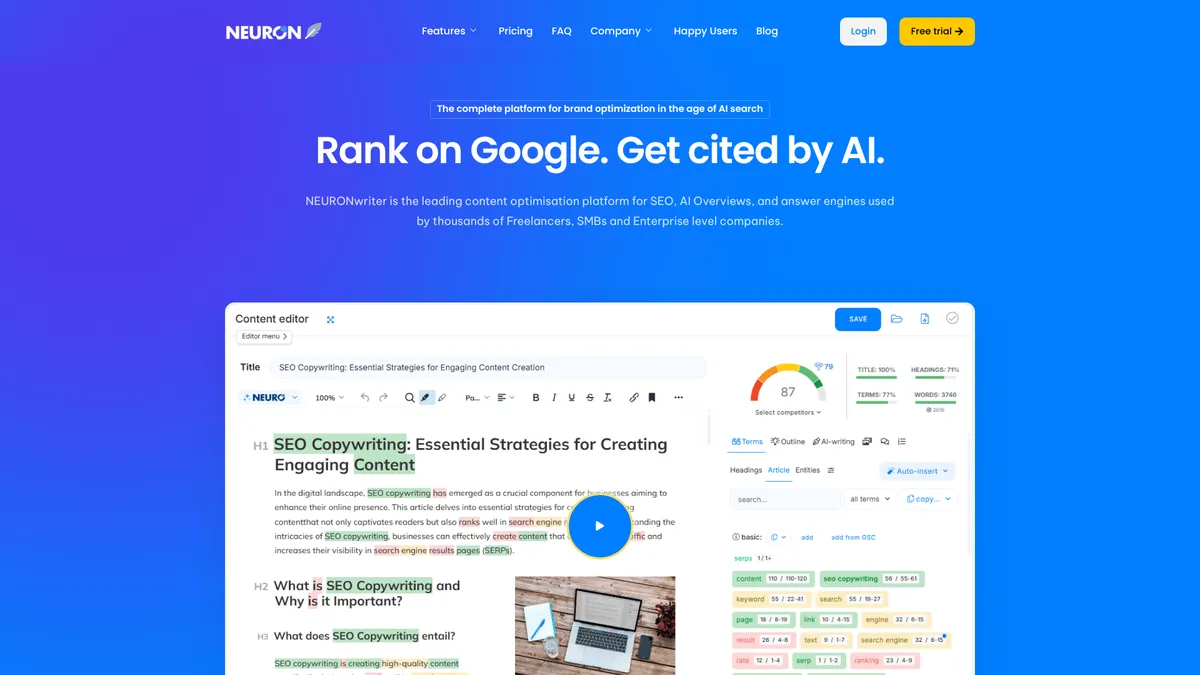
What is NEURONwriter?
How to Use NEURONwriter
Getting started with NEURONwriter is straightforward. The platform guides you through a proven optimization workflow that takes you from keyword research to a fully optimized, publish-ready article. Follow these steps to create your first piece of SEO-optimized content.
Set up your project and add a target keyword
Create a new project in your NEURONwriter dashboard and enter the primary keyword you want to target. The tool will analyze the current top-ranking pages for that keyword, pulling data on word count, headings structure, keyword usage, and content gaps that you can leverage to create something better.
Review the Content Designer suggestions
Use the Content Designer feature to review AI-generated outlines based on your target keyword and competitor analysis. The AI suggests headings, key points, facts, and statistics to include. You can customize the outline, add your own sections, or regenerate suggestions until the structure aligns with your content strategy.
Write or generate your article with real-time scoring
Write your article directly in the editor or use the AI generation tool to create a full draft with one click. As you write, the real-time SEO quality score updates based on keyword density, semantic relevance, readability, and content completeness. Use the 'Autoinsert terms' feature to weave in critical keywords naturally.
Optimize with internal links and plagiarism check
Run NEURONwriter's internal link suggestions to connect your new article to existing content on your site, improving site architecture and SEO equity flow. Before publishing, run the plagiarism checker to ensure originality and make any necessary revisions based on the optimization checklist.
Export, publish, and track performance
Once your article meets the quality score threshold, export it directly to WordPress or Shopify, or download it for manual publishing. Connect Google Search Console to track how your content performs over time and use NEURONwriter's next-content ideas to plan your editorial calendar based on performance data.
NEURONwriter Core Features
NEURONwriter Use Cases
- 1Freelance SEO consultants can rapidly produce optimized client content, from keyword research to final draft, all within a single workflow that ensures every article is built to rank.
- 2Small-to-medium businesses can replace multiple SEO tools with one platform, handling keyword discovery, content creation, on-page optimization, and performance tracking without switching tabs.
- 3Content agencies managing dozens of client domains can leverage team collaboration, bulk writer analyses, and API access to scale content production while maintaining consistent SEO quality across portfolios.
- 4E-commerce teams using Shopify can integrate SEO recommendations directly into product pages, optimizing for both traditional search and AI-generated shopping results.
- 5Marketing teams building editorial calendars can use the Next-Content Ideas generator and content planner to maintain a consistent publishing schedule that targets high-opportunity keywords.
Pros and Cons of NEURONwriter
Pros
- Comprehensive all-in-one suite that combines AI writing, keyword research, competitor analysis, plagiarism detection, and image generation in a single platform.
- Deep platform integrations with WordPress, Google Search Console, and Shopify save time by connecting directly to your existing workflow tools.
- Bring-your-own-OpenAI-key option gives power users control over API costs and access to the latest GPT models without being locked into proprietary AI.
- Step-by-step optimization workflow with real-time scoring makes it accessible for SEO newcomers while still offering depth for experienced professionals.
✕ Cons
- No permanent free tier exists; only a 7-day trial is available, which may not be enough time to fully evaluate the platform for larger projects.
- Monthly AI credit caps can be restrictive for heavy content producers, often requiring a jump to higher-priced plans to get sufficient capacity.
- The breadth of features can feel overwhelming for beginners who simply need basic keyword tools without the advanced content design and AI image generation modules.
NEURONwriter vs Top Alternatives
| Feature | Surfer SEO | Frase | Content Harmony |
|---|---|---|---|
| Content creation | AI full-length article generation with one-click creation | AI full-length article generation with one-click creation | AI full-length article generation with one-click creation |
| Image generation | Built-in AI image generation for visual content | Built-in AI image generation for visual content | Built-in AI image generation for visual content |
| Plagiarism detection | Plagiarism checker included in all paid plans | Plagiarism checker included in all paid plans | Plagiarism checker included in all paid plans |
| AI-search optimization | Emphasis on AI-search readiness for SGE and answer engines | Emphasis on AI-search readiness for SGE and answer engines | Emphasis on AI-search readiness for SGE and answer engines |
NEURONwriter Pricing
Bronze
- 2 projects/folders
- 25 writer analyses per month
- 15,000 AI credits per month
- Standard templates
- Content plan & editorial calendar
- Read-only sharing
Silver
- 5 projects/folders
- 50 writer analyses per month
- 30,000 AI credits per month
- Standard templates
- Content plan & editorial calendar
- Read-only sharing
Gold (Most Popular)
- 10 projects/folders
- 75 writer analyses per month
- 45,000 AI credits per month
- Advanced/custom templates
- Content Designer
- Unlimited team sharing
- 75 plagiarism checks
- GSC/WordPress/Shopify integrations
- Own OpenAI key
- NEURON API
Platinum
- 25 projects/folders
- 100 writer analyses per month
- 60,000 AI credits per month
- All Gold features
- 100 plagiarism checks
Diamond
- 50 projects/folders
- 150 writer analyses per month
- 75,000 AI credits per month
- All Platinum features
- 150 plagiarism checks
- Designed for agencies
NEURONwriter FAQ
What is NEURONwriter and how does it work?+
Does NEURONwriter have a free plan or free trial?+
How is NEURONwriter different from Surfer SEO or Frase?+
Can I use my own OpenAI API key with NEURONwriter?+
What platforms does NEURONwriter integrate with?+
Is NEURONwriter suitable for content agencies?+
Does NEURONwriter help with Google's AI search updates?+
NEURONwriter Review — Editor's Score
Who Should Use NEURONwriter?
NEURONwriter is ideal for SEO professionals, content marketers, and agencies who want an all-in-one platform that handles the entire content lifecycle—from keyword research and competitor analysis to writing, optimization, and publishing. It's particularly well-suited for teams already using WordPress or Shopify who want tighter integration between their SEO tooling and CMS.
NEURONwriter is a compelling all-in-one SEO content platform that goes beyond traditional optimization to address the emerging world of AI-powered search. Its combination of AI writing, image generation, competitor analysis, and deep platform integrations makes it a strong alternative to Surfer SEO and Frase. While the learning curve and credit caps may frustrate some users, the depth of features and focus on AI-search readiness makes it a smart investment for serious SEO content teams.
- One-click AI article generation with real-time SEO scoring
- Deep integrations with WordPress, Google Search Console, and Shopify
- Bring-your-own-OpenAI-key for cost control and flexibility
- Unique focus on AI-search readiness for Google SGE and answer engines
📺 NEURONwriter Tutorials & Introduction
NeuronWriter Review: Is This AI Tool Worth It? - YouTube
NeuronWriter Tutorial 2026 – How to Use NeuronWriter - YouTube
NeuronWriter Review 2024 - Write SEO Optimized Content With An ...
Keywords: