

Morgen
AI-Powered Daily Planning, Simplified
What is Morgen?
How to Use Morgen
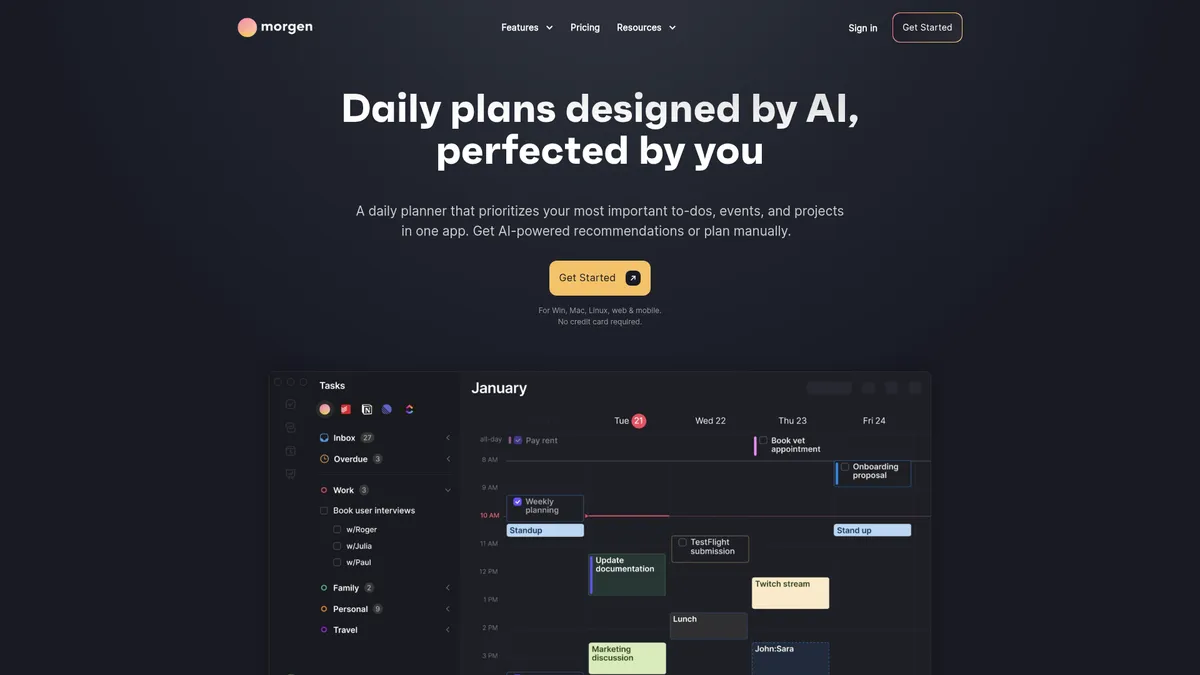
Morgen brings your calendars, tasks, and projects together in one AI-powered daily planner. Here's a step-by-step guide to setting it up and planning your first optimized day.
Connect Your Calendar Accounts
Start by linking your Google Calendar, Outlook, Apple Calendar, or Fastmail accounts to Morgen. You can connect unlimited calendars and view them all in a single unified interface, making it easy to see your commitments at a glance across personal and work schedules.
Integrate Your Task Management Tools
Connect your favorite task platforms like Notion, ClickUp, Linear, Todoist, or Asana. Morgen will pull in all your tasks and projects, allowing you to view and prioritize them alongside your calendar events without switching between multiple apps.
Generate Your AI-Powered Daily Plan
Use the AI Planner to automatically analyze your tasks and calendar. Morgen will prioritize your most important work, suggest optimal time blocks, and create a balanced daily schedule that accounts for deadlines, meeting times, and focus periods.
Customize Your Schedule Manually
Fine-tune the AI-generated plan by dragging and dropping tasks to different time slots. You can adjust buffers, add travel time between meetings, set reminders, and tweak your schedule until it feels realistic and perfectly tailored to your workflow.
Share Availability and Schedule with Your Team
Use Morgen's booking pages and scheduling links to share your availability with colleagues. The team view lets you see when others are free, making it easy to coordinate meetings, find common slots, and eliminate endless email chains.
Morgen Core Features
Morgen Use Cases
- 1Daily Planning and Task Prioritization - Morgen helps professionals consolidate tasks from multiple tools into one unified daily view. The AI Planner automatically prioritizes your to-do list and suggests the optimal schedule, so you can focus on high-impact work instead of manually arranging your day.
- 2Team Meeting Scheduling and Coordination - With shared availability calendars and integrated booking links, teams can quickly find common free time slots, schedule meetings, and eliminate the back-and-forth email coordination. Morgen syncs in real-time so everyone stays updated on schedule changes.
- 3Calendar Automation and Time Optimization - Automate routine calendar tasks like adding travel time between meetings, setting focus time buffers, and blocking deep work sessions. This creates a realistic schedule that accounts for transitions and protects your most productive hours.
- 4Cross-Platform Productivity Management - Sync tasks and events across Windows, macOS, Linux, iOS, and Android devices. Morgen acts as a central command center that connects your disparate productivity tools into one streamlined planning experience.
- 5Privacy-Focused Project Organization - For teams and individuals who prioritize data security, Morgen offers Swiss-hosted, GDPR-compliant planning with end-to-end encryption. It's ideal for organizations that need robust scheduling without compromising on strict privacy regulations.
Pros and Cons of Morgen
Pros
- AI-powered daily planning intelligently prioritizes tasks and optimizes your calendar, saving hours of manual scheduling each week.
- Deep integration ecosystem connects with 7+ task tools and all major calendar platforms, creating a unified productivity hub.
- Strong privacy and security posture with Swiss hosting and full GDPR compliance, ideal for data-conscious organizations.
- Cross-platform availability on desktop, mobile, and browser with real-time sync keeps your plans accessible everywhere.
✕ Cons
- Pricing is steep for individual users at $30/month for the monthly plan, which feels expensive compared to free built-in calendar tools.
- Free tier is very limited, offering minimal functionality and requiring a paid subscription to unlock AI planning and key integrations.
- Customer support resources are limited, with fewer documentation and troubleshooting materials than more established competitors.
Morgen vs Top Alternatives
| Feature | Motion | Reclaim.ai | Akiflow |
|---|---|---|---|
| AI Planning | AI auto-scheduling with daily task prioritization | AI scheduling with smart habits and task blocking | AI-powered time blocking with focus mode |
| Integrations | Google Calendar, Outlook, and popular task integrations | Google Calendar, Google Tasks, Todoist, Linear | Google Calendar, Outlook, Todoist, Notion, Asana |
| Team Features | Full team project management and scheduling | Team availability and meeting scheduling | Limited team features, individual-focused |
| Platform Support | Web, iOS, Android, Chrome Extension | Web, Chrome Extension, Mobile | Mac, Windows, Web |
Morgen Pricing
Individual Monthly
- AI-powered daily planning
- Unlimited calendar integrations
- Task integrations with 7+ tools
- Time blocking with AI Planner
- Booking pages and scheduling links
- Cross-platform access
Individual Yearly
- Everything in Individual Monthly
- 50% savings vs monthly plan
- Priority support
Team Monthly
- Everything in Individual
- Team availability view
- Shared scheduling links
- Team meeting coordination
- Admin controls
Team Yearly
- Everything in Team Monthly
- 60% savings vs monthly plan
- Priority support
Morgen FAQ
What is Morgen and how does it work?+
Which calendar platforms does Morgen support?+
Which task management tools integrate with Morgen?+
Is Morgen secure and GDPR compliant?+
What is the AI Planner feature in Morgen?+
Does Morgen have a free version?+
Can teams use Morgen for scheduling?+
Morgen Review — Editor's Score
Who Should Use Morgen?
Morgen is ideal for professionals, freelancers, and teams who rely on multiple productivity tools and want a centralized AI-powered planner. It's particularly well-suited for privacy-conscious users in Europe who need GDPR-compliant scheduling, as well as anyone tired of manually time-blocking their day.
Morgen successfully bridges the gap between calendar scheduling and task management with a clever AI-powered planner. It's not the cheapest option, but its depth of integrations, cross-platform support, and strong privacy stance make it a standout choice for productivity power users. If you live in your calendar and juggle multiple task tools, Morgen is worth the investment.
- AI-powered daily planning and time blocking
- Deep integrations with 7+ task tools and 4 calendar platforms
- Swiss-hosted, GDPR-compliant data privacy
- Cross-platform apps for Windows, macOS, Linux, iOS, and Android
📺 Morgen Tutorials & Introduction
Introducing Morgen AI Planner - YouTube
New Morgen AI Planner: Walkthrough & Opinions - YouTube
How to create and use Frame Filter for AI planning in Morgen
Keywords: