

Krisp
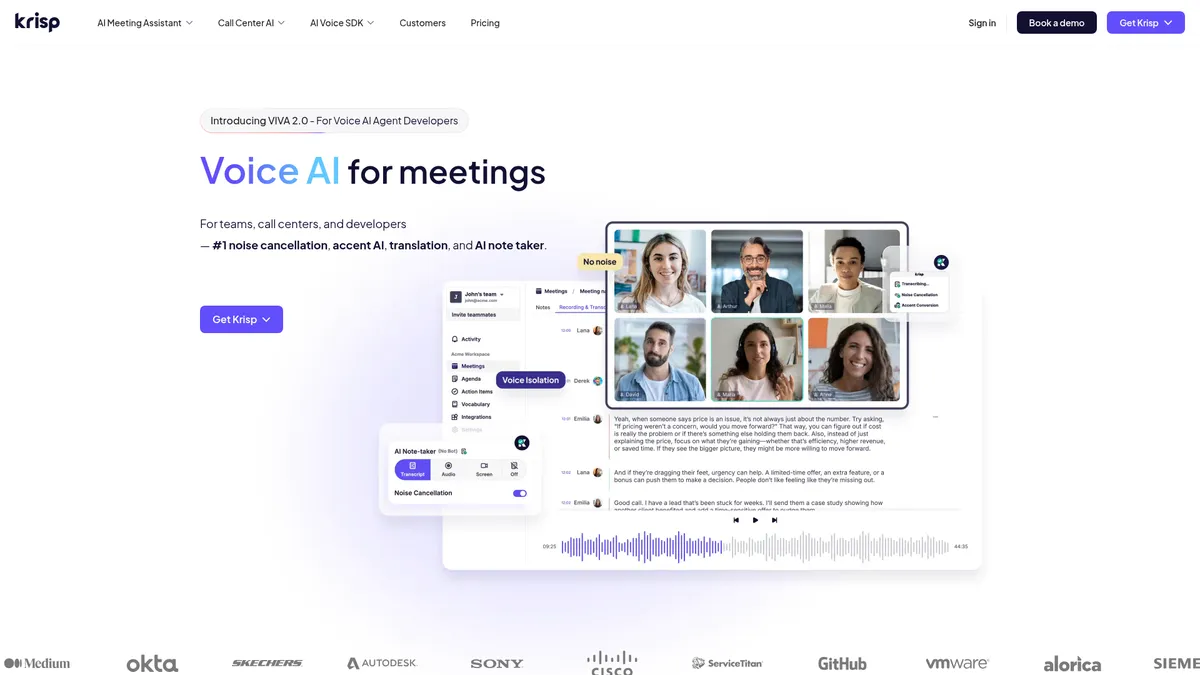
AI-powered noise cancellation and meeting productivity suite
What is Krisp?
How to Use Krisp
Krisp sets up in minutes and works silently in the background to improve your audio quality on every call. Whether you are using it for personal meetings or team collaborations, this guide will walk you through getting the most out of its noise cancellation, transcription, and AI summary features.
Download and Install the Krisp App
Visit krisp.ai and download the desktop app for Windows or macOS. Run the installer and sign up for a free account using your email or Google account. The app runs in the background and activates automatically whenever it detects an audio call.
Configure Your Microphone and Speakers
Open the Krisp app and navigate to the settings panel. Select your preferred input device (microphone) and output device (speakers or headphones) from the dropdown menus. Krisp will then process all audio passing between your conferencing apps and your hardware.
Enable Noise Cancellation
Toggle on the noise cancellation switch in the main app window. You can adjust the intensity level depending on your environment—choose light filtering for quiet spaces or aggressive mode for noisy coffee shops, co-working spaces, or homes with background chatter.
Connect Krisp to Your Conferencing Apps
Open your preferred conferencing app such as Zoom, Microsoft Teams, or Google Meet. Go to the audio settings and select 'Krisp Microphone' as your input device and 'Krisp Speaker' as your output. Krisp will now automatically process all audio on your calls.
Unlock Advanced AI Features
Upgrade to a Pro or Team plan from within the app to access full transcription, AI note-taking, meeting recording, accent conversion, and voice translation. Once enabled, these features activate automatically during your calls and can be accessed from the Krisp dashboard.
Krisp Core Features
Krisp Use Cases
- 1Remote teams can use Krisp to eliminate background noise from home offices, get automatic meeting transcripts, and receive AI-generated summaries so they never miss key decisions or action items during calls.
- 2Call centers can leverage accent conversion and real-time voice translation to serve global customers more effectively while using speech analytics to monitor call quality and ensure compliance.
- 3Developers building voice-enabled applications can integrate Krisp's AI Voice SDK for noise-free audio input, voice isolation, and optimized turn-taking in AI agents, chatbots, and voice bots.
- 4Content creators and podcasters can achieve studio-quality audio without expensive hardware by using Krisp's noise cancellation and voice isolation features during recording sessions.
- 5Compliance-focused organizations can maintain searchable recording archives with speech analytics for audit trails and ensure clear communication across multilingual teams and customer interactions.
Pros and Cons of Krisp
Pros
- Market-leading AI noise cancellation that works across all major conferencing platforms and consistently delivers studio-quality audio even in the noisiest environments like coffee shops and co-working spaces.
- Comprehensive all-in-one suite covering the entire meeting workflow from real-time audio cleanup and live transcription to AI-powered summaries and automated action item extraction.
- Unique real-time accent conversion and multilingual voice translation capabilities that are rarely found together in a single platform, making cross-cultural communication seamless.
- Flexible deployment options with standalone desktop and mobile apps, SaaS platform, and a developer SDK that allows individuals, teams, call centers, and enterprises to use Krisp their way.
✕ Cons
- Advanced features like full transcription, AI note-taking, and speech analytics are locked behind paid plans, with the generous free tier limited primarily to noise cancellation functionality.
- Cloud processing dependency can introduce slight latency that may be noticeable in ultra-low-delay use cases such as live performances or on slower internet connections.
- The platform presents three distinct product families (Meeting Assistant, Call Center AI, and SDK) together on the same site, which can make navigation feel cluttered for new users.
Krisp vs Top Alternatives
| Feature | Otter.ai | Fireflies.ai | Descript |
|---|---|---|---|
| AI Noise Cancellation | No native noise cancellation feature | Basic noise filtering only | Studio Sound noise reduction tool |
| Live Transcription | Yes, real-time live transcription | Yes, real-time live transcription | Yes, transcription with editing |
| AI Meeting Summaries | Yes, AI-powered meeting summaries | Yes, AI meeting summarization | No automatic meeting summaries |
| Accent Conversion | No accent conversion available | No accent conversion available | No accent conversion available |
Krisp Pricing
Free
- Unlimited AI noise cancellation for personal use
- Limited transcription minutes per month
- Basic meeting recording
- Cross-platform desktop and mobile apps
Pro
- Unlimited noise cancellation
- Full meeting transcription with search
- Meeting recording with cloud storage
- AI note-taking and summary generation
- Accent conversion (speaker and listener side)
- Real-time voice translation
Team
- Everything in Pro
- Admin console for user and policy management
- Shared meeting libraries for team collaboration
- Usage analytics dashboard
- Priority customer support
Enterprise
- Everything in Team
- Single sign-on (SSO/SAML)
- On-premise deployment options available
- Dedicated account manager
- Volume-based pricing discounts
- Custom integrations and compliance support
Krisp FAQ
What is Krisp and what does it do?+
Is Krisp really free to use?+
Which conferencing platforms does Krisp work with?+
How does Krisp's accent conversion feature work?+
Does Krisp record or store my conversations?+
Can developers integrate Krisp's AI into their own applications?+
What is the difference between Krisp's Meeting Assistant and Call Center AI products?+
Krisp Review — Editor's Score
Who Should Use Krisp?
Remote workers, sales and support teams, call center operators, content creators, podcasters, and developers building voice-enabled applications who need crystal-clear audio and intelligent meeting automation.
Krisp is an essential tool for anyone who spends significant time on voice and video calls. Its noise cancellation alone is worth the download, and the added features of transcription, AI summaries, accent conversion, and voice translation make it a compelling all-in-one meeting productivity platform that delivers immediate value from day one.
- Industry-leading AI noise cancellation that works across all major conferencing platforms and consistently delivers studio-quality audio in any environment
- Unique real-time accent conversion and multilingual voice translation capabilities rarely found together in a single meeting productivity platform
- Flexible three-product structure serving individuals, remote teams, call centers, and developers with a unified audio processing engine
📺 Krisp Tutorials & Introduction
Krisp Review - 2026 | #1 AI Meeting Assistant - YouTube
Ultimate Noise Cancellation Software Review & Demo - YouTube
How To Use Krisp - Step By Step Tutorial - YouTube
Keywords: