

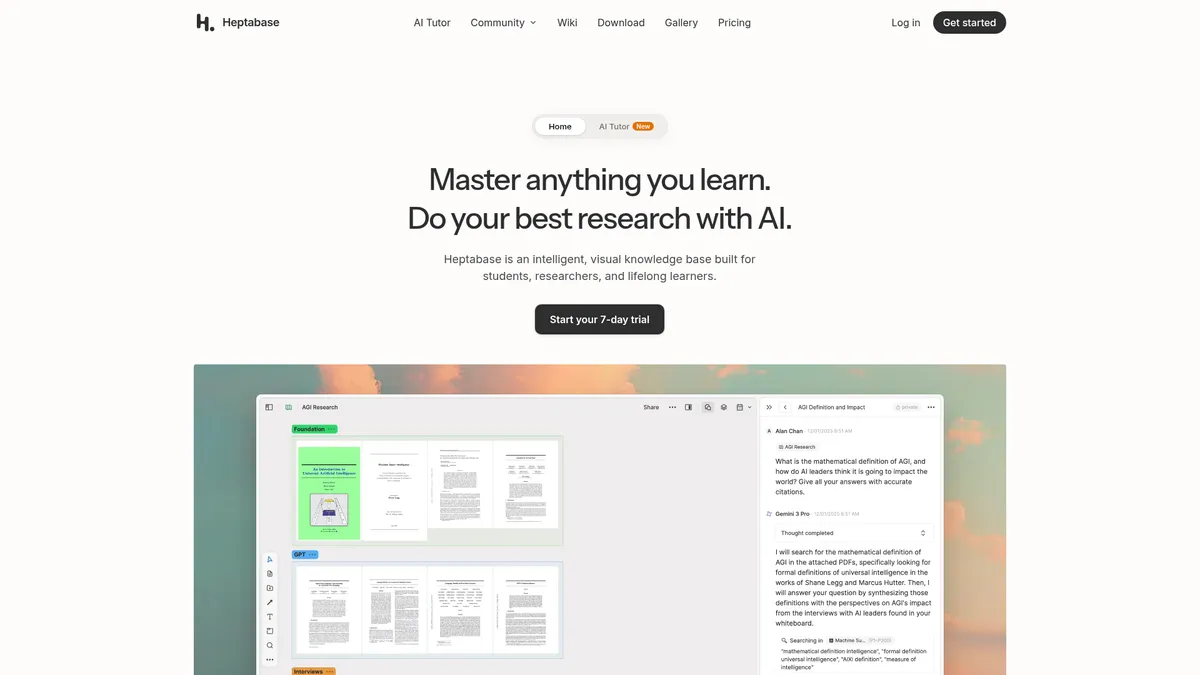
What is Heptabase?
How to Use Heptabase
Getting started with Heptabase is straightforward once you understand the core workflow. Here's a quick guide to setting up your first whiteboard, importing your research sources, and leveraging the AI tools to accelerate your knowledge work.
Create Your First Whiteboard and Cards
Start by creating a new whiteboard canvas from the dashboard. Use the slash command menu to add cards, text blocks, images, or embeds. Cards can be dragged around freely, color-coded, and connected with arrows to build visual mind maps. This is your primary space for brainstorming and organizing ideas visually.
Import Your Research Sources
Upload PDFs directly for annotation and OCR text extraction, paste YouTube links to import video transcripts, or use the web clipper browser extension to save articles. Connect your Readwise account to sync existing highlights, or link Zotero to pull in your reference library with full bibliographic metadata.
Use the AI Research Assistant
Select any source in your workspace—a PDF, YouTube transcript, or your own notes—and invoke the AI Research Assistant. Ask it to explain complex passages, generate citations in your preferred format, summarize lengthy content, or suggest connections to other cards in your knowledge base.
Link Ideas and Build Your Knowledge Graph
Use bi-directional links to connect related cards across different whiteboards and journals. The knowledge graph view visualizes these connections, helping you navigate your growing web of ideas. Add daily journal entries to capture thoughts and use the calendar view to track your learning journey over time.
Heptabase Core Features
Heptabase Use Cases
- 1Academic Research – Collect PDFs, web articles, and Zotero references into a single workspace. Annotate, link, and generate citation-ready notes while the AI Research Assistant explains complex passages and suggests related sources.
- 2Course Study & Exam Prep – Build visual whiteboards that map out entire subjects, create flash-card-style cards for revision, and use the AI Tutor for guided learning paths that track your progress across topics.
- 3Thesis & Long-Form Writing – Organize literature reviews, draft sections, and let AI suggest structural improvements or summarize your source material. Bi-directional links keep your argument threads connected.
- 4Personal Knowledge Management – Capture insights from podcasts, YouTube videos, and web articles into daily journals. Interlink ideas over time using the knowledge graph to build a true second brain.
- 5Team Collaboration – Share whiteboards and notes with classmates, research groups, or coworkers with unlimited collaborator invites. Use shared canvases for brainstorming sessions and group project planning.
Pros and Cons of Heptabase
Pros
- Integrated AI research assistant, tutor, and chat features dramatically reduce manual effort in synthesizing and understanding complex information
- Visual whiteboard canvas combined with a powerful block editor supports both freeform brainstorming and structured, linear note-taking
- Deep integration ecosystem (Readwise, Zotero, YouTube, PDF) creates a seamless research workflow that centralizes all your sources
- Generous unlimited core content limits with an affordable entry-level price point, backed by reputable investors including Y Combinator
✕ Cons
- Best AI features including the AI Tutor and premium models are locked behind higher-priced tiers, limiting functionality on the basic Pro plan
- No free tier is available—only a 7-day free trial—which may not be enough time for casual users to fully evaluate the platform
- Extensive feature set and non-traditional interface present a steep learning curve that may overwhelm new users initially
Heptabase vs Top Alternatives
| Feature | Notion | Obsidian | Roam Research | Logseq |
|---|---|---|---|---|
| AI Research & Tutoring | Basic AI Q&A only, no tutoring features | No native AI features; requires third-party plugins | No native AI research or tutoring features | No native AI features; limited plugin AI support |
| Visual Whiteboard Canvas | No native whiteboard canvas for mind mapping | Canvas available via community plugin (not native) | Outliner-based interface, no visual whiteboard canvas | Whiteboard available through plugins (not native) |
| Bi-directional Knowledge Graph | No bi-directional linking or knowledge graph | Strong bi-directional linking as core mechanic | Core bi-directional linking and block references | Strong bi-directional linking with block-level references |
| Integrated Research Workflow | Minimal research workflow tools, no PDF research AI | Plugin-based research workflow, no integrated PDF AI | Basic PDF support without AI-powered analysis | Good local PDF annotation but no AI research assistant |
Heptabase Pricing
Pro
- 100 AI credits per month
- Unlimited notes, whiteboards, tags & image uploads
- Unlimited collaborator invites
- PDF highlights (limited uploads)
- Basic AI chat only
- AI Tutor excluded
Premium
- 1,800 AI credits per month
- All Pro features
- Unlimited PDF uploads & OCR
- Unlimited basic AI chats (after credits used)
- Premium AI models (OpenAI, Google, Anthropic)
- AI Tutor access
Premium+
- 8,100 AI credits per month
- All Premium features
- 33% discount on additional AI credits
- Best rate for power users
- Premium AI models included
- AI Tutor included
Heptabase FAQ
What is Heptabase and who is it for?+
Does Heptabase have a free tier or free trial?+
What AI models does Heptabase use?+
Can I import my data from other tools like Notion or Obsidian?+
How does the AI Research Assistant work?+
Is Heptabase suitable for team collaboration?+
What integrations does Heptabase support?+
Heptabase Review — Editor's Score
Who Should Use Heptabase?
Students, academic researchers, and lifelong learners who need to synthesize large volumes of information from multiple sources and want AI-powered assistance to accelerate their research and note-taking workflow. Also suitable for small research teams and study groups looking for a shared visual workspace.
Heptabase successfully bridges the gap between traditional note-taking and AI-powered research. It's not the simplest tool out there, but for anyone serious about knowledge management—students drowning in PDFs, researchers juggling dozens of sources, or lifelong learners building a second brain—it offers a uniquely integrated experience. The AI features genuinely reduce busywork, and the visual canvas makes abstract connections tangible in a way that linear note-taking apps can't match.
- AI Research Assistant that automatically explains and cites sources across PDFs, YouTube, and web
- Visual whiteboard canvas with card-based mind mapping that makes complex ideas tangible
- Deep integrations with Readwise and Zotero create a seamless research workflow
- Bi-directional linking and knowledge graph navigation for exploring idea connections over time
📺 Heptabase Tutorials & Introduction
My main reason for switching to Heptabase - YouTube
This NEW Heptabase Update Is INSANE! - YouTube
Heptabase killed NotebookLM and Mem (Best AI Note-Taking App ...
Keywords: