

Headspace
Everyday mindfulness with AI and therapy
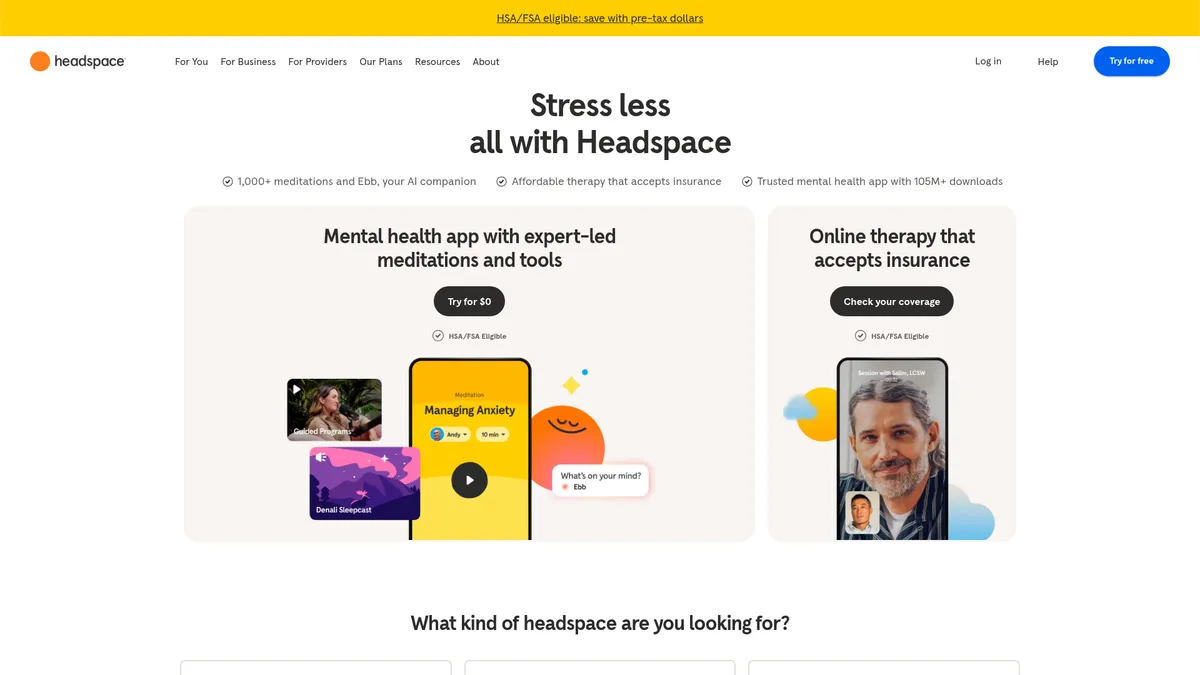
What is Headspace?
How to Use Headspace
Struggling with racing thoughts at bedtime? Headspace's Sleep Suite is designed to help you wind down with proven techniques. Follow these steps to create a calming bedtime routine and improve your sleep quality using the app.
Open the Sleep Tab
Launch Headspace and tap the Sleep icon at the bottom of the screen. You'll find three main sections: Sleep Meditations, Sleep Sounds, and SOS Sessions. Take a moment to browse the options and see what appeals to you.
Choose a Sleep Meditation
Select from guided wind-down sessions ranging from 10 to 45 minutes. Popular picks include 'Sleeping Easy' and 'Nighttime SOS.' These meditations use body scans, breathing techniques, and visualizations to quiet your mind.
Explore Sleep Sounds & Music
If you prefer ambient noise, browse the sleep sounds library featuring rain, ocean waves, forest sounds, and white noise. You can mix and match sounds or set a timer for them to play as you drift off.
Use SOS Sessions for Tough Nights
When you're lying awake with racing thoughts, tap the SOS button for quick relief sessions. The 'Racing Thoughts' exercise is specifically designed to help you break the spiral and calm your mind in under 10 minutes.
Track Your Sleep Progress
After each session, Headspace logs your activity and shows streaks and trends over time. Use the Progress tab to see how your sleep consistency is improving and earn achievement badges for building the habit.
Headspace Core Features
Headspace Use Cases
- 1Stress Management: Use quick Breathe meditations during hectic workdays or follow structured stress-reduction courses to build long-term resilience. The app's mood tracking helps identify stress patterns over time.
- 2Improving Sleep: Wind down with bedtime meditations, sleep sounds, or the SOS Racing Thoughts session. The Sleep Suite combines proven exercises to quiet a busy mind and establish healthier sleep routines.
- 3Anxiety & Mood Regulation: Access guided practices specifically designed for anxiety, complemented by mood tracking via Ebb. The AI learns what helps you most and suggests relevant content proactively.
- 4Focus & Productivity: Leverage concentration-focused sessions and Focus playlists to stay in the zone during work or study. Short exercises can be used between meetings to reset attention.
- 5Therapeutic Support: Book ongoing video therapy sessions with licensed professionals for deeper mental health concerns. Therapy integrates with meditation progress for a holistic approach to wellbeing.
Pros and Cons of Headspace
Pros
- Massive high-quality content library featuring 1,000+ expert-led meditations and courses backed by scientific research and real-world testing
- Integrated AI companion (Ebb) plus online therapy in one platform, creating a seamless bridge between self-guided practice and professional support
- Flexible pricing options including free trial, student discount, family plan, and corporate licensing that make it accessible to diverse audiences
- Multi-platform availability with offline download capability ensures you can practice mindfulness anywhere, anytime without internet access
✕ Cons
- Full meditation library and premium features locked behind paid subscription; the free tier is extremely limited to just a 7-day trial period
- Therapy session costs can add up quickly ($70-$120 per session) if not covered by insurance, making ongoing professional support expensive
- AI chat companion (Ebb) can feel scripted and repetitive after extended use, lacking the depth of human conversation for complex emotional needs
Headspace vs Top Alternatives
| Feature | Calm | Insight Timer |
|---|---|---|
| Content Library | 500+ guided meditations, celebrity-narrated Sleep Stories | 100,000+ free meditations (mostly user-generated) |
| AI Features | Basic AI recommendations; no conversational AI companion | AI-driven course recommendations; no chat companion |
| Online Therapy | Not offered | Not offered |
| Family Plan | Calm Family (up to 6 members) | Not explicitly offered (free model) |
Headspace Pricing
Free Trial (7-Day)
- Full meditation library access
- Ebb AI companion
- Sleep content
- Limited 7-day access
Individual Monthly
- Full meditation library
- Ebb AI companion
- Sleep suite
- Offline access
- Progress tracking
Individual Yearly
- All monthly features
- Approximately 55% savings vs monthly
- Annual commitment
Family Plan
- Up to 6 members
- All individual features per member
- Shared family content
Student Plan
- All individual features
- Discounted student rate
- Verification required
Headspace FAQ
What is Headspace and how does it work?+
Is Headspace free to use?+
Does Headspace offer online therapy?+
What is the Ebb AI companion in Headspace?+
Can I use Headspace offline?+
What is the difference between Headspace and Calm?+
Is Headspace suitable for beginners?+
Headspace Review — Editor's Score
Who Should Use Headspace?
Anyone looking to build a consistent mindfulness practice, manage stress or anxiety, or access affordable online therapy—from complete beginners to experienced meditators, students, families, and even corporate teams.
Headspace successfully bridges the gap between casual meditation apps and full clinical mental health services. While it's not the cheapest option on the market, the combination of expert-led content, AI personalization, and integrated therapy makes it a compelling choice for anyone serious about their mental wellbeing. The polished experience and research-backed approach justify its premium positioning.
- Expert-led content library with 1,000+ meditations
- Ebb AI companion for personalized support
- Integrated online therapy with insurance acceptance
- Comprehensive sleep suite and family features
📺 Headspace Tutorials & Introduction
How Headspace Set the Stage for Deep and Safe Reflection with AI
Can Replit build an app like Headspace using AI? - YouTube
UX/UI Design Review for Leading Healthcare Apps ... - YouTube
Keywords: