

Doxis
AI-first document intelligence for enterprise teams
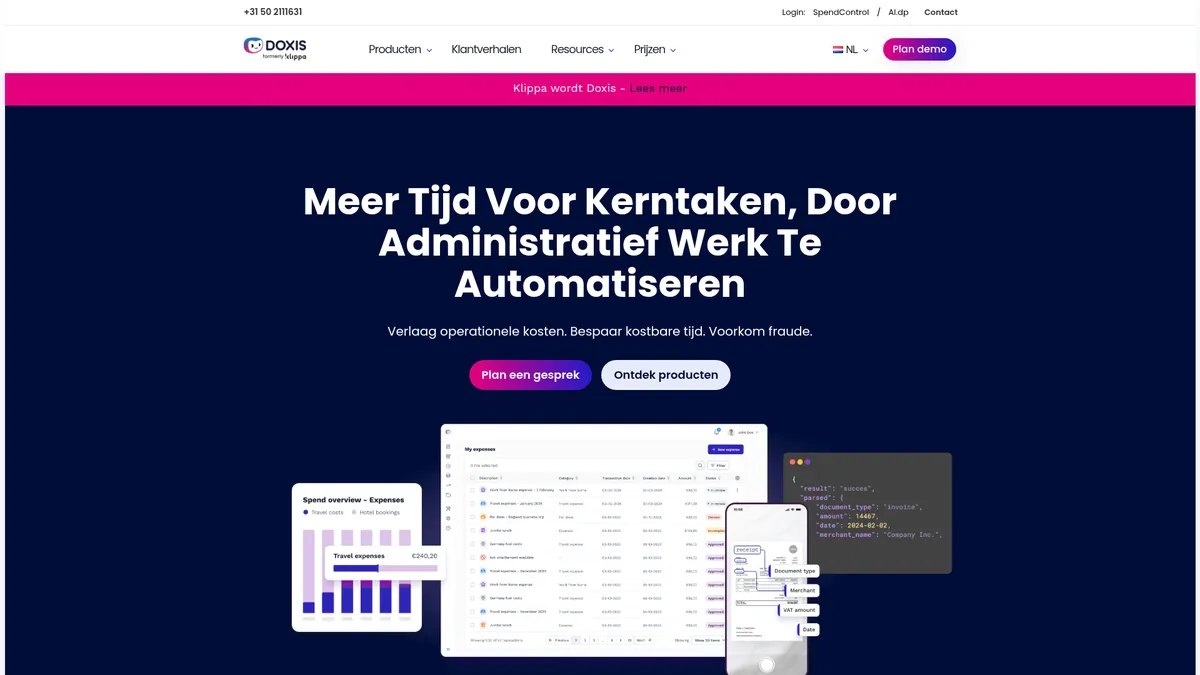
What is Doxis?
How to Use Doxis
Getting started with Doxis is straightforward. Follow these steps to set up your document intelligence pipeline and start automating your document workflows with AI-powered extraction and verification.
Create Your Account and Set Up Your Workspace
Visit the Doxis website and sign up for an account. Once registered, create your workspace and configure your organization's profile. You'll be guided through the initial setup wizard that helps you define your document processing goals and preferences.
Upload or Connect Your Document Sources
Upload documents directly through the web interface or connect your existing document sources such as email inboxes, cloud storage (Google Drive, Dropbox), or enterprise systems. Doxis can automatically pull documents from connected sources for processing.
Configure Document Types and Extraction Fields
Define the types of documents you process (invoices, receipts, forms, etc.) and specify which data fields you want to extract. Doxis's AI will learn from your configurations and can automatically classify documents based on their content and structure.
Set Up Workflow Automation Rules
Create rules for how documents should be processed, verified, and routed after extraction. Define approval workflows, set up validation checks, configure integration triggers for sending data to SAP or Salesforce, and establish exception handling for documents that need manual review.
Review, Validate, and Export Processed Data
Monitor processed documents in the dashboard, review extracted data for accuracy, make corrections if needed, and export the finalized data to your connected systems. Doxis provides analytics and reporting to track processing volumes, accuracy rates, and workflow performance.
Doxis Core Features
Doxis Use Cases
- 1Financial Services: Automate loan processing, mortgage applications, and account opening with intelligent document extraction and verification, reducing processing time from days to minutes while maintaining compliance with regulations.
- 2Accounts Payable Automation: Streamline invoice receipt, data extraction, approval routing, and payment processing with AI that reads and categorizes vendor invoices, matching them against purchase orders automatically.
- 3Expense Management: Digitize expense reporting by scanning receipts with OCR, extracting line items, categorizing expenses, and enforcing policy compliance before approval and reimbursement.
- 4Insurance Claims Processing: Accelerate claims handling by automatically extracting claim details from submitted documents, verifying policyholder information, and routing claims to the appropriate adjuster.
- 5Identity Verification: Verify customer identities in real-time by analyzing government-issued IDs, passports, and official documents for authenticity, data accuracy, and fraud indicators.
Pros and Cons of Doxis
Pros
- Advanced AI technology delivers exceptional accuracy in document understanding, data extraction, and verification across hundreds of document types and formats with minimal human intervention.
- Seamless enterprise integration with SAP, Salesforce, and Microsoft 365 means document workflows fit directly into existing business systems without manual data transfer or custom middleware.
- Comprehensive security and compliance features, including data anonymization, fraud detection, and audit trails, make it ideal for highly regulated industries like finance, insurance, and healthcare.
- Scalable architecture handles everything from small business needs to high-volume enterprise document processing without compromising on speed, accuracy, or reliability.
✕ Cons
- Pricing is not publicly available on the website, requiring potential customers to schedule demos and negotiate custom quotes before understanding the total cost of ownership.
- Implementation and training require significant time and investment, especially for complex enterprise workflows with multiple document types, integration points, and compliance requirements.
- Limited public information on customization options for niche industry needs and specialized document formats beyond standard use cases like invoices, receipts, and identity documents.
Doxis vs Top Alternatives
| Feature | ABBYY | Rossum | Hyperscience |
|---|---|---|---|
| AI-Powered OCR Accuracy | High accuracy OCR with decades of industry expertise | Deep learning-based extraction with high accuracy | ML-powered extraction with human-in-the-loop learning |
| Enterprise Integrations | SAP, Salesforce, Microsoft 365, and extensive ecosystem | Limited native enterprise integrations beyond common tools | Enterprise-grade integrations with major platforms |
| Workflow Automation | Robust workflow automation and process orchestration | Strong document workflow automation capabilities | Comprehensive end-to-end workflow automation |
| Pricing Transparency | Transparent pricing available on website for most plans | Usage-based pricing with transparent per-document costs | Custom enterprise pricing requires sales consultation |
Doxis Pricing
Starter
- Up to 1,000 documents per month
- Basic OCR and data extraction
- Web platform access
- Standard integrations
- Email support
Business
- Up to 10,000 documents per month
- Advanced AI extraction and classification
- Workflow automation tools
- Full API access
- Priority support
Enterprise
- Unlimited document processing
- Full platform feature set
- Custom integrations and workflows
- Dedicated account manager
- SLA guarantees and premium support
Doxis FAQ
What is Doxis and how does it work?+
What types of documents can Doxis process?+
Does Doxis integrate with my existing business software?+
Is Doxis suitable for small businesses?+
How accurate is Doxis's document processing?+
What security and compliance features does Doxis offer?+
How much does Doxis cost?+
Doxis Review — Editor's Score
Who Should Use Doxis?
Mid-to-large enterprises in finance, insurance, retail, and logistics that process high volumes of documents and need intelligent automation with enterprise-grade security, compliance, and seamless integration with existing business systems.
Doxis is a powerful document intelligence platform that excels at automating complex document workflows. Its AI-powered extraction, OCR, and verification capabilities are best-in-class, and the enterprise integrations make it a natural fit for large organizations. While the lack of transparent pricing and the learning curve may deter smaller teams, Doxis delivers serious ROI for high-volume document processing in regulated industries.
- AI-powered document processing with exceptional accuracy across hundreds of document types
- Seamless native integration with SAP, Salesforce, and Microsoft 365 ecosystems
- Comprehensive compliance and security features including data anonymization and fraud detection
- Scalable architecture that grows from mid-market to enterprise-grade deployments
📺 Doxis Tutorials & Introduction
AI Agent for Document Fraud Detection in Action - YouTube
Doxis - Ready for the next generation of Enterprise ... - YouTube
Enhance Your Expense Management Process with the Doxis ...
Keywords: