
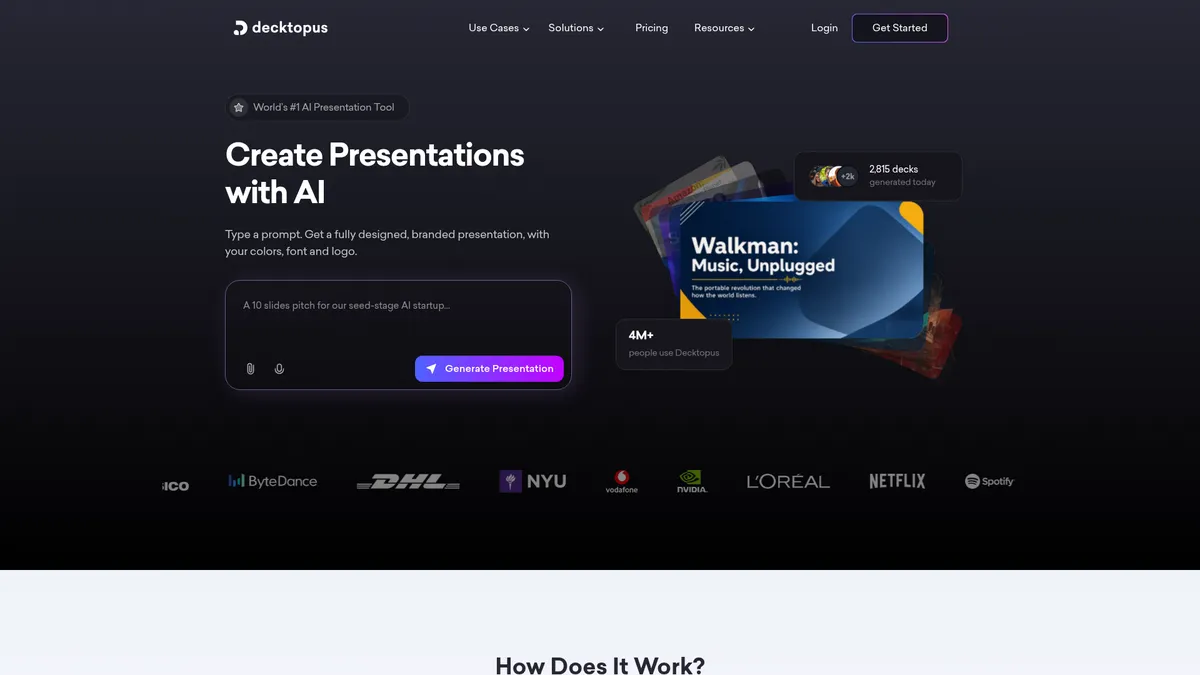
What is Decktopus?
How to Use Decktopus
Creating a stunning presentation with Decktopus is fast and straightforward. Follow these five simple steps to go from a blank canvas to a polished deck powered by AI.
Sign Up and Choose a Template
Create a free Decktopus account and browse the template library. Choose a pre-designed theme that matches your presentation style, or start from a blank canvas if you prefer full creative control. Templates are organized by use case—business, education, marketing, and more.
Generate Content with AI
Describe your presentation topic in the AI prompt box—for example, 'Annual marketing results 2024.' The AI will generate slide titles, bullet points, and even visual suggestions. Review the output and refine your prompt if needed to get more accurate and relevant content.
Customize Design and Layout
Use the drag-and-drop editor to rearrange slides, change colors, upload your brand assets, and adjust fonts. Apply your brand kit to maintain consistency across all slides. You can also manually edit any AI-generated text or swap out images from the built-in library.
Collaborate with Your Team
Invite team members to collaborate in real-time. They can leave comments, suggest edits, and track changes through version history. Set permissions to control who can edit, comment, or view the presentation, ensuring your content stays secure.
Share, Present, and Analyze
Export your final presentation as a PowerPoint file, PDF, or share a link for online viewing. Present directly from Decktopus and track viewer engagement with built-in analytics. See who opened the deck, which slides they spent time on, and gather feedback for future improvements.
Decktopus Core Features
Decktopus Use Cases
- 1Sales teams can create polished client pitches and proposals in minutes using AI-generated slides, reducing prep time from hours. The analytics feature helps track which slides prospects engage with most for better follow-ups.
- 2Marketing professionals can design brand-consistent presentations for webinars, conferences, and product launches using customizable templates and brand kits that enforce visual guidelines across the team.
- 3Educators and corporate trainers can build interactive lesson plans and training materials with AI-generated content, real-time collaboration, and easy sharing with students or employees across devices.
- 4Entrepreneurs and startups can craft compelling investor pitch decks with professional design and layout, without hiring a designer or spending days wrestling with formatting tools.
- 5Remote and hybrid teams can collaborate on presentations asynchronously, leave context-specific comments, and track revisions through version history—eliminating endless email chains and version confusion.
Pros and Cons of Decktopus
Pros
- Incredibly fast presentation creation—AI generates complete slide decks from simple prompts, cutting creation time from hours to minutes for busy professionals.
- Intuitive drag-and-drop interface that anyone can use effectively, regardless of design experience or technical skill level, reducing the learning curve to nearly zero.
- Built-in collaboration tools with real-time editing, commenting, and version control make team projects seamless and eliminate version control headaches.
- Presentation analytics provide actionable insights on viewer engagement, helping sales and marketing teams understand which content resonates and optimize their pitches accordingly.
✕ Cons
- Free plan is quite restrictive, limiting access to premium templates, branding features, and advanced AI capabilities, pushing users toward paid plans quickly.
- AI-generated content can sometimes feel generic or miss the mark on brand voice and tone, requiring manual refinement and editing to match specific messaging needs.
- Integration ecosystem is smaller than competitors like Canva or Google Slides, with fewer third-party app connections and limited API access for custom workflows.
Decktopus vs Top Alternatives
| Feature | Canva | Beautiful.ai | Gamma |
|---|---|---|---|
| AI Slide Generation | Magic Design and Magic Write for presentations | Smart slide builder with AI-assisted layouts | AI generates full decks from prompts |
| Template Library | 250,000+ templates (all design types) | 50+ smart templates with auto-layout | 30+ templates plus AI-generated designs |
| Real-time Collaboration | Yes, with comments and live editing | Team sharing and commenting available | Yes, real-time collaboration |
| Starting Price | Free (Pro at $12.99/mo) | $12/mo (billed annually) | Free (Pro at $10/mo) |
Decktopus Pricing
Free
- Basic templates
- Limited AI generations
- Export to PDF
- Up to 5 slides per deck
Pro
- Unlimited AI generations
- All templates and themes
- Custom branding and brand kit
- Export to PPTX and PDF
- Presentation analytics
- Up to 100 slides per deck
Business
- Everything in Pro
- Team collaboration tools
- Admin controls and permissions
- Priority customer support
- Unlimited slides
- Custom user roles
Enterprise
- Everything in Business
- Dedicated success manager
- Custom integrations and API access
- SSO/SAML authentication
- SLA guarantee
- Bulk user management
Decktopus FAQ
What is Decktopus and how does it work?+
Is Decktopus free to use?+
Can I import existing PowerPoint files into Decktopus?+
Does Decktopus support team collaboration?+
What integrations does Decktopus offer?+
Can I track who views my presentations?+
Is Decktopus suitable for educational purposes?+
Decktopus Review — Editor's Score
Who Should Use Decktopus?
Business professionals, sales teams, marketers, educators, and freelancers who want to create professional presentations quickly without design skills. Best suited for users who value speed and AI assistance over granular design control.
Decktopus delivers on its promise of fast, AI-powered presentation creation. Its strength lies in simplicity—anyone can generate a decent deck in minutes. The AI content generation is genuinely useful for overcoming blank page syndrome, and collaboration features are solid. It's not as polished or deeply integrated as Canva, and the free plan will frustrate power users. But for business professionals who need professional presentations fast, it's a strong contender worth trying.
- AI generates complete slide decks from simple text prompts in seconds
- Real-time collaboration with version control and commenting
- Presentation analytics to track viewer engagement per slide
- Affordable pricing starting at $14.99/month with a free tier
- Supports import of PowerPoint and PDF files for editing
📺 Decktopus Tutorials & Introduction
Decktopus Review & Tutorial: The Ultimate Beginner's Guide to AI ...
Decktopus AI Tutorial & Review - Step By Step Guide For ... - YouTube
Decktopus Review and Demo- AI Presentation Tool - YouTube
Keywords: