

DagsHub
Version, track, and deploy AI models — all in one platform
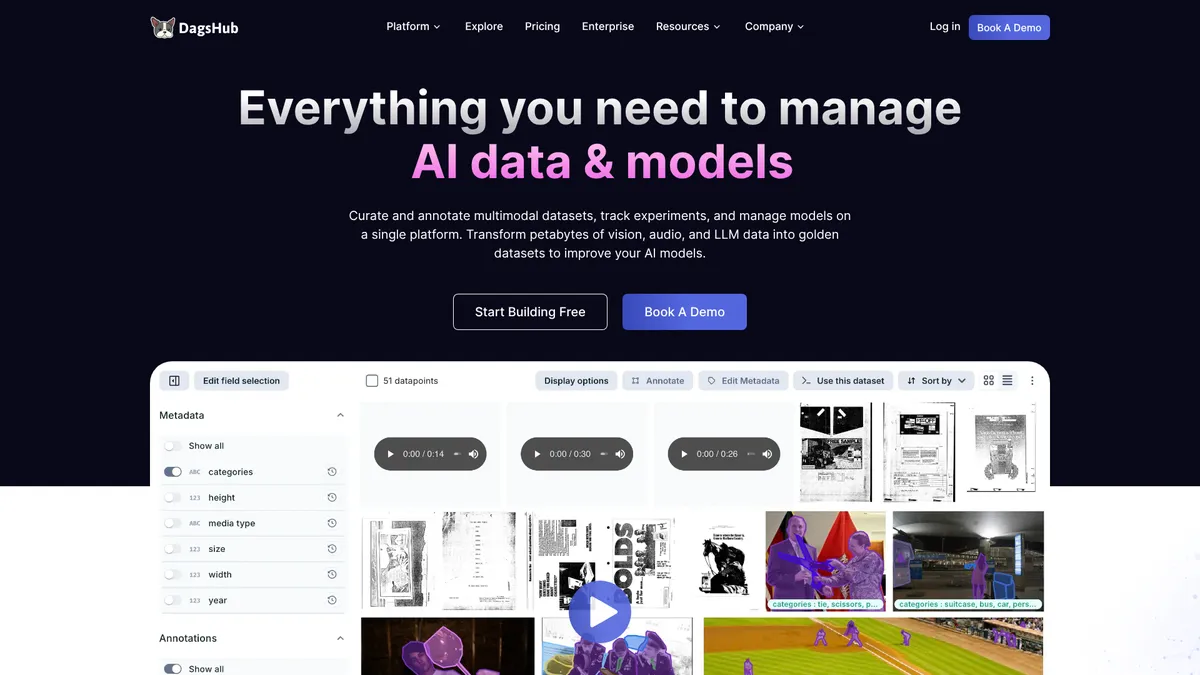
What is DagsHub?
How to Use DagsHub
Getting started with DagsHub is quick and straightforward. Follow these steps to create your account, set up a repository, and begin managing your ML projects with data versioning and experiment tracking.
Create an Account and Repository
Sign up for a free DagsHub account at dagshub.com. Once your email is verified, create a new repository by clicking 'New Repository' and choose between public or private visibility based on your project needs.
Connect and Version Your Data
Upload your datasets directly to DagsHub Storage or connect external storage like S3, GCS, or Azure Blob. Use the DagsHub CLI to track your data files—run 'dagshub init' in your project directory, then 'dagshub add' to track files, and 'dagshub commit' to create versioned snapshots.
Track Your First Experiment
Launch your ML training script with DagsHub experiment tracking enabled. The platform automatically logs parameters, metrics, and artifacts. Use the experiment dashboard to compare runs, visualize results, and identify the best performing models.
Collaborate with Annotations
If your project requires labeled data, use the built-in annotation workspace or connect Label Studio. Assign annotation tasks to team members, track progress, and leverage auto-labeling to speed up the process.
Deploy Your Model to Production
Once you have a trained model, set up CI/CD/CT pipelines directly in DagsHub to automate testing and deployment. Deploy to your own Kubernetes cluster or on-premise infrastructure with full VPC/air-gapped options for enterprise security.
DagsHub Core Features
DagsHub Use Cases
- 1Manage end-to-end AI data and model workflows from a single platform, enabling seamless collaboration across data science teams of any size.
- 2Curate and annotate multimodal datasets with built-in annotation workspaces and auto-labeling capabilities for image, video, audio, and text data.
- 3Track and compare thousands of machine learning experiments to identify the best performing models with full parameter and metric logging.
- 4Deploy machine learning models to production clusters using CI/CD/CT integration and infrastructure management for reliable releases.
- 5Scale data management to petabytes using DagsHub Storage or by connecting your own S3-compatible, GCS, or Azure Blob Storage solutions.
Pros and Cons of DagsHub
Pros
- Generous free tier with unlimited public repositories and unlimited collaborators, making DagsHub accessible for individual developers, students, and open-source projects without upfront cost.
- Comprehensive all-in-one platform covering data versioning, experiment tracking, annotation, and model deployment—eliminating the need for multiple disjointed MLOps tools.
- Strong data lineage and reproducibility features ensure every dataset change and experiment run is fully tracked, creating a complete audit trail for ML projects.
- Flexible deployment options including cloud-hosted, on-premise, and air-gapped installations for enterprises with strict compliance and security requirements.
✕ Cons
- Free tier significantly limits private repository features with only 2 collaborators and 100 experiments tracked, which may not be sufficient for serious team collaboration.
- Team pricing at $119/user/month is relatively expensive compared to open-source alternatives like MLflow or DVC that can be self-hosted for free.
- Platform has a steep learning curve, particularly around pipeline configuration, CI/CD integration, and storage setup, requiring significant time investment to fully leverage all features.
DagsHub vs Top Alternatives
| Feature | DVC | MLflow | Weights & Biases | Hugging Face |
|---|---|---|---|---|
| Data Versioning | ✅ Built-in data and model versioning with Git-like workflows | ❌ Limited to artifact logging; no native data versioning | ❌ Basic data logging; no versioning workflow | ✅ Dataset versioning with built-in dataset hub |
| Experiment Tracking | ❌ Not built-in; requires external tools like MLflow | ✅ Comprehensive tracking with parameter logging and comparison UI | ✅ Advanced tracking with hyperparameter optimization and reports | ❌ Limited; focuses on model hosting, not experiment management |
| Annotation Tools | ❌ No native annotation support | ❌ No annotation capabilities | ❌ No built-in annotation; integrations available | ✅ Community annotation tools and dataset curation |
| Model Deployment | ❌ Requires additional CI/CD tooling | ✅ Model registry with deployment to serving endpoints | ✅ Model registry with deployment integrations | ✅ Model hosting via Inference API and Spaces |
DagsHub Pricing
Individual
- Unlimited public repositories with unlimited collaborators
- Unlimited experiment tracking for public repositories
- Up to 100 tracked experiments in private repositories
- Up to 2 collaborators in private projects
- 20GB of DagsHub Storage
- Data versioning and lineage
- Community support
Team
- Everything in Individual plan
- Unlimited private repositories
- Unlimited experiment tracking
- Unlimited collaborators
- Team RBAC for access control
- Annotations workspace for public repositories
- Label Studio compatibility
- Priority support
Enterprise
- Everything in Team plan
- Petabyte-scale data management
- Deploy models to your own cluster
- Full VPC/air-gapped on-premise installation
- Connect your own storage
- Dedicated enterprise support
DagsHub FAQ
What is DagsHub?+
Is DagsHub free?+
How does DagsHub compare to GitHub?+
Can I use my own storage with DagsHub?+
Does DagsHub support Label Studio?+
What types of data annotations does DagsHub support?+
Can I deploy models directly from DagsHub?+
DagsHub Review — Editor's Score
Who Should Use DagsHub?
DagsHub is ideal for MLOps engineers, data science teams, and AI researchers who need a unified platform for managing the entire ML lifecycle. It's particularly well-suited for organizations that prioritize reproducibility, data lineage, and end-to-end governance, as well as open-source projects looking for a free collaboration hub for public ML work.
DagsHub is a powerful all-in-one MLOps platform that successfully brings together data versioning, experiment tracking, annotation, and model deployment under one roof. It's not the easiest tool to master—the learning curve around pipelines and storage configuration is real—but for teams committed to reproducibility and collaboration, the payoff is substantial. The generous free tier makes it accessible for individual developers, while enterprise features like on-premise deployment and petabyte-scale storage make it viable for the largest organizations.
- Unified platform for data versioning, experiment tracking, annotation, and model deployment
- Generous free tier with unlimited public repositories and collaborators
- Multimodal annotation workspace with auto-labeling and Label Studio compatibility
- Enterprise-ready with on-premise, VPC, and air-gapped deployment options
📺 DagsHub Tutorials & Introduction
Introduction to DagsHub for Data Science - YouTube
Version and Stream Data with DVC and DagsHub - YouTube
MLOps 101 - A Practical Tutorial on Creating a Machine ... - YouTube
Keywords: