
Cronometer
Lab-verified nutrition tracking for optimal health
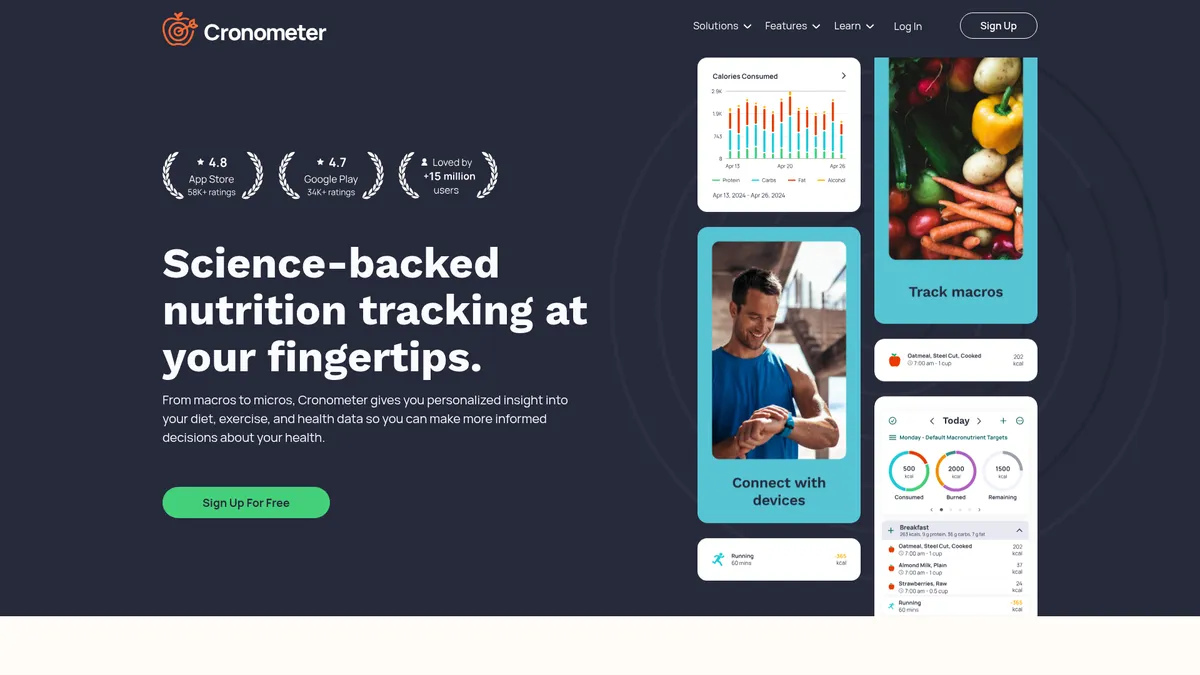
What is Cronometer?
How to Use Cronometer
Getting started with Cronometer is straightforward. Here's how to set up your account, log your first meal using the AI photo feature, and customize your nutrition targets for optimal results.
Create your account and set goals
Sign up for free on the web or mobile app. Use the setup wizard to input your age, weight, height, and activity level. The wizard will generate personalized calorie and macro targets based on your health goals, whether that's weight loss, muscle gain, or maintenance.
Log your first meal with AI photo capture
Tap the camera icon on the dashboard and snap a picture of your meal. Cronometer's AI will identify the food items and estimate portion sizes. Review the suggested entries and adjust serving sizes before saving to your daily log.
Customize your micronutrient targets
Navigate to Settings > Nutrition Targets and adjust your goals for specific vitamins and minerals. You can set targets based on RDA guidelines for your demographics or input custom values for particular health needs like iron optimization or electrolyte balance.
Sync your wearable devices
Go to Settings > Device Sync and connect your Fitbit, Oura, Apple Watch, or other compatible devices. This automatically integrates activity, sleep, and biometric data into your daily dashboard for a complete health picture.
Review your daily and weekly summaries
Check the Dashboard and Reports tabs to see how your nutrient intake compares to your targets. Use the visual charts and color-coded indicators to quickly identify deficiencies or excesses and adjust your diet accordingly.
Cronometer Core Features
Cronometer Use Cases
- 1Precision weight management – Track calories and macros with lab-verified data while monitoring weight trends through visual charts. Ideal for anyone serious about body composition goals.
- 2Micronutrient optimization for special diets – Vegans, keto dieters, and athletes can monitor up to 95 vitamins and minerals to prevent deficiencies and optimize performance.
- 3Chronic condition management – Log blood glucose, blood pressure, and gut symptoms alongside food intake to identify triggers and patterns for diabetes, hypertension, or IBS.
- 4Professional client coaching – Dietitians and personal trainers use Cronometer Pro to monitor client nutrition, analyze deficiencies, and provide data-driven recommendations at scale.
- 5General wellness and longevity – Everyday users build a complete picture of their diet, activity, and health metrics to make informed decisions for long-term health.
Pros and Cons of Cronometer
Pros
- Unmatched data accuracy – Unlike crowdsourced databases, Cronometer uses verified, lab-analyzed nutrition data from the USDA and NCC, making it the most reliable option for serious trackers.
- Multiple frictionless logging methods – AI photo recognition, barcode scanning, voice commands, and manual search give you flexibility to log however fits your routine.
- Deep health ecosystem integration – Syncs with virtually all major wearables and health apps, creating a centralized dashboard for all your biometric data.
- Trusted by medical professionals – Used by dietitians, doctors, and researchers for clinical monitoring, giving it a level of credibility most consumer apps lack.
✕ Cons
- Steep learning curve for beginners – The sheer breadth of micronutrient data and biometric tracking can overwhelm casual users who just want to count calories.
- Pricing transparency issues – Gold subscription pricing isn't easily found on the website, and some advanced features are locked behind a paywall.
- International food database gaps – While extensive, the barcode database can miss niche or non-US products, requiring manual entry for some users.
Cronometer vs Top Alternatives
| Feature | MyFitnessPal | Lose It! | MacroFactor |
|---|---|---|---|
| Nutrient Database Depth | Calories and basic macros only | Macros with limited micronutrients | Macros with adaptive coaching algorithm |
| Data Verification Method | Crowdsourced user database | Crowdsourced with some verified items | Algorithm-adjusted nutrition database |
| Logging Features | Barcode scanner, manual entry | Barcode scanner, basic photo scanning | Manual entry and barcode scanner |
| Professional & Clinical Tools | No professional or clinical tools | Consumer-focused only, no pro portal | Advanced coaching, no clinical tools |
Cronometer Pricing
Free
- Core food logging
- Basic nutrient tracking
- Device sync with wearables
- Barcode scanner
- Manual food entry
Gold
- Ad-free experience
- Advanced reports and analytics
- Priority customer support
- Custom biometric targets
- CSV/JSON data export
Pro
- Client management portal
- Team collaboration tools
- Research-grade data export
- Clinical monitoring features
- Dedicated account support
Cronometer FAQ
Is Cronometer really free?+
How accurate is Cronometer's nutrition data?+
Can Cronometer help with weight loss?+
Does Cronometer work with my fitness tracker?+
What is Cronometer Gold and how much does it cost?+
Is Cronometer suitable for managing medical conditions?+
How is Cronometer different from MyFitnessPal?+
Cronometer Review — Editor's Score
Who Should Use Cronometer?
Cronometer is ideal for health optimizers, biohackers, athletes on specialized diets, and anyone managing chronic conditions through nutrition. It's also the go-to choice for dietitians, nutritionists, and fitness professionals who need reliable data for client monitoring.
Cronometer delivers the most comprehensive nutrition tracking experience money can buy. Its lab-verified database and 95+ micronutrient tracking set a new standard for accuracy that crowdsourced apps simply can't match. While the learning curve is real and the pricing could be more transparent, anyone serious about health optimization will find Cronometer indispensable.
- Only app tracking 95+ micronutrients with lab-verified data
- AI photo logging combined with barcode scanning and voice entry
- Trusted by 10M+ users including healthcare professionals
- Deep integration with 50+ wearables and health platforms
📺 Cronometer Tutorials & Introduction
Cronometer Tutorial - YouTube
How to Set Up Cronometer and Set Your Macros - YouTube
Cronometer's Gold Features Explained 8 19 20 - YouTube
Keywords: