

ChatPDF
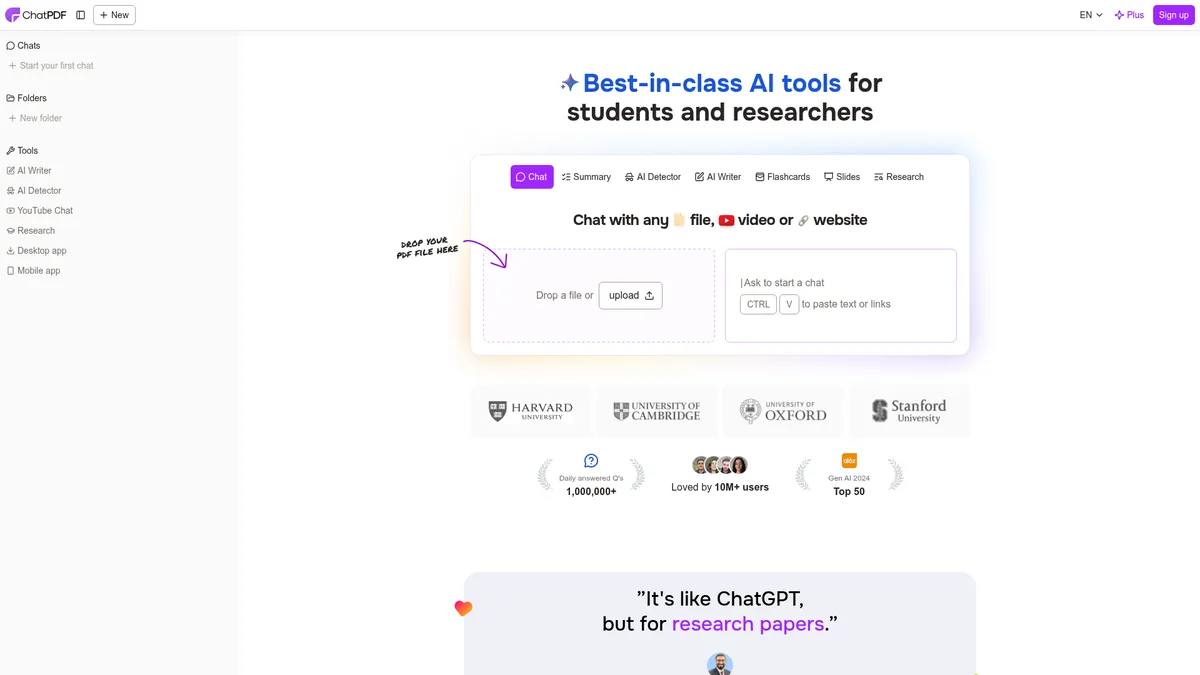
Chat with any PDF, file, video, or website
What is ChatPDF?
How to Use ChatPDF
Getting started with ChatPDF takes less than 10 seconds—no account needed. Here's how to upload a document and start extracting insights like a pro.
Navigate to ChatPDF
Open your browser and go to chatpdf.com. You'll land on a clean interface with a drag-and-drop upload zone. No sign-up forms or paywalls—just a straightforward upload screen.
Upload or paste your content
Drag and drop a PDF (or any supported file) onto the upload area. You can also click to browse files, paste a URL using CTRL+V, or type in a website link. ChatPDF accepts PDFs, DOCX, TXT, and more.
Start asking questions
Once your document is uploaded, a chat interface opens. Type any question about the content—'Summarize this in 3 bullet points,' 'What are the key findings?' or 'Translate the abstract to Spanish.' ChatPDF scans the document and provides cited answers instantly.
Organize and revisit chats
If you create a free account, you can save your chat history, organize files into folders, and upload multiple PDFs into one conversation for cross-referencing. This makes it easy to manage research projects or study materials over time.
ChatPDF Core Features
ChatPDF Use Cases
- 1Students can upload textbooks, lecture notes, or past exam papers and ask specific questions to study faster, clarify concepts, and prepare for exams without re-reading entire chapters.
- 2Researchers working with scientific papers and academic articles can quickly extract key findings, compare methodologies across multiple studies, and generate literature reviews in minutes.
- 3Professionals dealing with legal contracts, financial reports, or compliance manuals can ask targeted questions to locate clauses, understand obligations, and stay ahead without legal training.
- 4Multilingual users can upload documents in foreign languages and get instant translations or ask questions in their native tongue, breaking down language barriers in global research.
- 5Content creators and journalists can paste article links or reference PDFs to fact-check, pull quotes, and gather background information without manually scanning pages of text.
Pros and Cons of ChatPDF
Pros
- Completely free to start with no sign-up required, making it one of the most accessible PDF AI tools available for quick document queries.
- Cited responses with source anchoring save hours of manual searching—each answer points you exactly to the relevant page and paragraph.
- Multi-language support works both ways: upload documents in any language and ask questions in any language, ideal for international users.
- Multi-file chat capability lets you load multiple PDFs into a single conversation, perfect for cross-referencing research papers or comparing contracts.
✕ Cons
- Pricing details are not publicly available, making it unclear what limitations exist on the free tier or what premium features cost.
- Performance can degrade with very large or complex PDFs (100+ pages or heavy scanned images), leading to slower responses or inaccuracies.
- Company background and ownership information is sparse, which may concern enterprise buyers looking for long-term reliability and data security guarantees.
ChatPDF vs Top Alternatives
| Feature | ChatGPT (PDF Upload) | Adobe Acrobat AI Assistant | Claude (Anthropic) | Google Gemini |
|---|---|---|---|---|
| Best for | Dedicated PDF-first interface optimized for document Q&A | Specifically built for document analysis and PDF chat | Every response is anchored to source text with visible citations | Specialized for document Q&A with citation support |
| Unique differentiator | Built-in citations with page-level source anchoring | Free tier available with no subscription needed | Can handle multiple PDFs in a single chat conversation | Supports multi-file chat natively |
| Multi-file support | Multi-file chat for cross-referencing several documents at once | Supports 100+ languages for both input and output | No credit card or sign-up required to start using | Free tier available without mandatory sign-up |
| Free tier access | Free tier with no sign-up required for basic use | Lightweight web tool requiring no software installation | Supports PDF translation and multilingual document Q&A | Full multilingual input and output capabilities |
ChatPDF Pricing
Free
- Chat with PDFs and files
- Summarize documents
- Multi-language support
- Cited responses
- No sign-up required
Pro
- Larger file uploads
- Faster processing speeds
- Priority support
- Extended chat history
- Advanced document analysis
Enterprise
- Custom integrations
- Team management dashboard
- Dedicated support
- API access
- Custom pricing
ChatPDF FAQ
Is ChatPDF really free to use?+
What file types does ChatPDF support?+
How accurate are ChatPDF's responses?+
Can ChatPDF translate documents?+
Does ChatPDF work with scanned PDFs?+
Is my data safe with ChatPDF?+
What is the maximum file size ChatPDF can handle?+
ChatPDF Review — Editor's Score
Who Should Use ChatPDF?
Students cramming for exams, researchers speed-reading academic papers, and professionals who need quick answers from contracts, reports, or manuals—basically anyone who regularly wrestles with PDFs and wants an AI assistant that cuts the noise.
ChatPDF is hands-down the quickest way to extract answers from PDFs without jumping through hoops. It nails the core use case—upload, ask, get cited answers—and does it with zero friction. The free tier is genuinely useful, and the multi-file chat feature is a standout for researchers and students juggling multiple sources. The main drawbacks are the lack of clear pricing transparency and sparse details about data handling, which may give enterprise users pause. But for individual students, researchers, and professionals who need a fast, reliable PDF AI assistant, ChatPDF is an easy recommendation.
- Zero sign-up required for basic use—upload and chat in seconds
- Cited answers anchor directly to source text, saving hours of manual searching
- Multi-file chat lets you cross-reference several PDFs in one conversation
- Full multilingual support works both ways for global document access
📺 ChatPDF Tutorials & Introduction
ChatPDF: Use this AI Tool to Chat with any PDF documents - YouTube
ChatPDF AI Tutorial How to Chat with Any PDF Document FREE 2025
Which AI tool is best for PDF Analysis & Research Workflows?
Keywords: