

Capacities
Build your second brain with objects, not files.
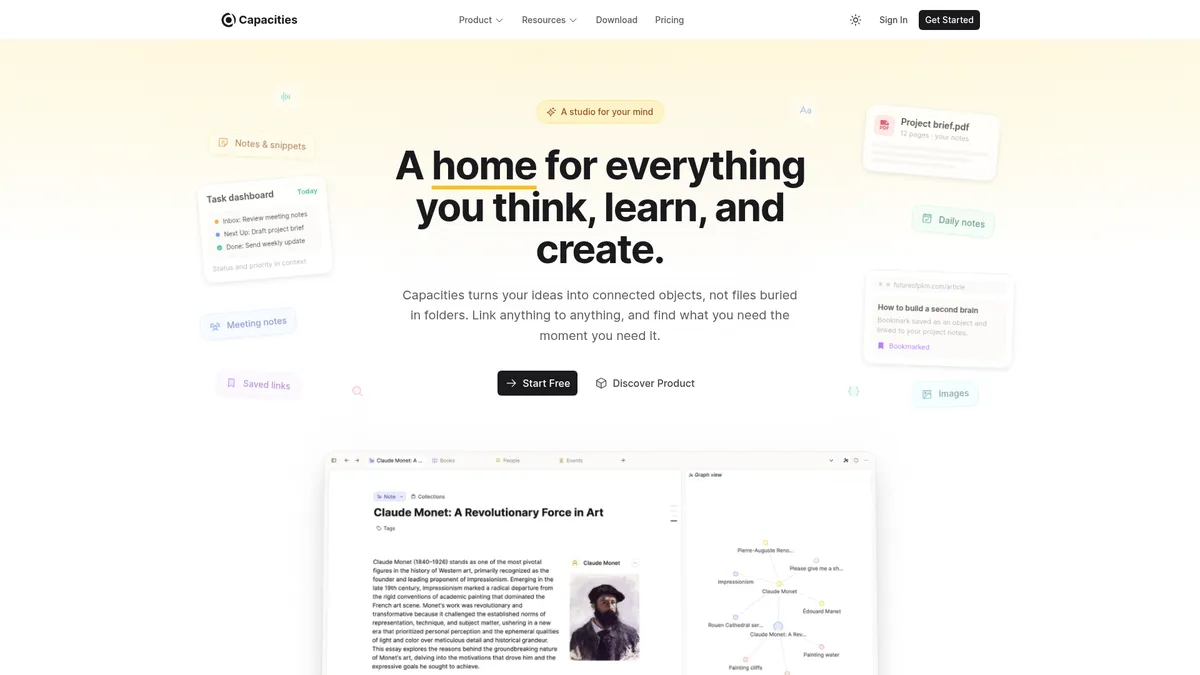
What is Capacities?
How to Use Capacities
Capacities helps you capture and connect your knowledge using objects instead of files. Follow these simple steps to start building your second brain.
Create Your First Object
Start by creating a new object. Click the 'New Object' button and choose a type like 'Person', 'Book', or 'Project'. Fill in the properties—name, description, status, or any custom fields you need. This becomes a structured entity in your knowledge graph.
Link Objects Together
To connect objects, type '@' followed by the name of another object in any text field. Capacities will create a bidirectional link. You can also use the 'Related' section to manually link objects. The backlinks panel will show you all incoming connections automatically.
Use the Daily Note Inbox
Your daily note is the central hub for capturing new thoughts. Jot down ideas, meeting notes, or random musings. Later, you can convert parts of your daily note into new objects by selecting text and choosing 'Create Object'. This keeps your capture flow frictionless while building your knowledge base over time.
Capacities Core Features
Capacities Use Cases
- 1Writers & Authors: Build detailed character databases, world-building lore, and plot timelines as linked objects. Automatically surface connections between story elements to maintain consistency across complex narratives.
- 2Researchers & Academics: Capture article highlights, literature reviews, and citation networks as structured objects. Use automatic related content detection to discover relevant papers and ideas you might have missed.
- 3Developers & Engineers: Organize code snippets, project specs, and bug tracking into custom object types. Link related issues and documentation to create a living knowledge base for your projects.
- 4Students: Take lecture notes, create study cards, and manage thesis research as interconnected objects. The daily note inbox helps capture ideas quickly, and bidirectional linking aids revision by showing relationships between topics.
- 5Managers & Founders: Track meeting notes, OKRs, stakeholder maps, and product roadmaps as structured objects. Smart queries and calendar integrations (Pro) help you tie daily tasks to long-term strategy.
Pros and Cons of Capacities
Pros
- Intuitive object-based workflow mirrors how your brain naturally connects ideas, eliminating the friction of traditional folder hierarchies.
- Automatic linking and related-content discovery save hours of manual tagging and make your knowledge graph grow organically.
- No-code, no-plugin setup lets you start capturing and linking immediately without any technical configuration.
- Strong privacy stance with EU-hosted, GDPR-compliant encrypted servers and a free core tier that doesn't require a credit card.
✕ Cons
- Primarily designed for individual use; collaboration features are limited to view-only sharing, making it less suitable for team knowledge bases.
- Advanced features like AI assistant, task management, and API access are locked behind the $9.99/month Pro plan.
- No enterprise-grade admin controls or SSO, which may deter organizations looking for a company-wide solution.
Capacities vs Top Alternatives
| Feature | Notion | Obsidian | Roam Research | Logseq |
|---|---|---|---|---|
| Data model | Database/block-based model with pages and databases | File-based model using Markdown files | Block-based model with outliner interface | File-based model using Markdown/Org-mode |
| Bidirectional linking | Yes, via backlinks and relations | Yes, with core backlinks plugin | Yes, native bidirectional linking | Yes, native bidirectional linking |
| AI-powered features | No built-in AI (AI add-on available separately) | No built-in AI (community plugins available) | No built-in AI features | No built-in AI (community plugins) |
| Free tier availability | Yes, free tier with block limits | Yes, fully free for personal use | No free tier; paid only ($15/mo) | Yes, fully free and open-source |
Capacities Pricing
Basic (Free)
- Unlimited spaces, objects, and blocks
- Sync across devices
- Custom object types
- Import and export
- View-only sharing
- Full-text search
- Offline mode
- 5 GB media storage (100 MB/month thereafter)
Pro
- All Free features
- Task management
- AI assistant
- Calendar integrations
- Smart queries & advanced search
- Unlimited media (fair-use)
- Table formulas
- Curated icons
- Extensions & API access
Believer
- All Pro features
- Beta access to major new features
- Support the independent team
Capacities FAQ
What is Capacities?+
How is Capacities different from Notion?+
Is Capacities free to use?+
Can I use Capacities offline?+
How does the AI assistant work in Capacities?+
Is my data secure in Capacities?+
Can I collaborate with others using Capacities?+
Capacities Review — Editor's Score
Who Should Use Capacities?
Ideal for writers, researchers, students, and knowledge workers who want a flexible, object-oriented PKM system that grows with them. Best suited for individuals rather than teams.
Capacities offers a refreshingly intuitive object-based approach to knowledge management. Its automatic linking and AI features reduce the friction of building a personal knowledge graph, while the generous free tier makes it accessible to everyone. It's an excellent choice for individual thinkers and creators who want a 'second brain' without the overhead of complex databases.
- Object-centric data model
- AI-powered related content detection
- Generous free tier with offline support
- EU-hosted encrypted servers
📺 Capacities Tutorials & Introduction
Capacities: Full Tutorial - YouTube
Capacities App Review: Best Note-Taking App? - YouTube
Release 59 - A Smarter AI Assistant - YouTube
Keywords: