

Artbreeder
Create unique AI-powered characters and artworks
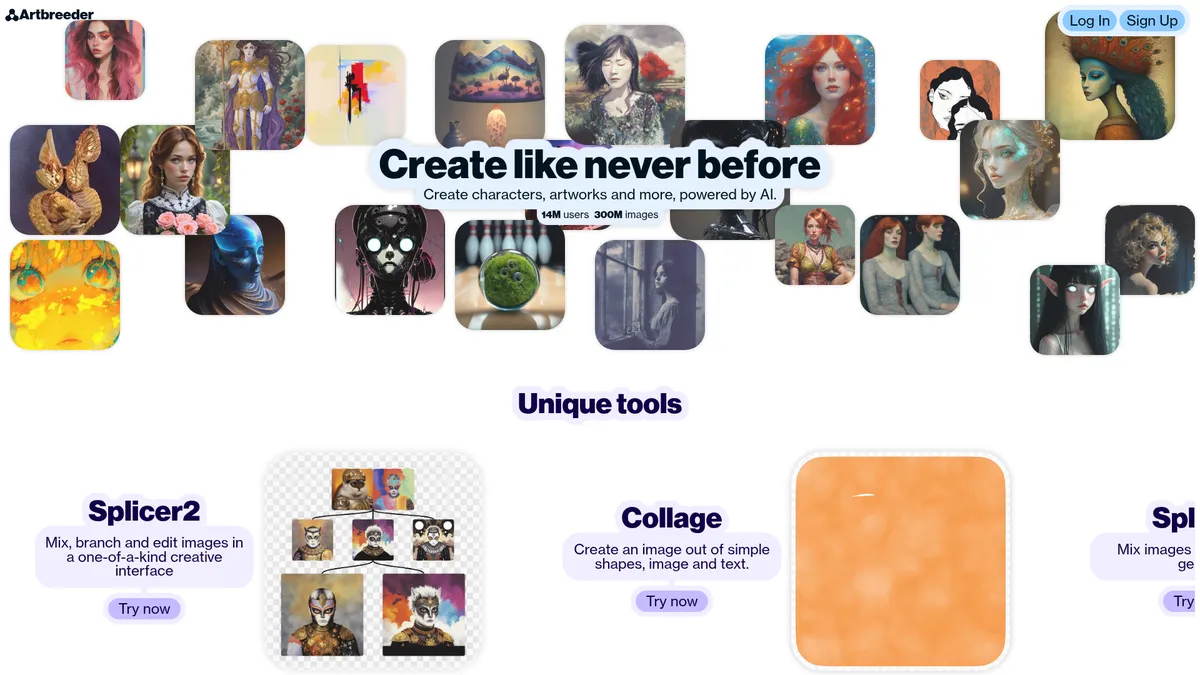
What is Artbreeder?
How to Use Artbreeder
Getting started with Artbreeder is simple. This guide walks you through creating your first AI-generated character using the Splicer tool, from choosing base images to fine-tuning genetic attributes and sharing your creation with the community.
Create an Account and Choose a Plan
Head to Artbreeder.com and sign up for a free account. Browse the available plans to see which tier suits your needs—free gives you a feel for the tools, while paid plans unlock higher resolutions and faster rendering. You can upgrade anytime as you create more.
Start with the Splicer Tool
Click 'Create' and select the 'Splicer' option. Browse the community library or upload your own images to use as starting parents. The Splicer works like genetic breeding—you'll combine two images and adjust their influence slider to control how much each parent contributes to the result.
Fine-Tune with Genes and Attributes
Once you have a base blend, open the Genes panel to adjust specific attributes like age, gender, skin tone, hair style, and artistic style. Drag sliders to see real-time changes. You can save multiple variants by branching from your current image, creating a family tree of possibilities.
Export and Share Your Creation
When you're happy with the result, click 'Download' to export at your plan's maximum resolution (up to 2048px on paid plans). Use the 'Publish' option to share your creation with the Artbreeder community, add it to a collection, or sync it to Google Drive for safekeeping.
Join Contests and Remix Parties
Take your creativity further by browsing daily contests under the 'Community' tab. Vote on submissions and enter your own creations for themed challenges. Try a 'Remix Party' to collaborate with other artists—remix their images and see how your style evolves through collective creativity.
Artbreeder Core Features
Artbreeder Use Cases
- 1Game developers and concept artists can rapidly prototype character designs, creature concepts, and environmental art by breeding and evolving existing images to find the perfect look for their projects.
- 2Creative writers and authors use Artbreeder to generate character portraits and visual references for their stories, helping to visualize protagonists, antagonists, and fantasy races with precise control over age, style, and ethnicity.
- 3Digital artists and illustrators leverage the Collage and Splicer tools as a starting point for digital paintings, combining AI-generated elements with traditional techniques to speed up their creative workflow.
- 4Marketing and branding professionals create unique, royalty-free visuals for social media campaigns, website imagery, and brand assets without needing to commission expensive photoshoots or illustrations.
- 5Hobbyists and AI art enthusiasts explore the boundaries of generative creativity by participating in Remix Parties, entering contests, and collaborating with the global community to discover novel artistic styles.
Pros and Cons of Artbreeder
Pros
- The Splicer2 interface is genuinely innovative—it offers a creative workflow you simply cannot find in any other AI art tool, making image exploration feel organic and intuitive.
- The community features are exceptional; daily contests, Remix Parties, and creator following turn solo art generation into a collaborative social experience that inspires creativity.
- Credit-based pricing means you only pay for what you use, and the paid plans deliver excellent value with high-resolution exports, faster rendering, and unlimited generations in Composer.
- Privacy controls are robust—Private Mode and individual image privacy settings give artists full control over their portfolio, which is crucial for professional creators sharing work-in-progress.
✕ Cons
- The credit system can feel restrictive for free users, and unused credits do not roll over between billing cycles, which may frustrate casual creators who don't generate consistently.
- Free tier features are quite limited—you get a taste of the tools but quickly hit paywalls for higher resolutions, faster rendering, and unlimited generations, making it feel more like a demo.
- There is no dedicated mobile app, so all creation is locked to the web browser, which limits flexibility for artists who prefer working on tablets or phones.
Artbreeder vs Top Alternatives
| Feature | Midjourney | DALL-E 3 | Stable Diffusion | Leonardo AI |
|---|---|---|---|---|
| Platform | Web-based only, no dedicated app | Web-based only, no dedicated app | Web-based only, no dedicated app | Web-based only, no dedicated app |
| Pricing Model | Subscription credit system with rollover limits | Subscription credit system with rollover limits | Subscription credit system with rollover limits | Subscription credit system with rollover limits |
| Core Innovation | Generative breeding and genetic splicing | Generative breeding and genetic splicing | Generative breeding and genetic splicing | Generative breeding and genetic splicing |
| Community Features | Vibrant community, contests, and Remix Parties | Vibrant community, contests, and Remix Parties | Vibrant community, contests, and Remix Parties | Vibrant community, contests, and Remix Parties |
Artbreeder Pricing
Starter
- 1,200 credits per year
- High-resolution downloads
- Splicer fast mode
- No ads
- Privacy controls
Advanced
- 3,300 credits per year
- All Starter features
- Unlimited image generation in Composer
- Faster rendering
- Support for independent software
Champion
- 8,400 credits per year
- All Advanced features
- Highest priority rendering
- Maximum privacy controls
- Best value per credit
Artbreeder FAQ
What is Artbreeder and how does it work?+
Is Artbreeder free to use?+
What can I create with Artbreeder?+
Does Artbreeder have copyright or ownership issues?+
How do credits work on Artbreeder?+
Can I collaborate with other artists on Artbreeder?+
What is the Splicer2 feature?+
Artbreeder Review — Editor's Score
Who Should Use Artbreeder?
Artbreeder is ideal for character designers, concept artists, game developers, writers needing visual references, and creative explorers who enjoy a more interactive, collaborative approach to AI art. If you love tinkering with images like a visual gardener, this tool is for you.
Artbreeder is one of the most creatively refreshing AI tools on the market. Its genetic approach to image generation feels genuinely novel compared to the prompt-and-wait model of competitors like Midjourney or DALL-E. While the credit system and limited free tier are drawbacks, the community features and Splicer2 interface make it a must-try for any artist or designer exploring AI-assisted creation.
- Innovative Splicer2 genetic editing interface unlike any other AI art tool
- Strong community features including daily contests and collaborative Remix Parties
- Credit-based pricing that scales with usage across three affordable tiers
- Robust privacy controls with Private Mode and individual image visibility settings
📺 Artbreeder Tutorials & Introduction
Create AMAZING Art with AI: Artbreeder Tutorial for Stunning Images
AI Image Generation Walkthrough: Artbreeder Tutorial - YouTube
Artbreeder Tutorial for beginners: Design Jaw-Dropping AI Art in ...
Keywords: