
Akiflow
Your unified productivity command center with AI
What is Akiflow?
How to Use Akiflow
Getting started with Akiflow is straightforward. The platform is designed to replace your separate calendar and to-do list apps with one unified workspace. Follow these steps to set up your account, connect your tools, and start time-blocking like a pro.
Create your account and start the free trial
Visit akiflow.com and sign up for a 7-day free trial. No credit card is required. You'll be guided through a quick onboarding flow where you can set your working hours and preferences.
Connect your calendar and email accounts
Link your Google Calendar or Outlook account for two-way sync. Also connect your Gmail or Outlook email to enable the Universal Inbox and email-to-task conversion. This is where Akiflow starts consolidating your digital life.
Set up your Universal Inbox and organize tasks
Tasks from connected apps will flow into your Universal Inbox. Use labels, projects, and folders to categorize them. Set due dates and priority levels so your most important work rises to the top.
Start time-blocking with drag-and-drop
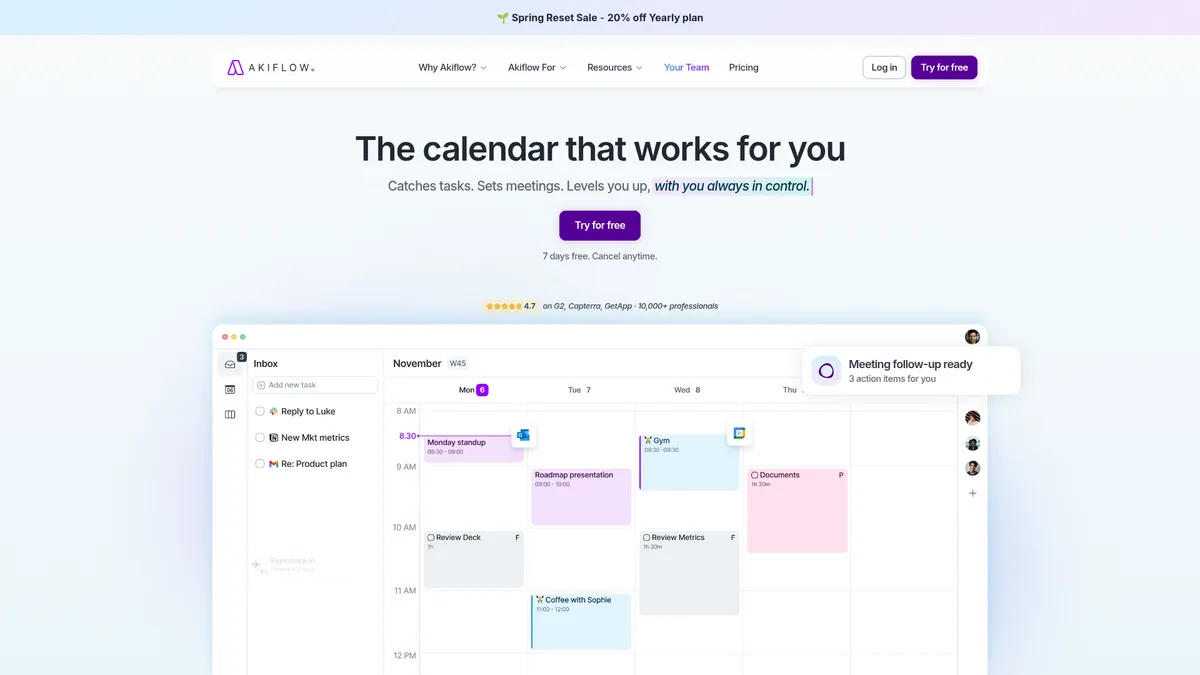
Open your calendar view and drag tasks from the inbox directly onto your schedule. Akiflow will suggest optimal time slots based on your availability. Use recurring tasks and daily routines to build consistent habits.
Leverage the AI assistant and analytics
Let Aki suggest your next actions and prioritise your day. Check the productivity analytics dashboard to see how much time you've saved and track your completion rates over time.
Akiflow Core Features
Akiflow Use Cases
- 1Busy professionals and executives consolidate meetings, emails, and tasks to reclaim over two hours daily by using Akiflow as a single command center.
- 2Team leaders and project managers share calendars, assign tasks, and monitor collective productivity with built-in team collaboration features.
- 3Freelancers and side-hustlers time-block client work, track billable hours, and keep personal projects visible alongside professional commitments.
- 4Students and researchers capture lecture notes, deadlines, and research tasks in one place, reducing the mental load of juggling multiple tools.
- 5Customer-support and sales teams automatically convert inbound emails into follow-up tasks and never let a lead or ticket slip through the cracks.
Pros and Cons of Akiflow
Pros
- All-in-one inbox eliminates constant app-switching and keeps your entire workflow visible in a single interface.
- Strong two-way sync with Google Calendar and Outlook means your schedule is always up to date across devices.
- AI assistant (Aki) proactively suggests tasks and helps prioritise, reducing decision fatigue during the workday.
- Wide integration ecosystem via Zapier, IFTTT, and native Gmail/Outlook connectors fits almost any existing tool stack.
✕ Cons
- No permanent free tier exists; paid plans start at $34 per month (or $15.20/month billed yearly), which may be steep for casual users.
- The full time-blocking workflow has a noticeable learning curve and can feel overwhelming for anyone used to simple to-do lists.
- Mobile app is functional but noticeably less feature-rich than the desktop version, limiting on-the-go productivity.
Akiflow vs Top Alternatives
| Feature | Todoist | Notion | Motion |
|---|---|---|---|
| Universal Inbox | No universal inbox; tasks come from Todoist only | No dedicated universal inbox; manual aggregation | Universal inbox pulls from limited sources |
| AI Assistant | No native AI assistant (uses third-party integrations) | No built-in AI task prioritization (AI features are add-ons) | AI auto-schedules tasks based on priority and deadlines |
| Time-Blocking Method | Basic time-blocking via labels and filters | Time-blocking is manual via calendar database views | Automatic time-blocking (less manual control) |
| Calendar Sync | Two-way sync requires premium third-party tools | Calendar sync is one-way or requires third-party bridges | Two-way sync with Google Calendar only |
Akiflow Pricing
Pro Monthly
- Unlimited tasks
- All integrations
- AI assistant (Aki)
- Universal Inbox
- Time-blocking
- 1-on-1 onboarding call
Pro Yearly
- Same features as Pro Monthly
- 20% discount
- Cancel anytime
- Billed annually at $182.40
Team / Enterprise
- Team admin console
- Advanced permissions
- Priority support
- Custom onboarding
Akiflow FAQ
What is Akiflow and who is it for?+
Does Akiflow have a free plan?+
How does the AI assistant (Aki) work?+
Can I sync Akiflow with Google Calendar or Outlook?+
Is Akiflow available on mobile devices?+
What integrations does Akiflow support?+
Can I use Akiflow with my team?+
Akiflow Review — Editor's Score
Who Should Use Akiflow?
Busy professionals, team leads, freelancers, and students who want to consolidate tasks, calendar, and email into one dashboard and are willing to invest in a premium tool to save time.
Akiflow delivers on its promise of a unified productivity hub. The combination of a Universal Inbox, AI suggestions, and drag-and-drop time-blocking is genuinely powerful for anyone drowning in app-switching. It's not cheap, and the learning curve is real, but the time savings can be substantial. For professionals who live in their calendar, Akiflow is a serious contender.
- Universal Inbox eliminates app-switching by aggregating tasks, emails, and meetings
- AI assistant (Aki) provides proactive task suggestions and prioritization
- Drag-and-drop time-blocking with real-time calendar sync boosts daily structure
- Productivity analytics quantify time saved and completion rates
📺 Akiflow Tutorials & Introduction
Akiflow in 5 Minutes or Less - YouTube
Akiflow Review: Best To-Do List App? - YouTube
Akiflow vs Motion: Which One is Best? - YouTube
Keywords: